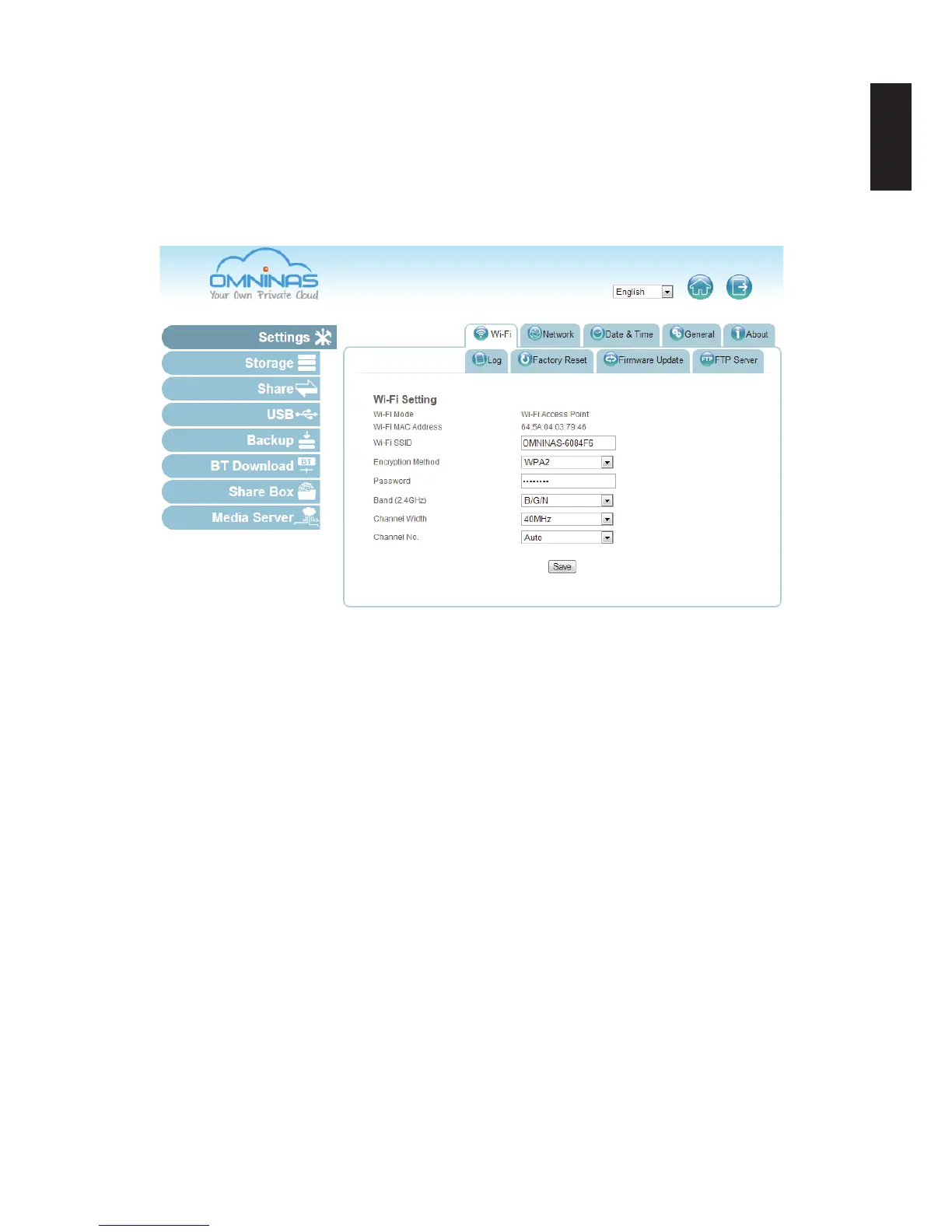
3. In the Encryption Method eld, select an encryption standard from the following: No, WEP
64 bits, WEP 128 bits, WPA, WPA2 (default, recommended), and WPA-mixed.
4. In the Password eld, enter the password that users will enter to connect to the OMNINAS.
The password must be longer than eight characters.
5. In the Band eld, select the bandwidth from the following: B/G/N (default, recommended),
B/G, G/N, B, G, or N.
Settings Wi-Fi Conguration
6. In the Channel Width eld, select the bandwidth delivery setting: 20MHZ or 40MHZ.
7. In the Channel No. eld, select the frequency for your Wi-Fi broadcast:
Auto (Default), 1, 2, ... 11.
8. Click Save to save your settings.
The new settings may take a few seconds to update.
Once setup, any user within the same subnet of your network can select the OMNINAS
device in their network.
Connecting to Wi-Fi
Once the Wi-Fi settings are congured, Wi-Fi enabled devices, such as: notebook computers,
smart phones, or tablet devices, can join the OMNINAS network.



 To Next Page