EasyManua.ls Logo

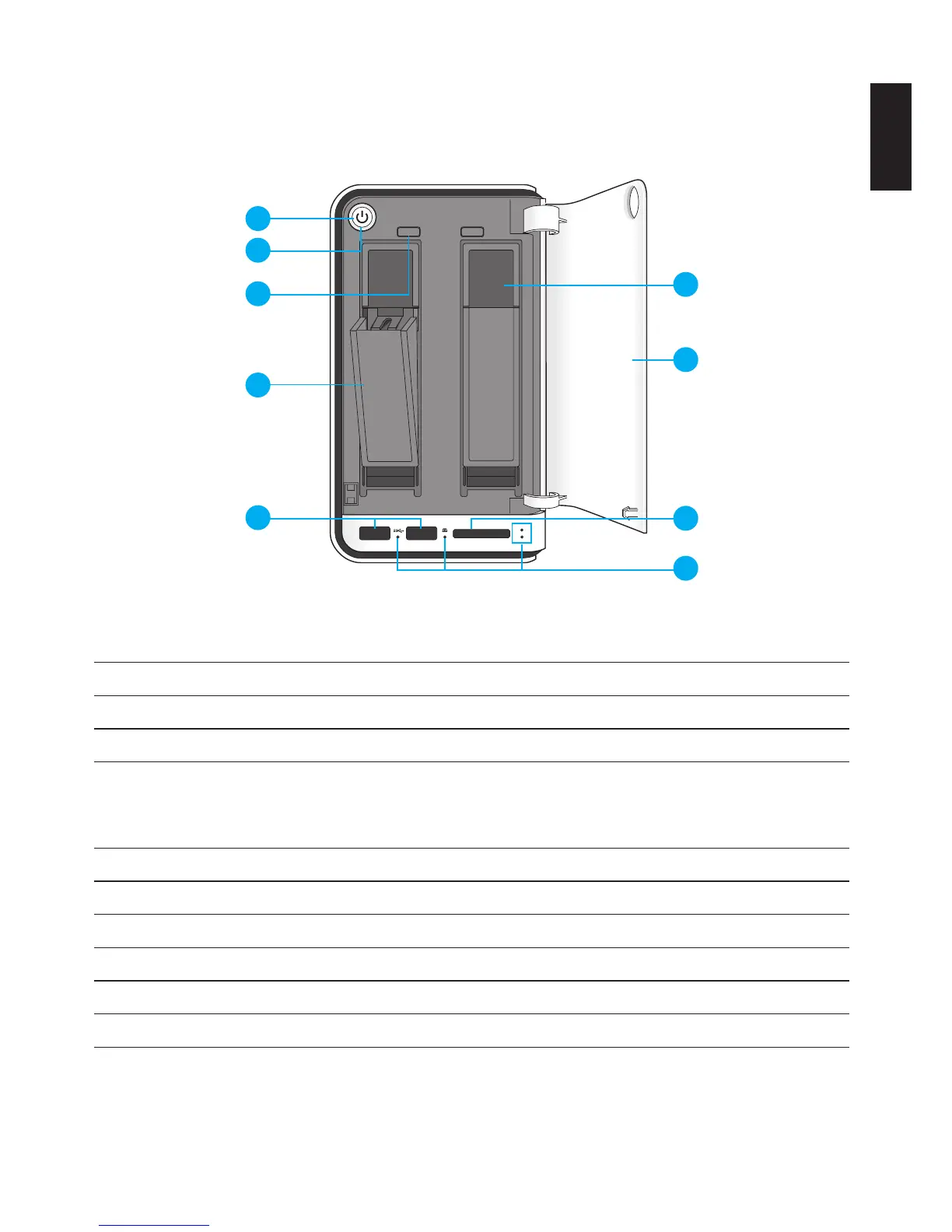
Shuttle Omninas KD21 - Product Views; Front View

Shuttle Omninas KD21
170 pages
Print Icon
To Next Page IconTo Next Page
To Previous Page IconTo Previous Page
Loading...
English
English
1-3
Product views Product overview
Product Views
Front View
2
1
2 1
4
8
9
5
6
7
1
2
3
OMNINAS Front View
Front View Identication
Item DescrIptIon
1 Power Button
2 Status LED, see LED Denitions
3
HDD removal buttons (2 = HDD2, 1 = HDD1)
Note:
For RAID 1 conguration only.
4 HDD tray release
5 USB 3.0 (x2), auto copy supported through these ports
6 HDD bay (HDD1 is on the right and HDD2 is on the left)
7 Bay cover
8 SD card reader, auto copy supported through this port
9 LED indicators, see LED Denitions

Table of Contents

Other manuals for Shuttle Omninas KD21

Related product manuals