SIGLENT
SDS2000X User Manual 11
The Rear Panel
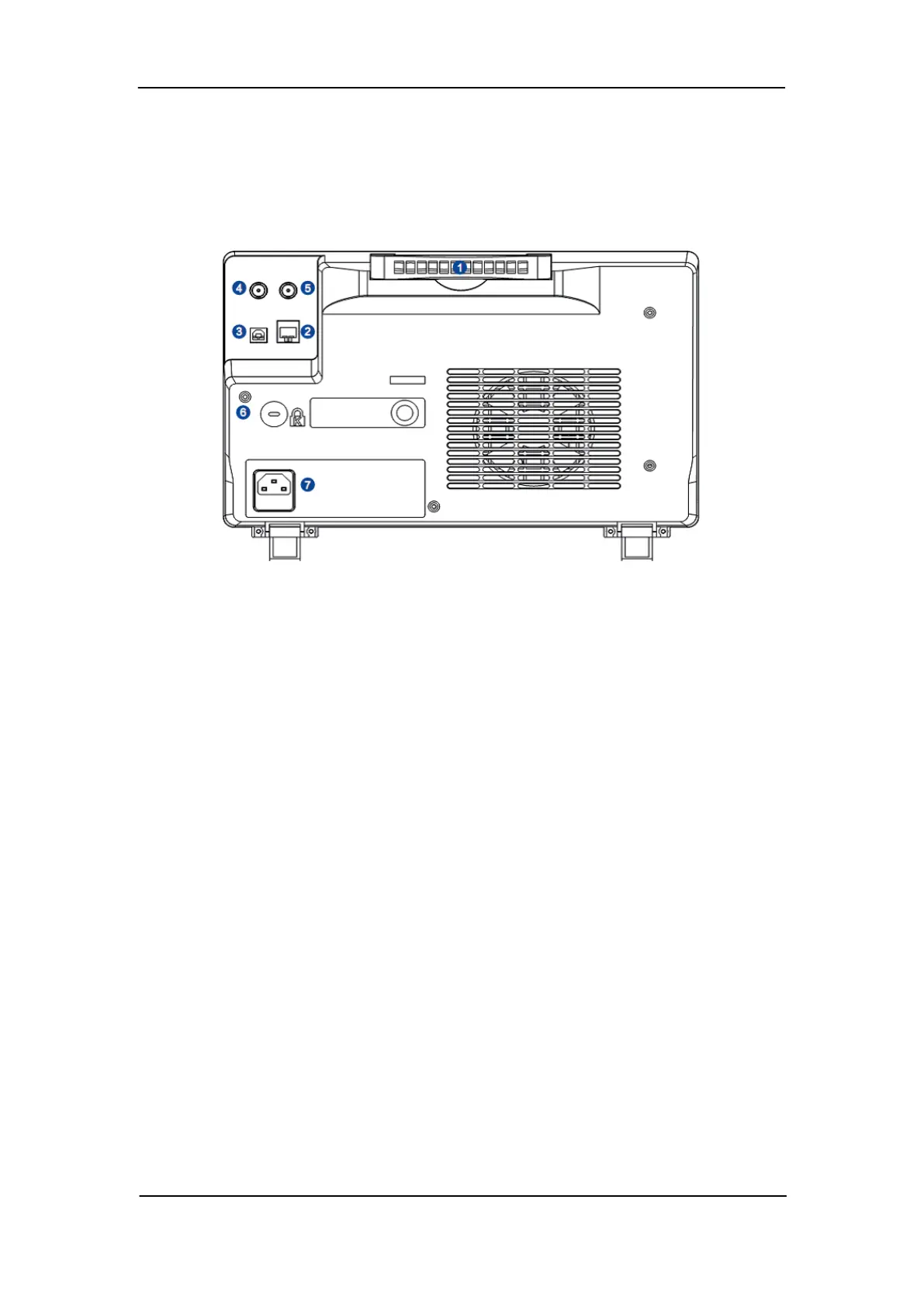
Figure 7: Rear panel Overview
1. Handle
Pull up the handle vertically for easy carrying of the instrument. When you do not need
the handle, press it down.
2. LAN
The instrument can be connected to a user-network via this interface to perform
remote control.
3. USB Device
The SDS2000X-series support SCPI remote control commands. User can control the
oscilloscope through this interface.
4. Pass/Fail or Trigger Out
This connector outputs either a Pass/Fail pulse when using this mode of operation or it
can be used to output a pulse that corresponds to each oscilloscope trigger operation.
5. External Trigger terminal
6. Safety lock Hole
This hole is designed to accommodate a Kensington style of lock (user-supplied).
7. AC Power Socket
AC power input terminal. The power requirements of this oscilloscope are 100-240 V,
50/60 Hz or 100-120 V, 400 Hz. Use the power cord provided with the instrument to
connect it to AC power.










 To Next Page