EtherHaul Operation, Administration and Maintenance Manual
Page 68
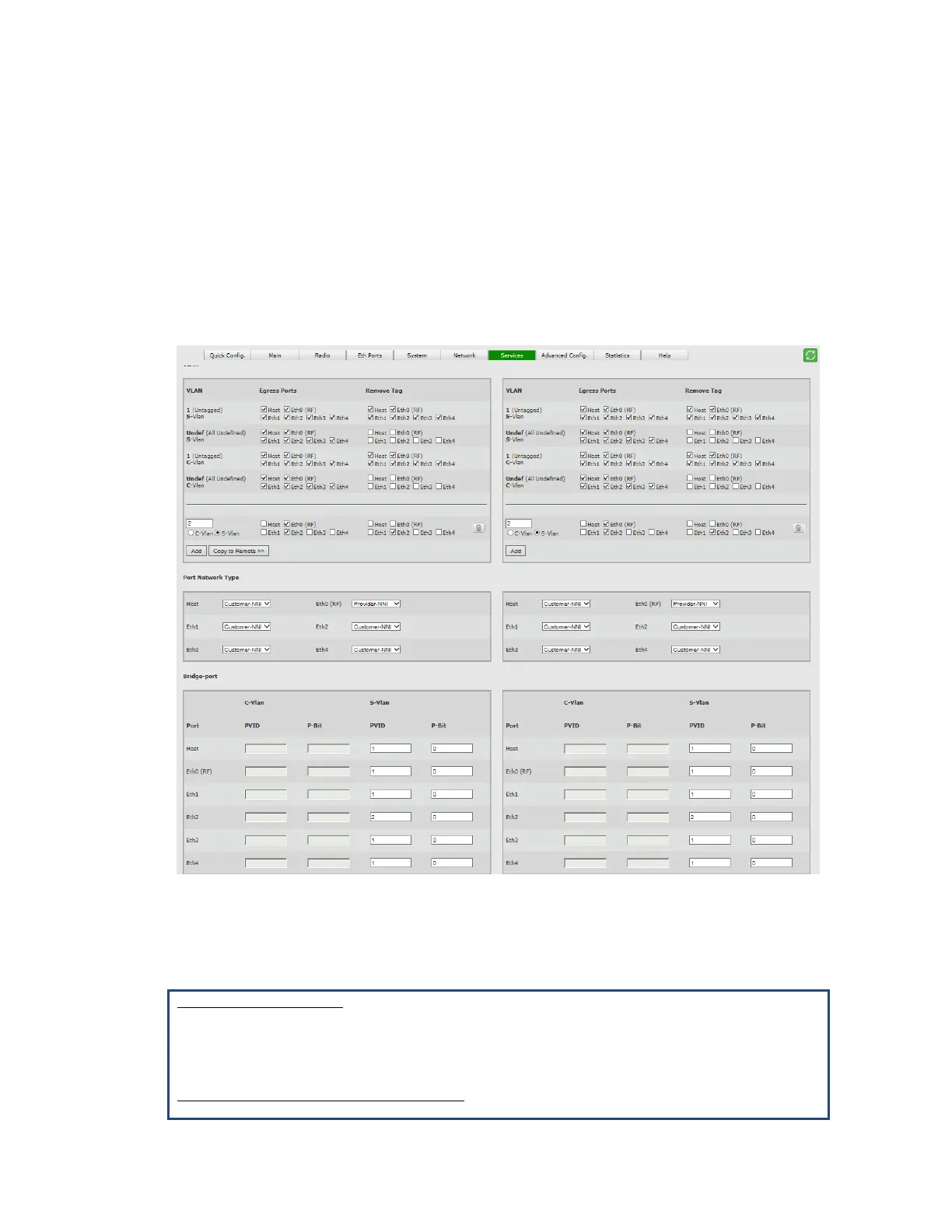
To provide this traffic separation, all traffic coming from Eth2 will be tagged with S -
VLAN (for example, S-VLAN 2). This S-VLAN will be allowed on Eth2 and Eth0 (RF).
Configuration steps using the GUI:
1. Add S-VLAN 2, Egresss to ports Eth2 and Eth0, Remove tag when going out of Eth2.
2. Use PVID to tag the traffic port: set S-VLAN PVID 2 on Eth2.
3. Change the Network Port Type of Eth0 to Provider-NNI to allow S-VLAN egress on
this port.
Figure 8-8 Services Page: Transparent Pipe
CLI
set vlan s1 1 egress host,eth1,eth2,eth4,eth0,eth3 untagged
host,eth1,eth2,eth4,eth0,eth3
set vlan s1 2 egress eth2,eth0 untagged eth2
set vlan s1 undef egress host,eth1,eth2,eth4,eth0,eth3 untagged none
Bridge-Port (PVID) Configuration:
set bridge-port s1 eth2 pvid 2



 To Next Page