4.7 APPLICATION/REMOVING OF LOADER UNIT (AUTOMATIC CLAMP + LOADER) -
OPTIONAL
In the main menu place the pointer on position 5 (Maintenance) and press ENTER, then place the pointer on
position 3 (Loader Unit) and press ENTER.
Follow the instructions in Ch.5.8.3 OPTIONAL Loader Unit.
NOTE: it is compulsory to turn off the machine before removing the Loader Unit or any part of it.
WITH LOADER UNIT INSTALLED
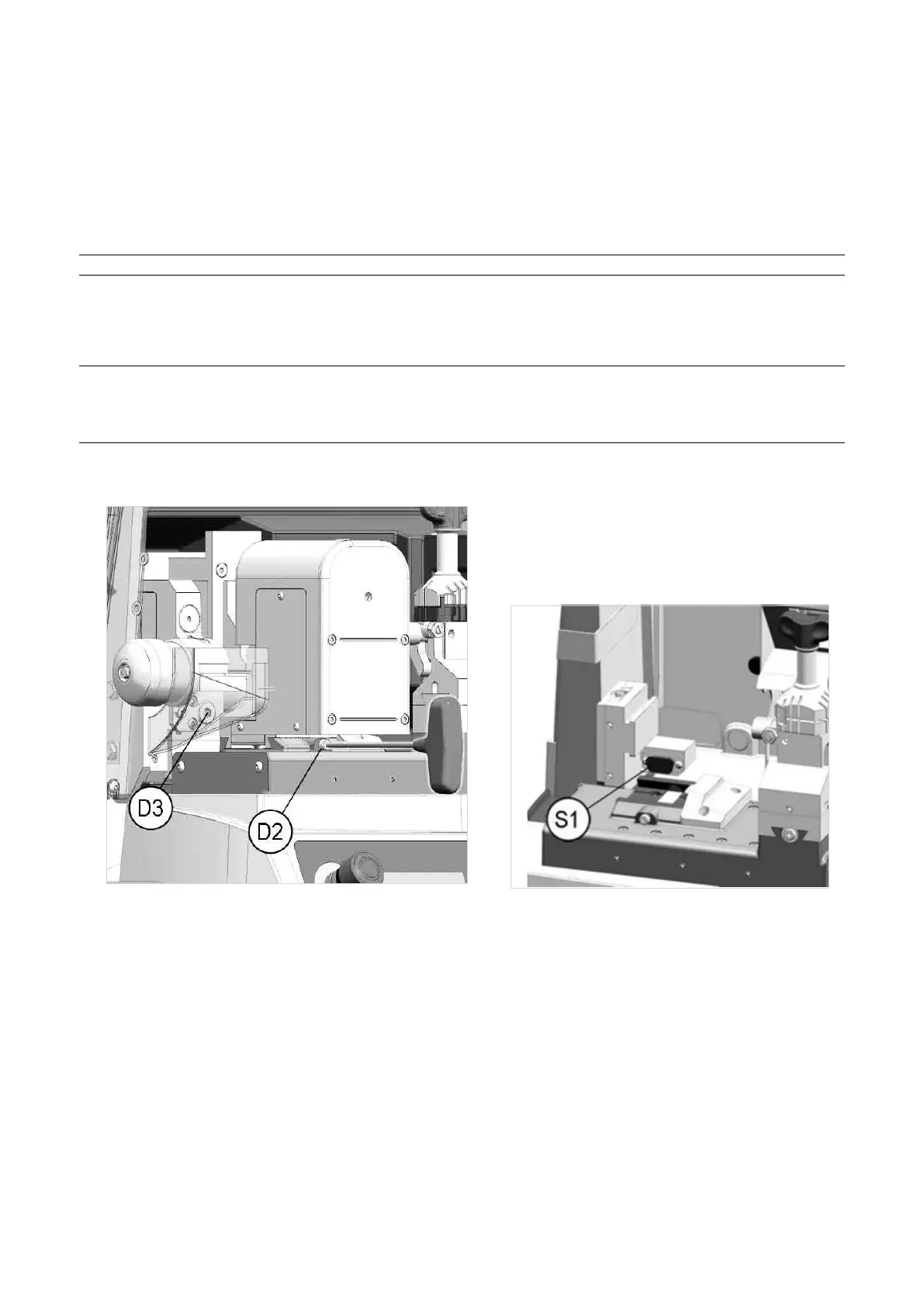
• Remove automatic clamp: loosen the screw (D2) and pull out the clamp to the left.
NOTE: If the machine is to be used without the Loader Unit, loosen the screw (D3) with the (long)
hex wrench provided, remove the loader and remember to t the serial protection (S1) into the loader
seat. Fit the standard cutting clamp into the special dovetail runner, pushing it to the right until it
stops, then tighten the screw (D2).
• FittheAutomaticClamp:ttheautomaticclampintothespecialdovetailrunner,pushingittotherightuntilit
stops, then tighten the screw (D2).
Fig. 33
Fig. 34
Operating Manual UC199
Copyright Silca 2012
24



 To Next Page