MOBILE CONFIGURATION OPTIONS
CHAPTER 9
184
ECOTEL 3G 16.1. Revised: 2011.
German country code):
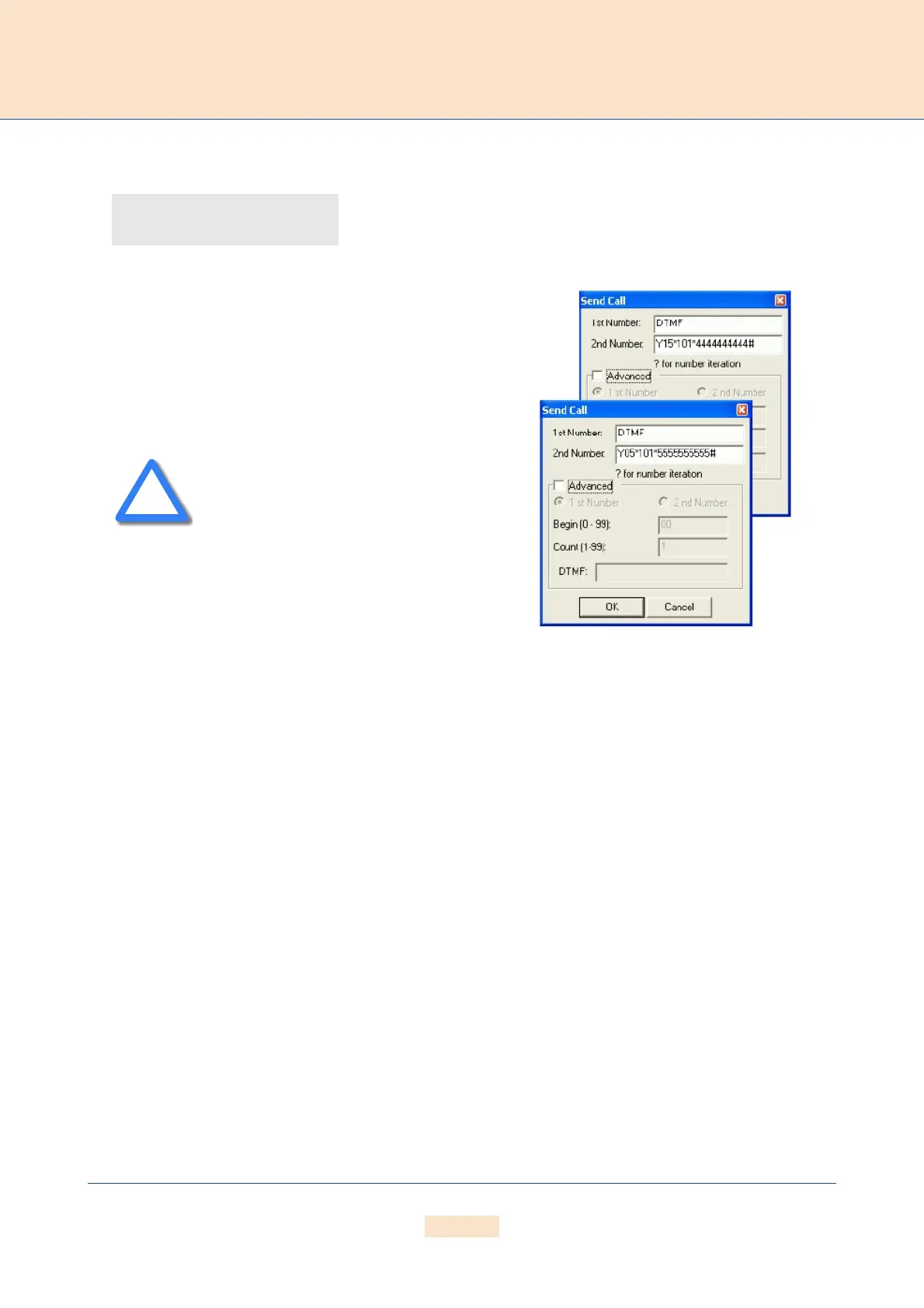
Set up a connection to the system through the GATE Manager
and select Commands | Send Call. Enter DTMF in the 1st
Number dialog box. In the 2nd Number dialog box, enter the
carrier's placeholder (Y or Z) and the number of the controller in
which the SIM card is active (15 or 05). Enter a 0 in front of sin-
gle-digit controller numbers. Then enter the carrier's USSD code
(*101*) and the voucher number (44444444444 or
55555555555). The USSD command ends with #.
Configuration entries for recharging confirmation are described
in Chapter 3.
Recharging via SMS (Short Message Service)
First of all, please check whether you have the license to send
SMS messages on your system.
You will find it in the General view under Licenses when you
connect to the system via GATE Manager.
MapAllDTMF=41DTMF
MapAllY??=26212*??01:
MapAllZ??=26213*??01:
Incorrect USSD commands can result in
blocked SIMs or failure in the mobile
module!
Figure 9.3 Recharging with USSD Codes



 To Next Page