MODULE SETTINGS
FMS-1650
- 67 -
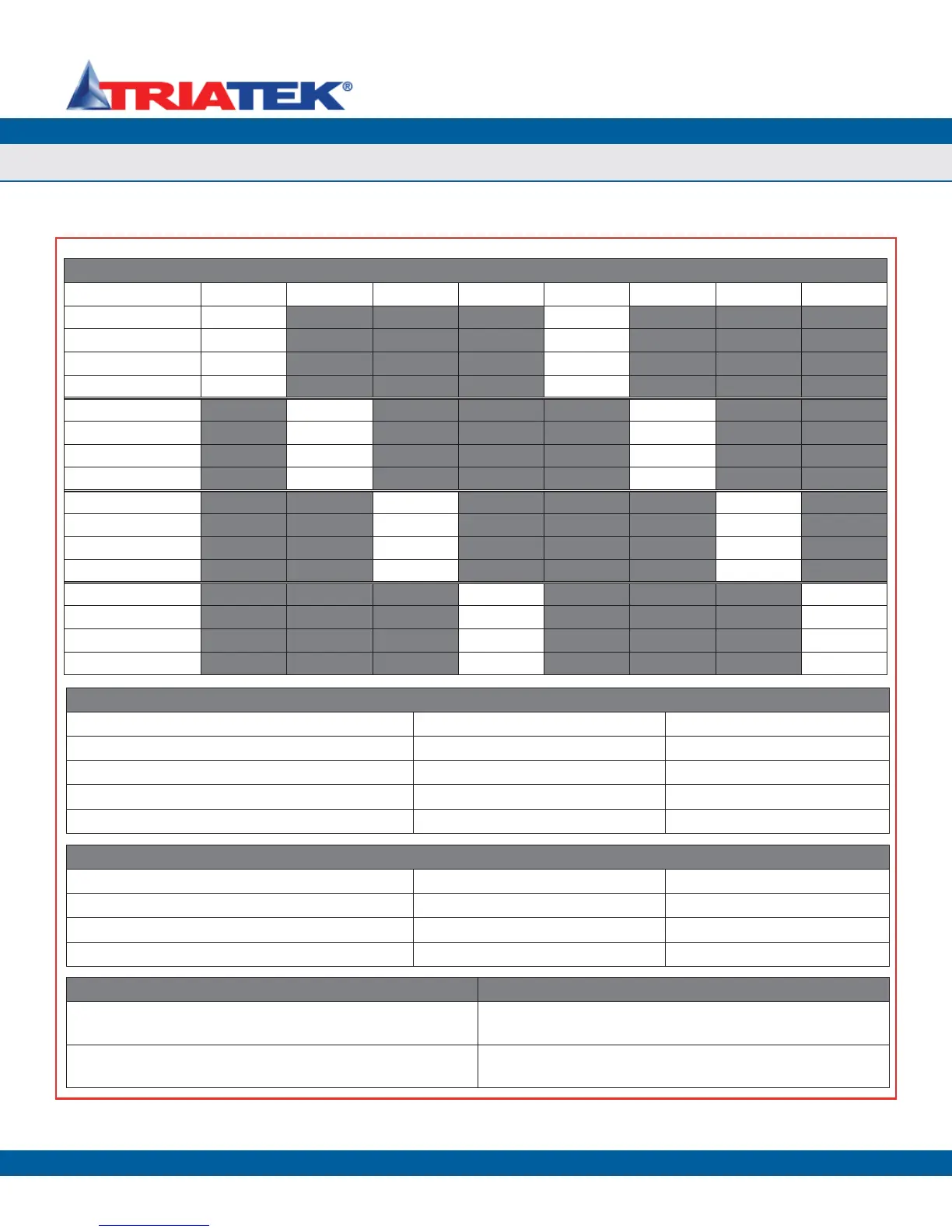
Table 1. Analog Input Configuration Settings (S1)
Mode S1 - 1 S1 - 2 S1 - 3 S1 - 4 S1 - 5 S1 - 6 S1 - 7 S1 - 8
AI-1 5Vdc OFF OFF
AI-1 20mA ON OFF
AI-1 10Vdc OFF ON
Not Valid ON ON
AI-2 5Vdc OFF OFF
AI-2 20mA ON OFF
AI-2 10Vdc OFF ON
Not Valid ON ON
AI-3 5Vdc OFF OFF
AI-3 20mA ON OFF
AI-3 10Vdc OFF ON
Not Valid ON ON
AI-4 5Vdc OFF OFF
AI-4 20mA ON OFF
AI-4 10Vdc OFF ON
Not Valid ON ON
Table 2. Protocol Selection Settings (S3)
Protocol Selection S3-7 S3-8
Reserved OFF OFF
Metasys® N2 ON OFF
LonWorks® OFF ON
BACnet® MS/TP (default) ON ON
Controller Configuration Dipswitch (S4)
1. AO-1 Voltage Range Selection: OFF = 0-10Vdc ON = 0 - 5Vdc
2. AO-2 Voltage Range Selection: OFF = 0-10Vdc ON = 0 - 5Vdc
3. AO-3 Voltage Range Selection: OFF = 0-10Vdc ON = 0 - 5 Vdc
4. AO-4 Voltage Range Selection: OFF = 0-10Vdc ON = 0 - 5 Vdc
Controller Configuration Slideswitch (S2) Controller Configuration Slideswitch (S5):
LEFT = Analog Outputs powered by remote source LEFT = Digital Inputs pulled-high (triggered by active low input -
default)
RIGHT = Analog Outputs powered locally by FMS1650 (default) RIGHT = Digital Inputs pulled-low (triggered by active high input, up to
24Vdc)
TRIATEK reserves the right to change product specifications without notice.
Confi gurations & Settings


 To Next Page