Smart Plus (PHT-35LHS)
Technical Manual
VT-TECH-Smart Plus-001
COPYRIGHT© 2018 VATECH.
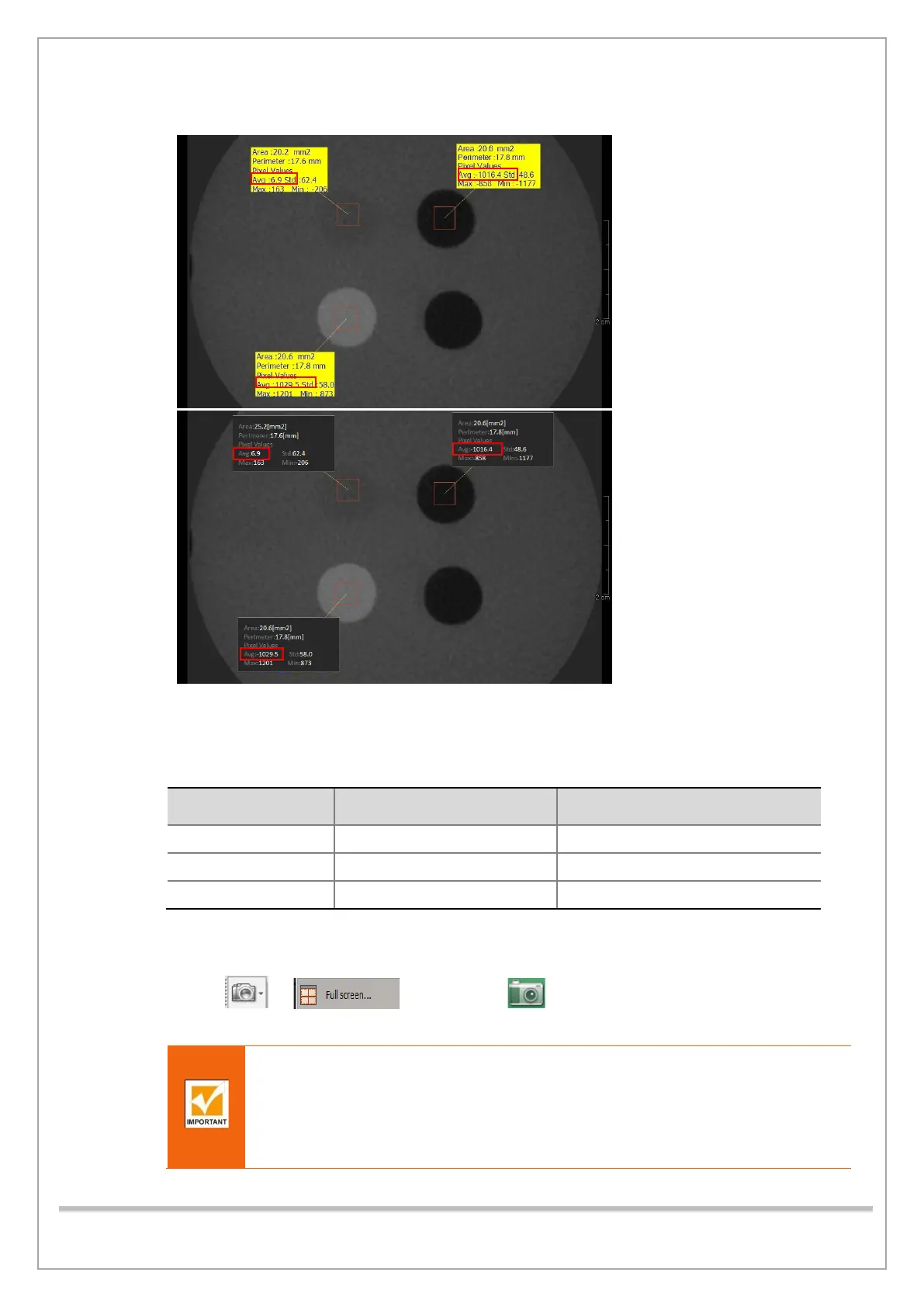
10) Make the boxes (20 mm2) on the WATER, BONE(TEFLON), and AIR area as shown in the figure.
(Ez3D plus)
(Ez3D-i)
13) Compare the CT NUMBER Avg values from the WATER, BONE(TEFLON), AIR area with the
standard.
CT Number Standard Value
LSL
(Lower Specification Limit)
USL
(Upper Specification Limit)
14) Record the mean CT Number of each material.
15) Click > (Ez3D plus) or (Ez3D-i) and save the captured screen in
the 3D Viewer.
After CBCT Image Inspection
1. Run VAKCAP.exe -> Click Settings tab -> Double-click reconstruction.vxm.
2. Make sure that the following values are shown as follows:
POSTPROCESSING = -50, UseCTNumCal = 1 UseArcCut=1
If not, change the value, save the file, and exit.














 To Next Page