EasyManua.ls Logo

Veeder-Root TLS2P - Autodial Alarm Setup Screen 2

Veeder-Root TLS2P
92 pages
Print Icon
To Next Page IconTo Next Page
To Previous Page IconTo Previous Page
Loading...
System Setup Screens [231-234] Autodial Alarm Setup Screen 2
39
[231-234] Autodial Alarm Setup Screen 2
Legend for numbered boxes
123456
8
6
7
01-01-2000
12:00 AM
ALL FUNCTIONS NORMAL
1
2
3
4
TANK 1SYSTEM SETUP AUTODIAL ALARMS
[231]
[232]
[233]
[234]
123456
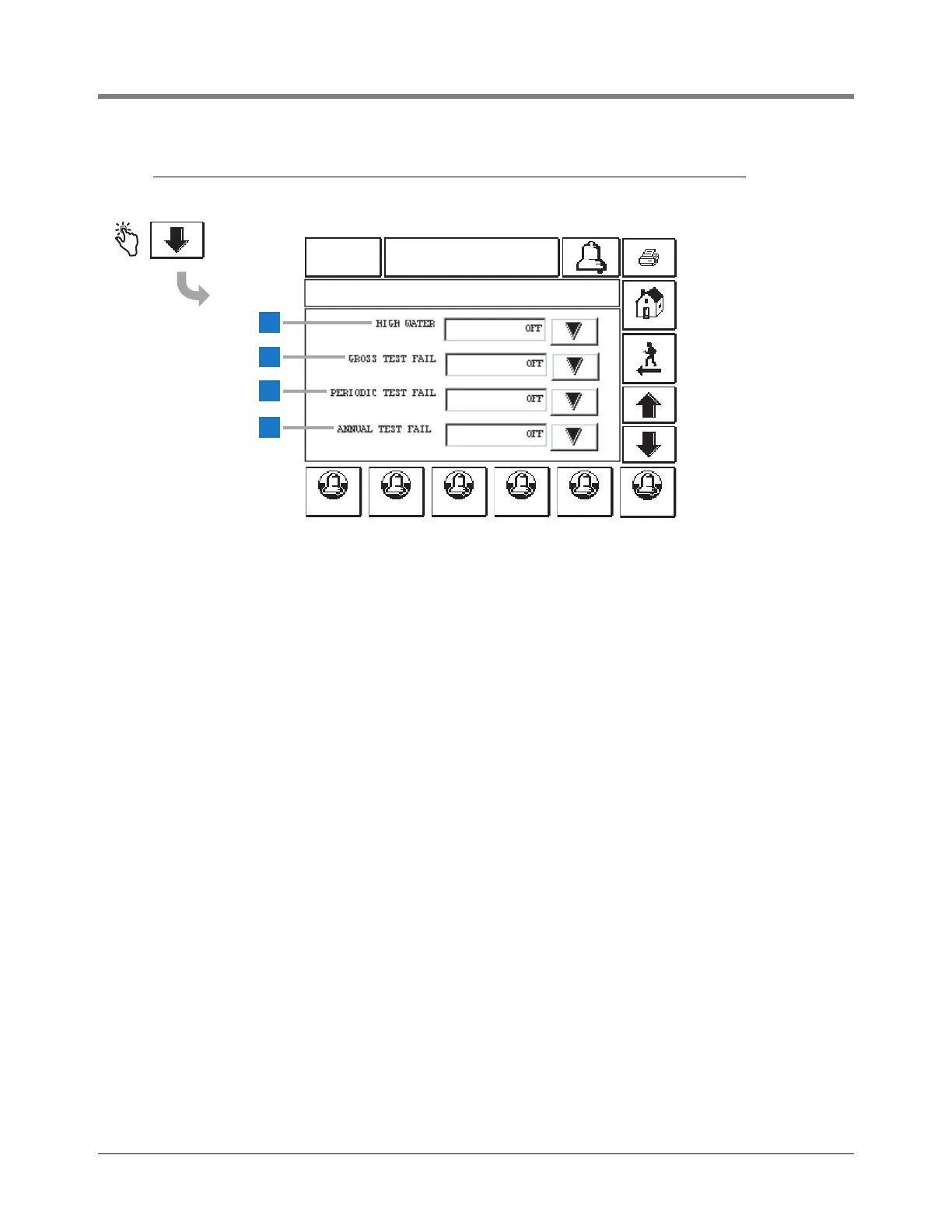
This screen continues Autodial Alarms setup.
Note: Autodial alarms continue on next page.
1 High Water [231] - touch the Down Arrow button to
select On (dial out) or Off (do not dial out).
2 Gross Test Fail [232] - touch the Down Arrow button to
select On or Off.
3 Periodic Test Fail [233] - touch the Down Arrow button
to select On or Off.
4 Annual Test Fail [234] - touch the Down Arrow button
to select On or Off.


Table of Contents

Related product manuals