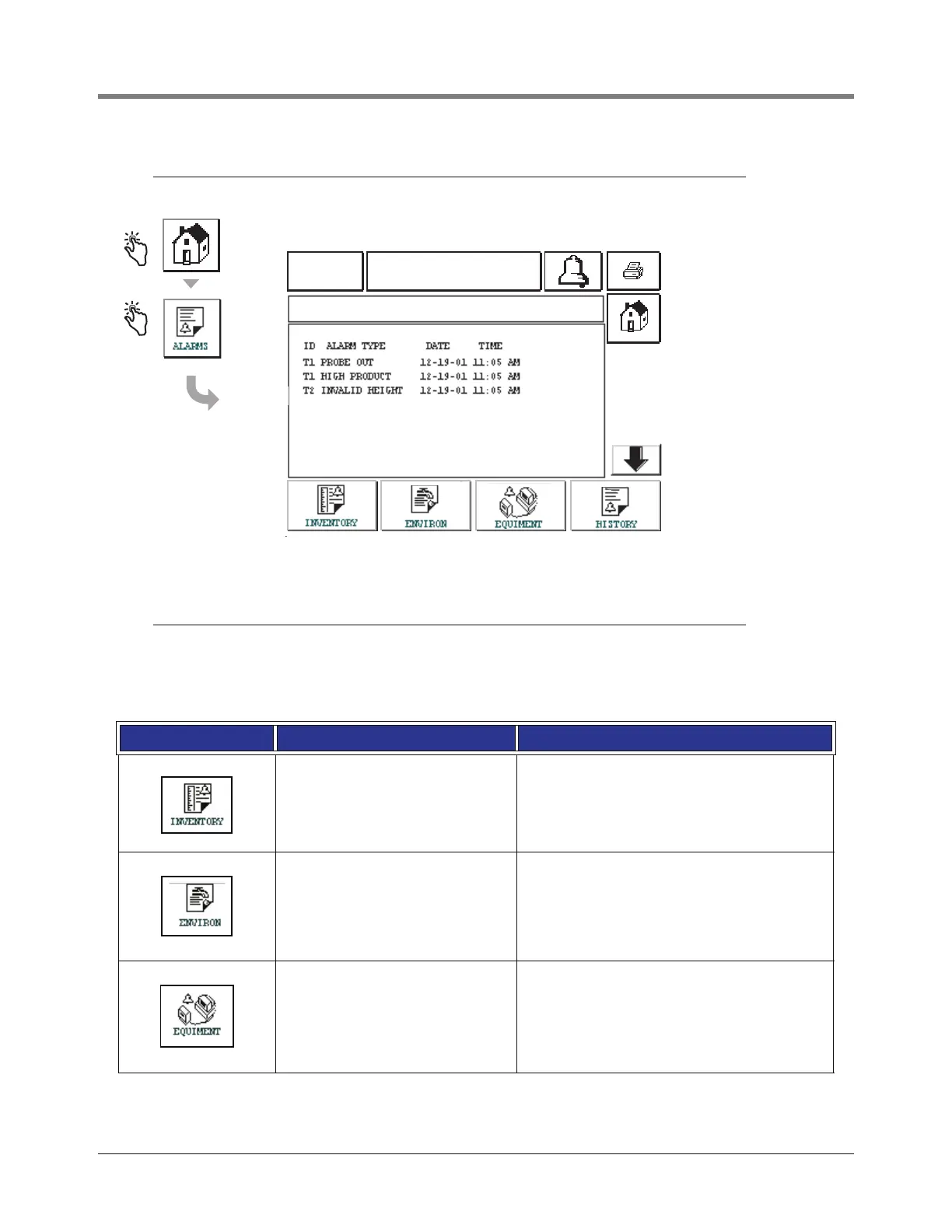
Reports Active Alarm Status Screen
69
Active Alarm Status Screen
Alarm Reports
Alarm reports are accessed from the Active Alarm Reports Screen above by touching the report buttons across the
bottom of the screen. Table 5 describes the available reports.
Table 5: Alarm Reports
Button Report Report Parameters
Touch to display the Inventory Alarm
Report. Touch the Down/Up arrow
buttons to scroll through all alarms.
Touch the Print button on the display
to print the report to a connected
printer.
INVENTORY ALARM REPORT
Date/Time of the following last 3 inventory alarms:
Max Product, Overfill Limit, Invalid Fuel Level, High
Water, Delivery Needed, Low Product, and Low
Temperature.
Touch to display the Environmental
Alarm Report. Touch the Down/Up
arrow buttons to scroll through all
alarms. Touch the Print button on the
display to print the report to a con-
nected printer.
ENVIRONMENTAL ALARM REPORT
Date/Time of last 3 Gross, Periodic, and Annual
Test Fails
Touch to display the Equipment
Alarm Reports Screen. From this
screen you can choose to view Tank
Equipment Alarm Reports
TANK EQUIPMENT ALARM REPORT
Date/Time of last 3 Probe Out alarms for each
tank.
01-01-2000
12:00 AM
ALL FUNCTIONS NORMAL
ACTIVE ALARM STATUS



 To Next Page