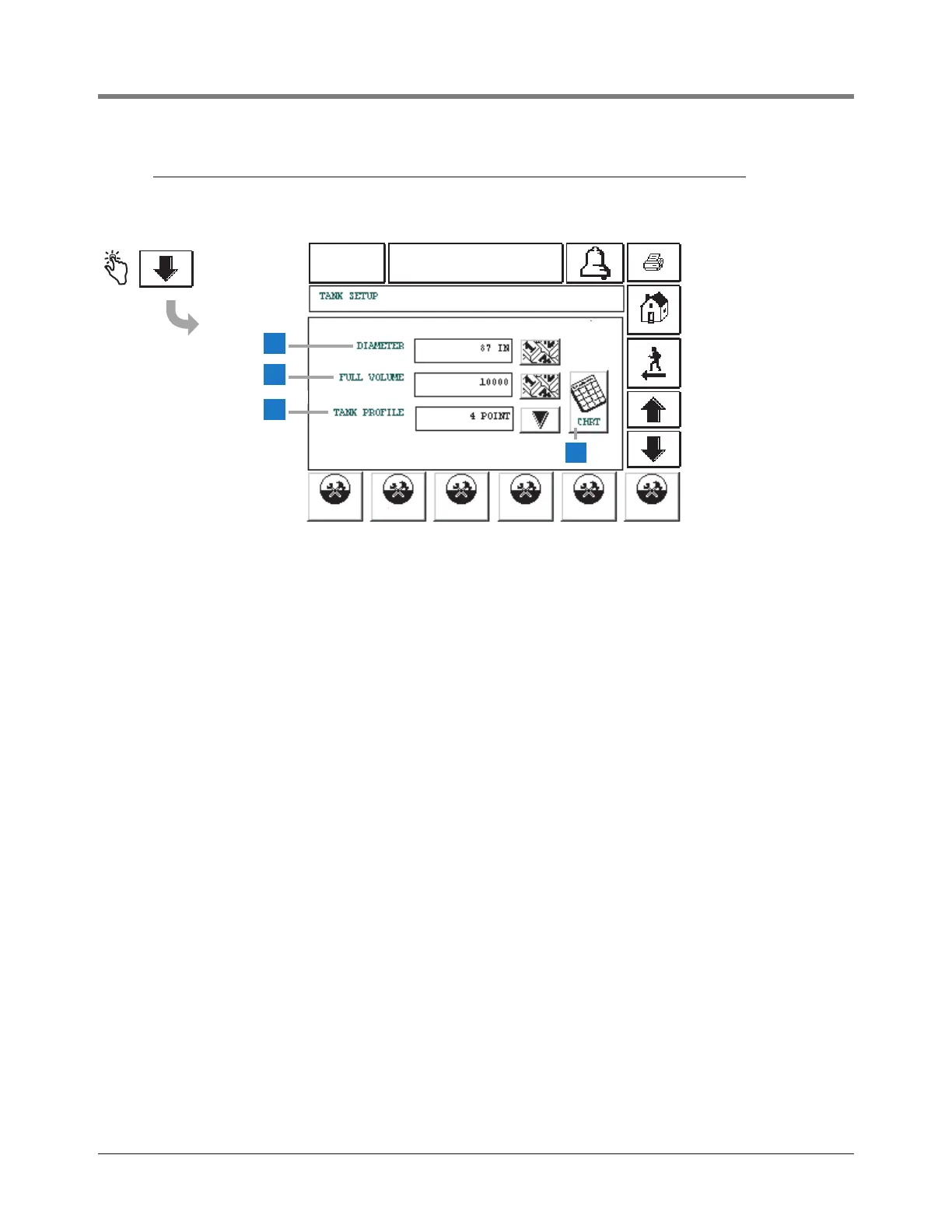
This screen continues Tank Setup.
1 Diameter [122] - touch the Down Arrow button to the
right of the window and enter the diameter of the tank.
2 Full Volume [123] - touch the Down Arrow button to the
right of the window and enter the Full Volume of the tank.
3 Tank Profile [124] - touch the Down Arrow button to the
right of the window and select a tank profile: Linear -for
rectangular tanks or cylindrical tanks standing on end, 1
point - for flat-ended steel tanks (default), 4 points - for
fiberglass tanks, or 20 points - for all tanks.
4 Tank Chart button - This button only appears if you have
selected the 4-point or 20-point Tank Profile.
• The system will calculate heights for each point (4 or
20) based on the selected profile and the tank’s
diameter, and display them beside windows in which
you must enter the corresponding volume. Get the
volume for the displayed heights from the tank chart
and enter that volume in the window.
• Take care to enter the exact value from the tank chart
for the labeled height. Out of range entries will not be
accepted.
• If the 4-point or 20-point profile is selected, you must
enter a volume for each point or the system will
compute a volume of 0 for any height.
Tank Setup parameters continue on next page.



 To Next Page