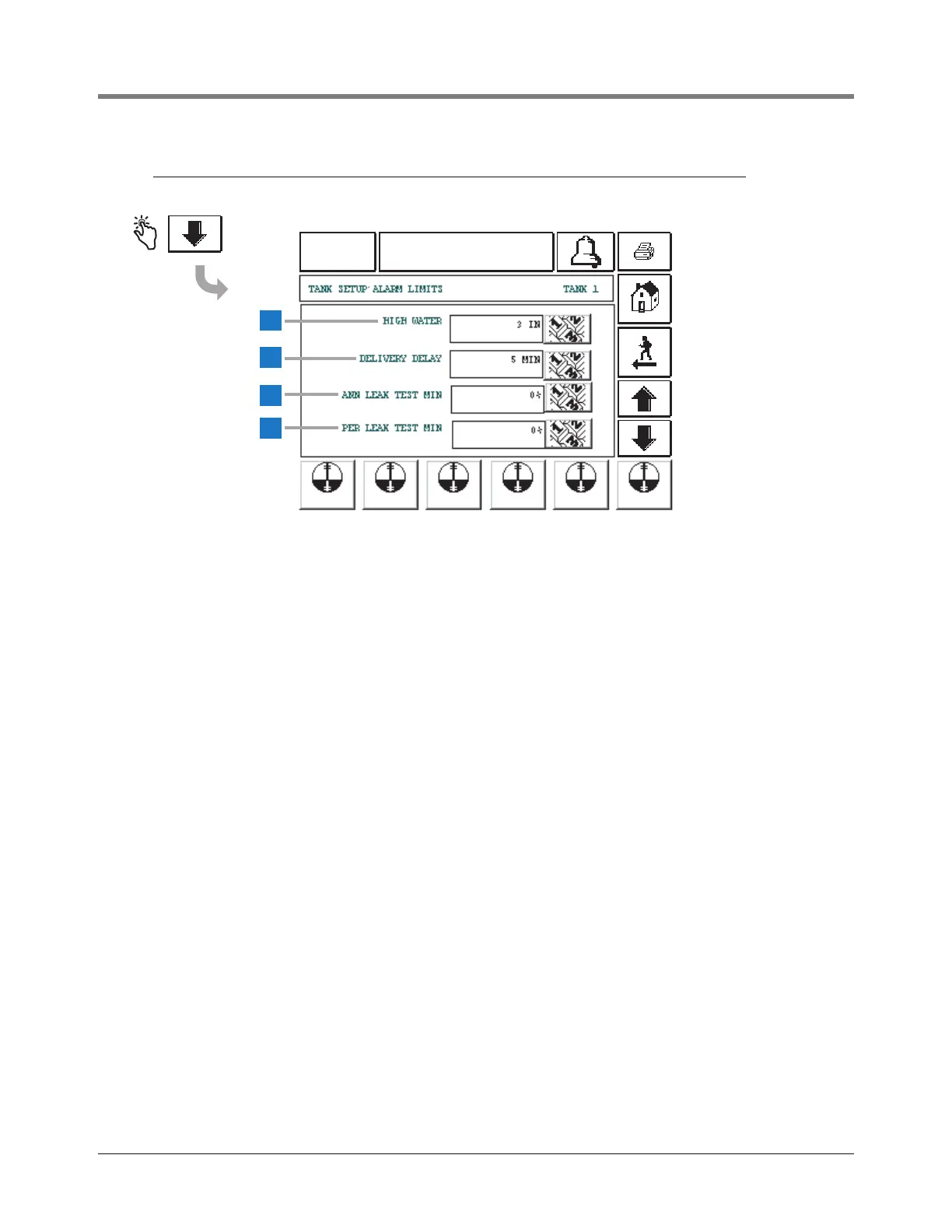
This screen continues Tank Alarm Limits setup.
1 High Water [105] - Alarms when the level of water in the
tank exceeds the height you enter here. Set this value at a
level lower than the pickup for the submersible pump or
suction line.
Allowable range is 0-9 inches (0-228.6 mm).
Default is 0 (which disables the alarm). Touch the Down
Arrow button to the right of the window and enter the
desired high water limit.
2 Delivery Delay [106] - Use this display to set a delay time
between the completion of a bulk delivery and the Delivery
Increase Report. This feature prevents generation of
multiple reports during the intervals between multi-
compartment drops to one tank. The feature also allows
fuel to “settle out” after a delivery, which is especially
important in manifolded tank groups. Allowable delay is 1
to 60 minutes. Default is 1. Touch the Down Arrow button
to the right of the window and enter a desired delay.
3 Ann Leak Test Min [107] - This value sets the minimum
tank volume required to record a passed annual leak test.
The value reflects federal, state, and local requirements.
This value is a percentage of Full Volume with an
allowable range of 1.0 to 100%. Default is 0 (which
disables the alarm). Touch the Down Arrow button to the
right of the window and enter a volume.
4 Per Leak Test Min [108] - This value sets the minimum
tank volume required to record a passed periodic leak
test. The value reflects federal, state, and local
requirements. This value is a percentage of Full Volume
with an allowable range of 1.0 to 100%. Default is 0
(which disables the alarm). Touch the Down Arrow
button to the right of the window and enter a volume.
The Tank Alarm Limit Setup continues on next page.



 To Next Page