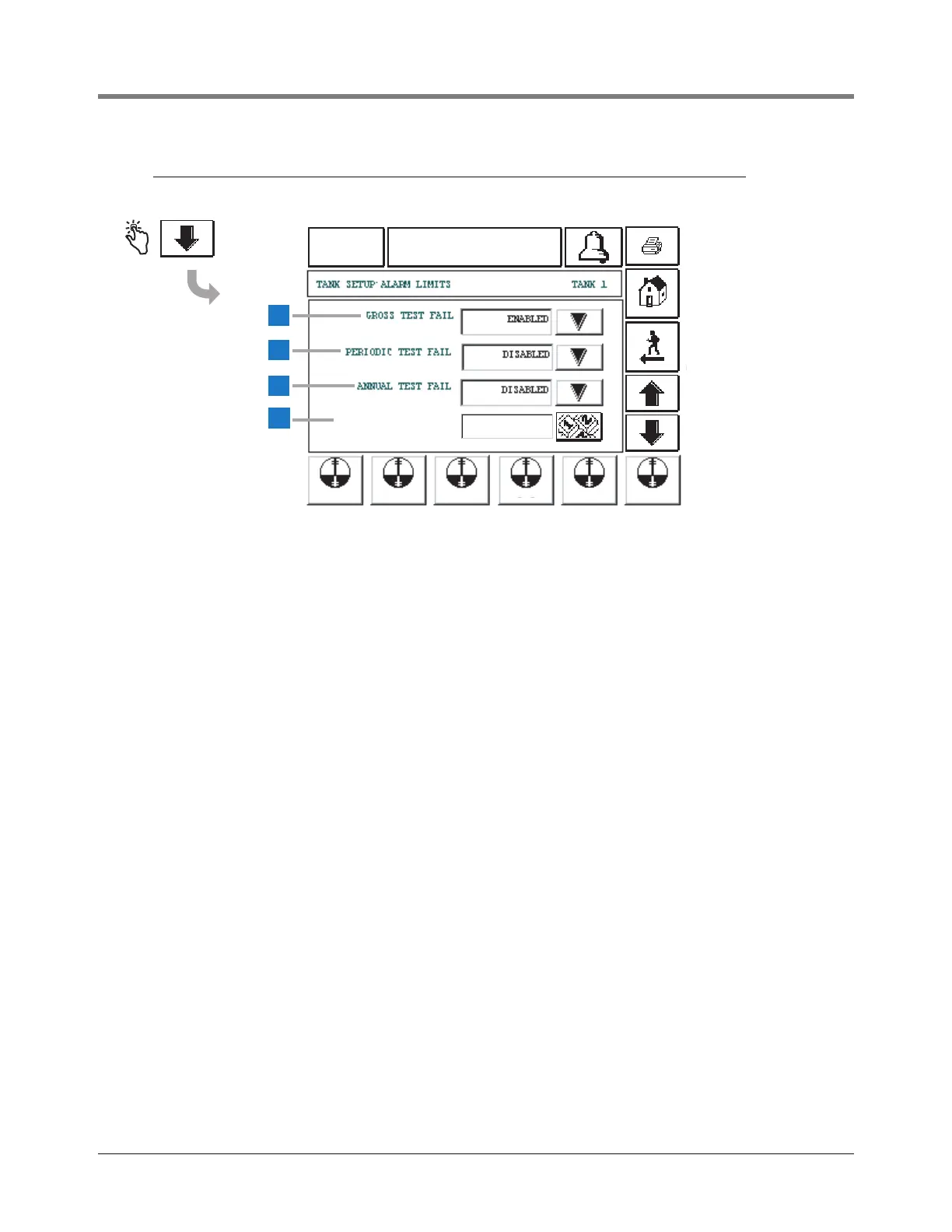
This screen continues Tank Alarm Limit setup.
1 Gross Test Fail [109] - Gross Test Fail allows you to
disable or enable an alarm that triggers if a 3 gph (11.3
lph) leak test fails. Choices are Alarm Enabled or
Disabled. Default is Disabled. Touch the Down Arrow
button to the right of the window and enter the desired
choice.
2 Periodic Test Fail [110] - Periodic Test Fail allows you to
disable or enable an alarm that triggers if a 0.2 gph (0.76
lph) leak test fails. Choices are Alarm Enabled or
Disabled. Default is Disabled. Touch the Down Arrow
button to the right of the window and enter the desired
choice.
3 Annual Test Fail [111] - Annual Test Fail alarms when an
annual leak test has not passed. Choices are Alarm
Enabled or Disabled. Default is Disabled. Touch the
Down Arrow button to the right of the window and enter
the desired choice.
4 Density High Limit [552] - touch the numeric button to
enter a high limit at which you want the set the density
warning. Allowable Tank Density High Limit range is :
674.00 to 901.00 kg/m
3
(42.076 TO 56.248 lbs/ft
3
).
Default high limit is 901.00 kg/m
3
(56.248 lbs/ft
3
).



 To Next Page