Eliminating malfunctions
129
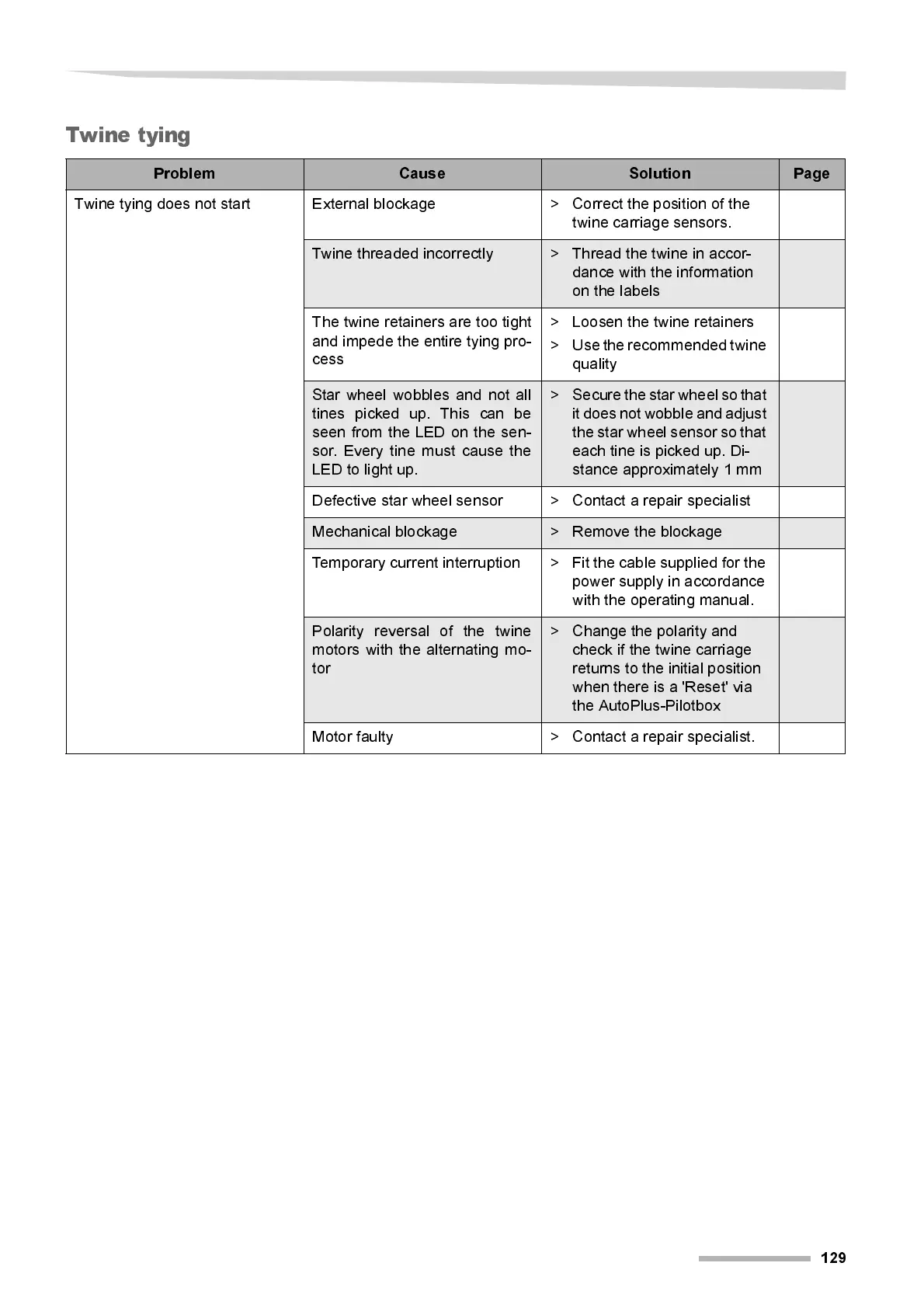
Twine tying
Problem Cause Solution Page
Twine tying does not start External blockage > Correct the position of the
twine carriage sensors.
Twine threaded incorrectly > T hread the twine in accor-
dance with the i nformati on
on the labels
The tw i ne r etai ners are t oo ti ght
and impede the entir e tying pro-
cess
> Loosen the twine retainers
> Use the recommended twine
quality
Star wheel wobbles and not all
tines picked up. This can be
seen from the LED on the sen-
sor. Every tine must cause the
LED to light up.
> Secure the star wheel so that
it does not wobble and adjust
the star wheel sensor so that
each tine is picked up. Di-
stance approximately 1 mm
Defecti ve star wheel sensor > Contact a repair special ist
Mechanical blockage > Remove the blockage
Tempo rary current interruption > Fit the cable supplied for the
power supply in accordance
wi t h the operating manual.
Polarity reversal of the twine
motors with the alternating mo-
tor
> Change the pol ari t y and
check if the twine carriage
returns to the initial position
when there is a 'Reset' via
the AutoPlus-Pil otbox
Motor faulty > Contact a repair specialist.



 To Next Page