Installation
14 TVM Series Installation and Operation Handbook
Copyright © 2008, Harris Corporation
Rack Mounting the TVM
CAUTION: The TVM should not be installed in a DRC-1 case. If installed in a
DRC-1 case, the unit will overheat.
When selecting the permanent mounting location for the TVM, make sure that the flow
of air to the ventilation holes on the top and sides of the chassis is not obstructed. Rack
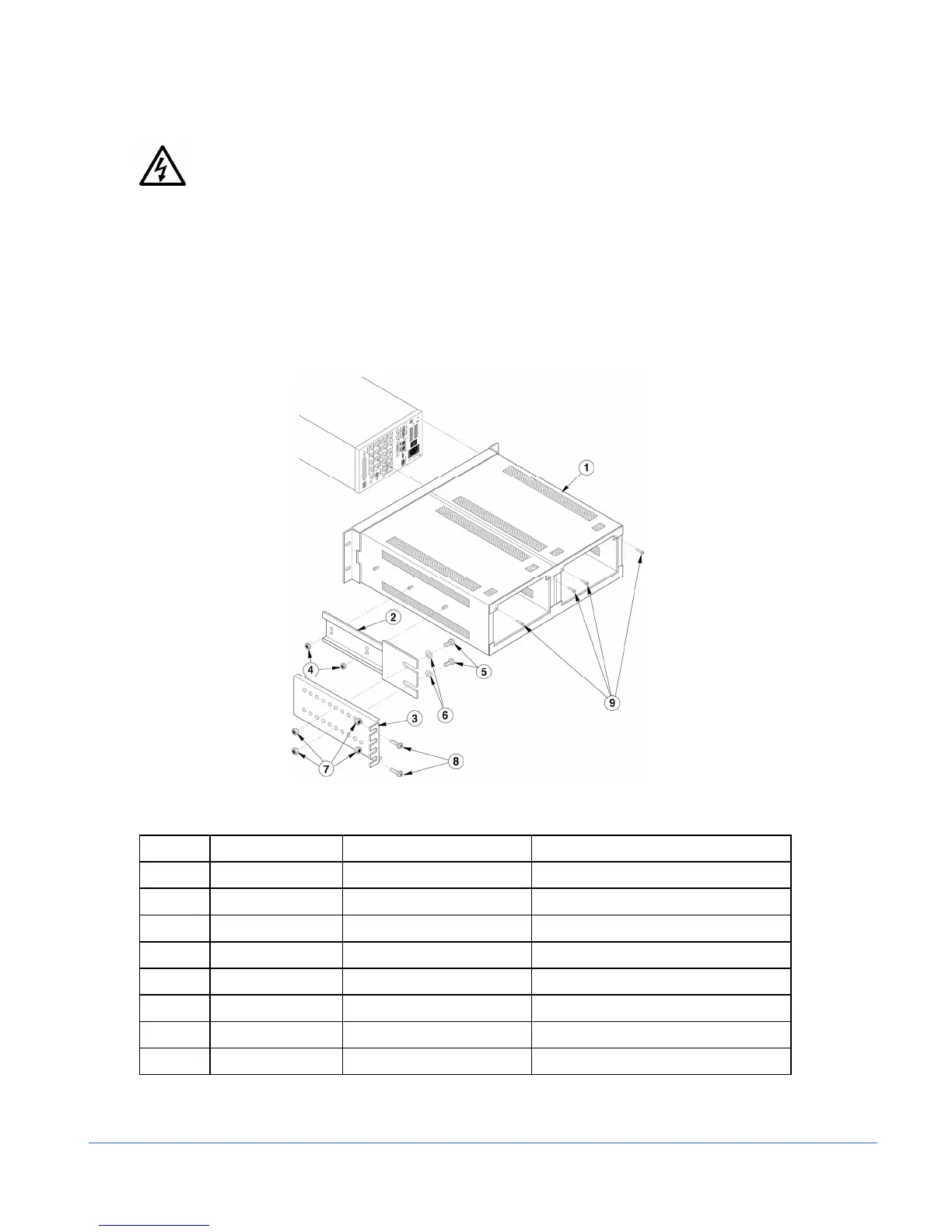
mounting the TVM is illustrated in Figure 2-1 for the DRC-2A double rack mount
case (for installing one or two TVMs). The parts required to rack mount the TVM into
the DRC-2A double rack mount case are listed in Table 2-1.
Figure 2-1. Mounting the TVM in a Rack Using the DRC-2A
Table 2-1. Parts Required to Rack Mount the TVM Using the DRC-2A
Key Item Number Quantity Description
1 832111 1 Dual rack case assembly
2 832140 2 (1 each side) Extension bracket mount
3 832150 2 (1 each side) Extension bracket
4 831119 4 (2 each side) #8–32 kep nuts
5 831065 4 (2 each side) #10–32×3/8-in. Phillips head screws
6 831118 4 (2 each side) #10 flat washers
7 831060 8 (4 each side) #10–32 kep nuts
8 831030 8 (4 each side) #10-32×3/4-in. Phillips head screws



 To Next Page