General Operation
44 TVM Series Installation and Operation Handbook
Copyright © 2008, Harris Corporation
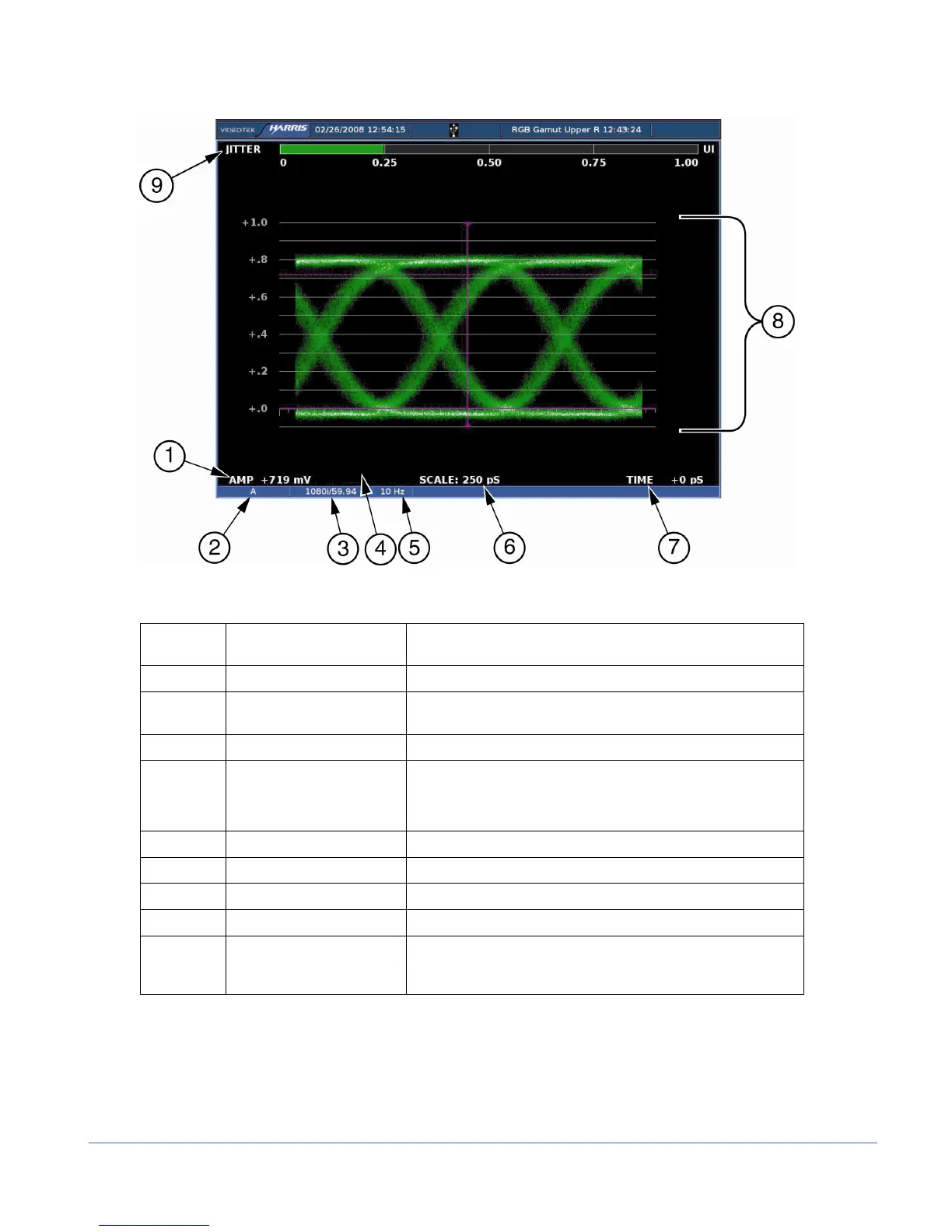
Figure 3-15. Eye Pattern Display Diagram
Table 3-11. Description of Eye Pattern Display Diagram
Field
Identifier
Field Information Nomenclature
1 Amplitude cursor readout Displays the amplitude cursor as AMP and the number in mV
2 Input Displays the user-configurable source IDs for the input and
routers
3 Standard Line rate/Frame rate
4 Zoom
• Displays the Zoom when enabled
• Blank when Zoom is disabled
• Press the ZOOM button cycle through Zoom modes
5 High Pass Filter Displays the selected Eye Filter
6 Scale Displayed in ps
7 Time cursor readout Displays the time cursor as Time and the number in ps
8 EYE graticule Displays the Eye Pattern graticule
9 Jitter Display Displays the Jitter display; jitter display changes according to
the EYE PATTERN > JITTER DISPLAY TYPE menu in the
Global Setup menu



 To Next Page