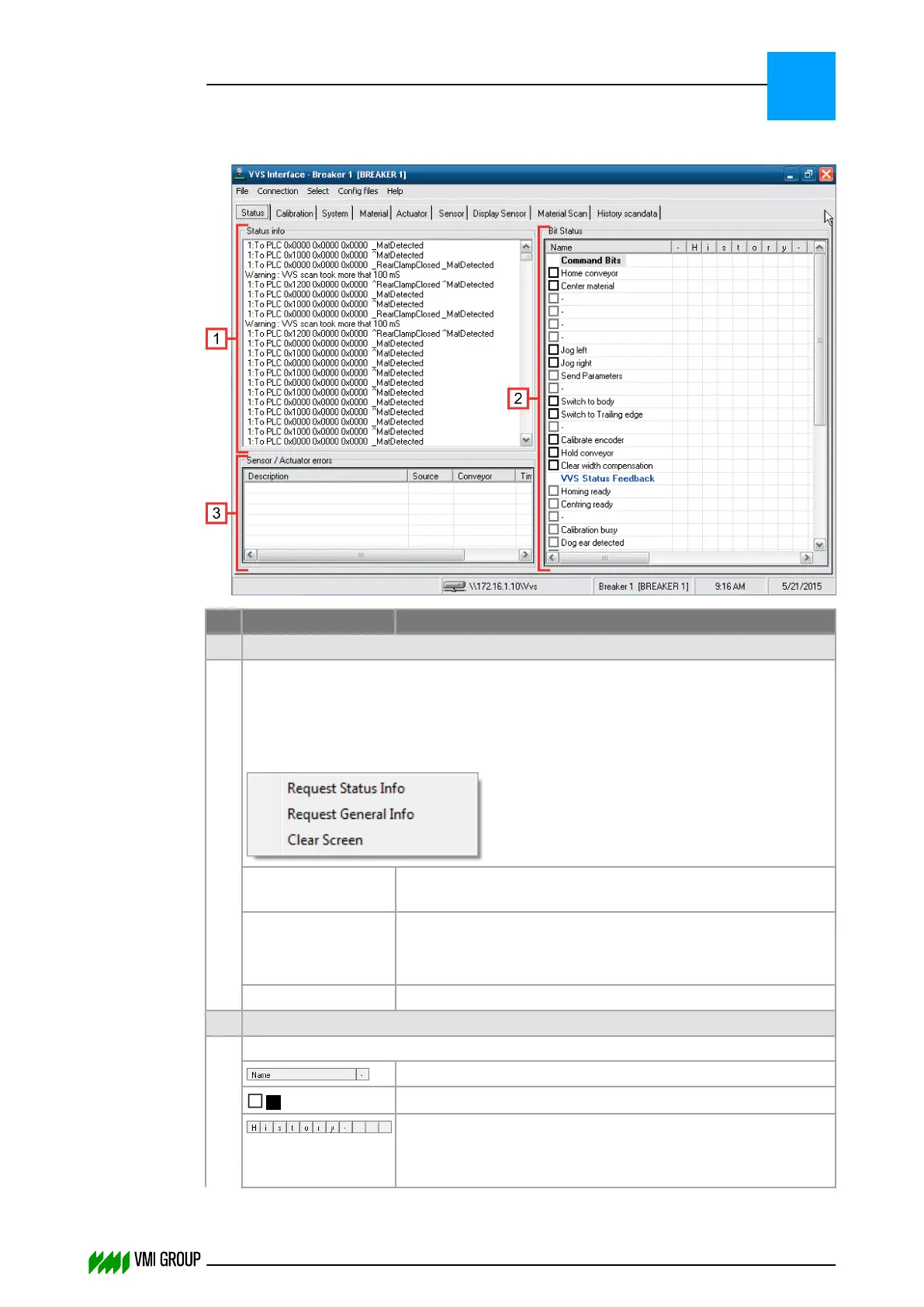
7.3.4.1 Status screen
No. Legend Description
1 Status Info
This field shows text data received from VVSX. The data is sorted per conveyor.
To display the status of another conveyor, select this conveyor via the SELECT
menu.
Right-click in the status info field, to open a shortcut menu for additional information:
Request Status
Info
Shows status information (channel and device status).
Request General
Info
Shows general VVS information (VVSX version,
PLC interface, number of conveyors in VVS).
The requested information is added at the top of the field.
Clear Screen Clears the status info field.
2 Bit Status
This field shows the command and status bits.
Shows the names and the actual status.
/
Click the check box to toggle a bit.
Shows the bit history.
With every change of a status bit (except for the heartbeat)
these columns move right.
VVSU OPERATION
Screen layout (generic)
7
THINKING FORWARD
VMI Vision System VVS (OL82) VVSX 13.0.12.0, VVSU 3.0.6 / 4 / 2016-07-11 / pd#175592
7-11



 To Next Page