08/2012
4-9
WorkCentre 5021/5019
REP 1.4.1
Repairs and Adjustments
Initial Issue
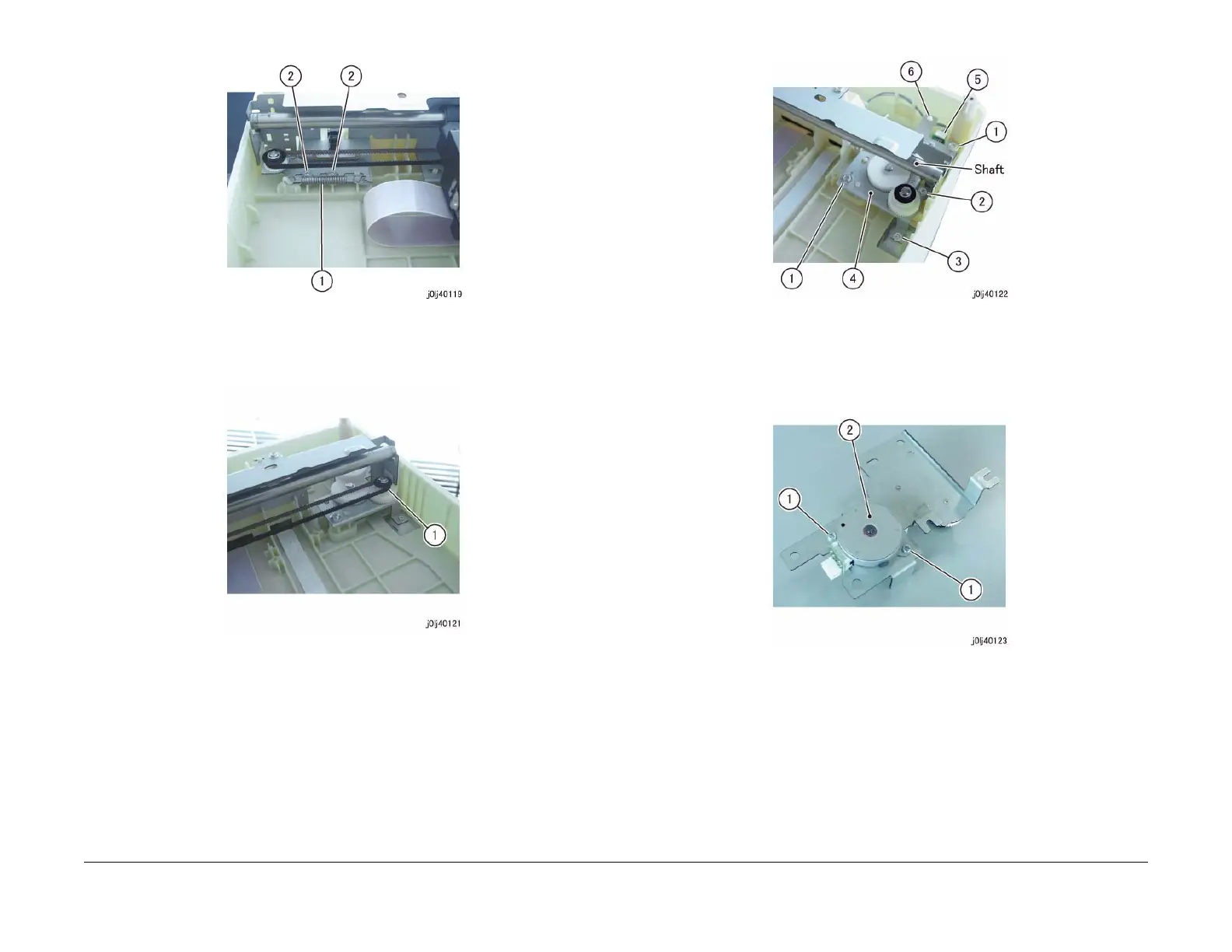
Figure 2 j0lj40119
5. Remove the IIT Carriage Belt from the pulley. (Figure 3)
(1) Remove the IIT Carriage Belt from the pulley.
Figure 3 j0lj40121
6. Remove the Carriage Drive and Motor. (Figure 4)
(1) Remove the Tapping Screw (x2). (Separate Display - 1)
(2) The Shaft is shifted and loosen the screw. (Separate Display - 2)
(3) Remove the screw. (Separate Display - 2)
(4) Remove the Carriage Drive and Motor.
(5) Disconnect the connector.
(6) Remove the cable band.
Figure 4 j0lj40122
7. Remove the Carriage Motor. (Figure 5)
(1) Remove the screw (x2).
(2) Remove the Carriage Motor.
Figure 5 j0lj40123
Replacement
1. To install, carry out the removal steps in reverse order.
2. After a replacement, enter the Diag Mode and use [Initialize HFSI Counter] to clear the
HFSI counter.
'Chain Link : 956-802'










 To Next Page