ADPRO
®
FastTrace™ 2 Series Hardware Installation Manual
21790_05 91
(*) Some PIR models have separate 0V terminals for data and power; on other models there is only one
common 0V terminal.
The PIRs are powered locally by a power adapter.
You can place locally powered PIR detectors at the maximum distance of 1200 m for RS-485 cables, but
remember that this remains a 3-line communication (RS-485 + 0V).
Make sure that there is no difference in earth potential between the server and the PIR.
18.2.2 Connecting the PIR Detector Using the USB to RS-485 8-Channel
Distribution Unit
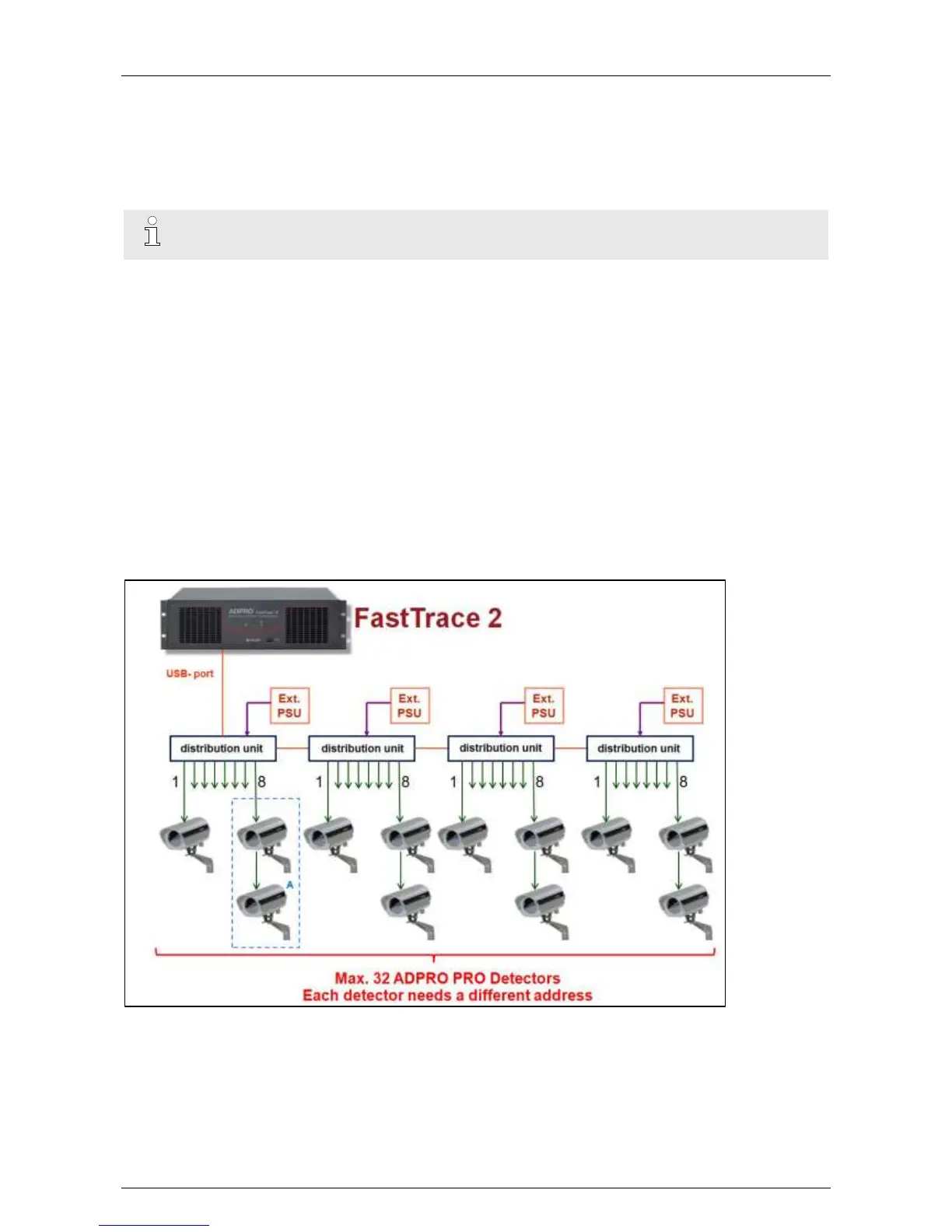
The USB to RS-485 distribution unit provides 8 channels (1 PIR unit per channel) to easily connect and
configure the PIR units to the server.
For more information, see technical datasheet 19532060 on the USB to RS-485 8-channel distribution unit.
Up to 8 PIRs can be connected through star wiring to the USB to RS-485 distribution unit. Only the 485
bidirectional communication of the PIRs is used, we do not use the mechanical PIR tampers. It is possible to
connect 4 distribution units in cascade (= only one of the 4 distribution units needs to be connected to the
server, but the cables between the other units shall not exceed 1 metre), so the server supports a maximum
of 32 PIR devices.
The distribution unit contains a USB connection port for communication with the server. Connect it to the
dev/ttyU2 USB port on the server. Do not use any other ports. Keep the USB cable between distribution unit
and server as short as possible (max. 1 metre).
Restart the XOa client software after connecting the PIR to the USB port.



 To Next Page