88
Genos2 Owner’s Manual
Displaying Lyrics of the MIDI Song
When the selected Song contains lyric data, you can view it on the instrument’s display during playback.
1 Select a MIDI Song (page78).
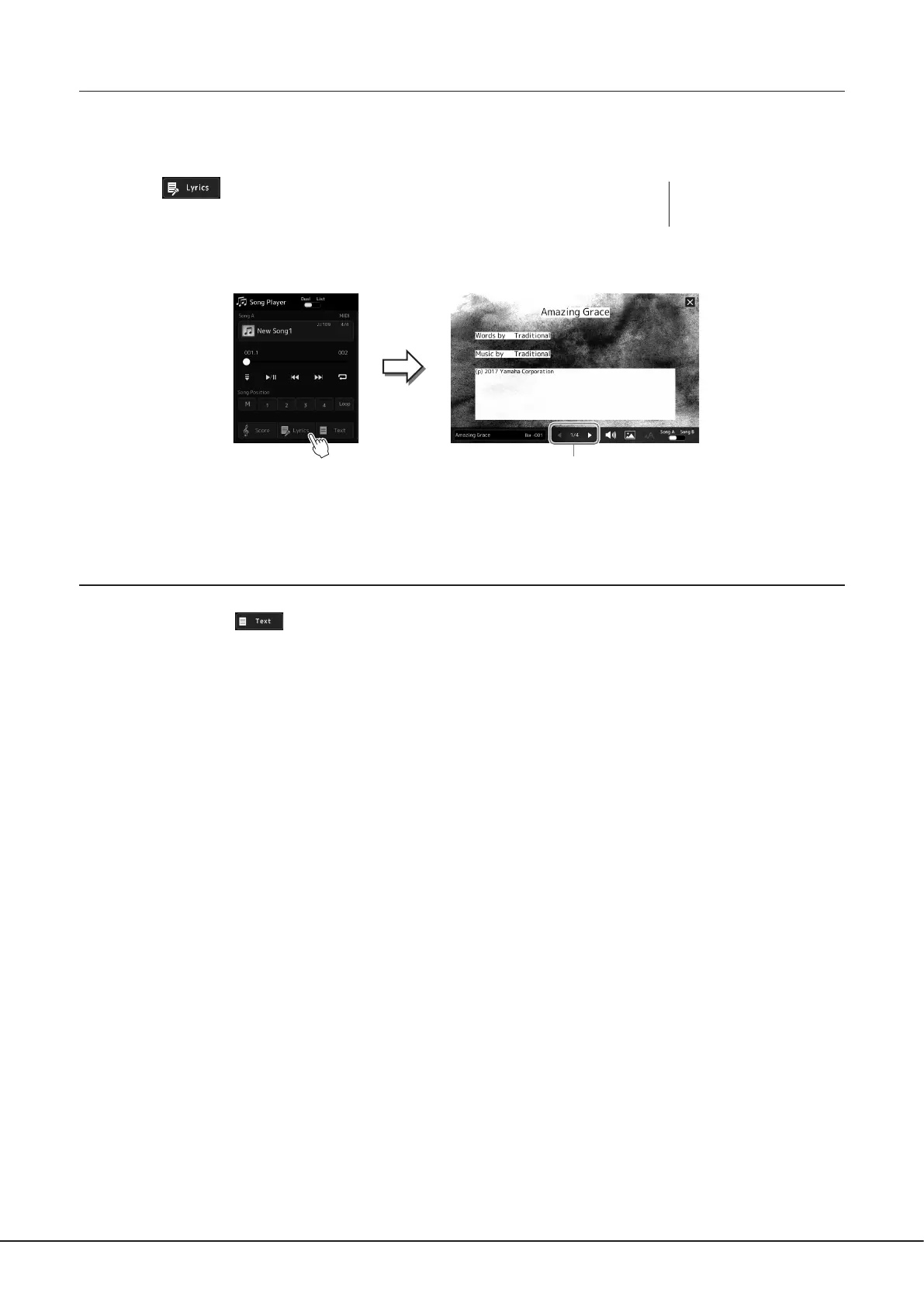
2 Touch (Lyrics) on the Song Playback display to call up the Lyrics
display.
When the Song data contains lyrics data, the lyrics are shown on the display. You can look
through the entire lyrics by touching [L] or [R] when Song playback is stopped. While the
Song is playing back, the color of the lyrics changes, indicating the current position.
For details on the Lyrics display, refer to the Reference Manual on the website.
Displaying Text
Regardless of whether a Song is selected or not, you can view computer-created text les (.txt) on the instrument’s display. To
call up the display, touch
(Text) on the Song Playback display. This feature enables various useful possibilities, such as
the showing of lyrics, chord charts and performance notes. For details on the Text display, refer to the Reference Manual on the
website.
NOTE
You can call up the Score display
as well, via [MENU] à [Lyrics].
For changing the page.


 To Next Page