6-6
Start-up
61211-1020202 CenterMax Operating Instructions
For more information, please see the following pages.
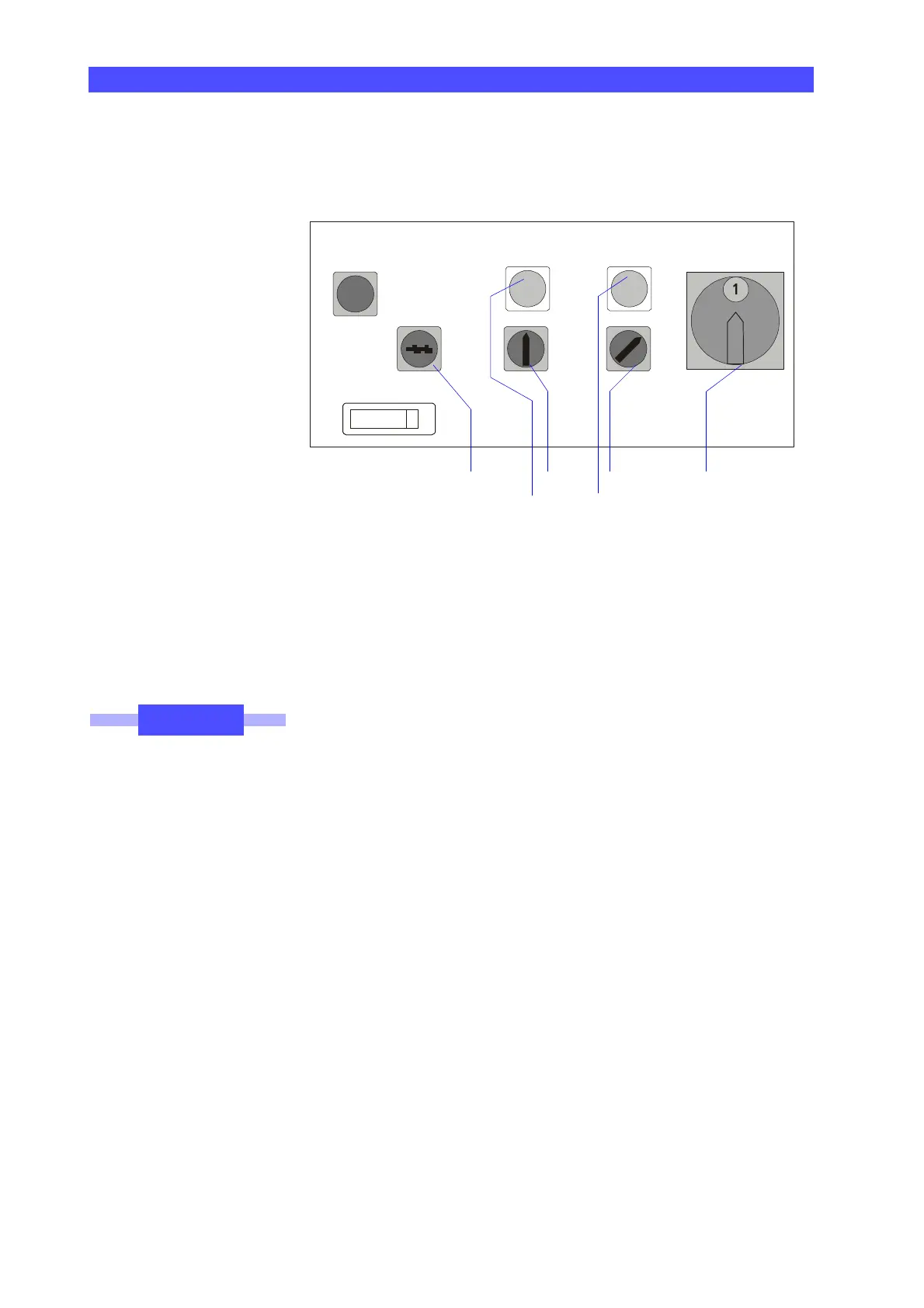
1 Main switch for power supply
2 Rotary switch for the control
3 Indicator lamp for control; green
4 Rotary switch for drives
5 Indicator lamp for drives; green
6 Key-operated switch for operating modes
For more information on the operating elements, please refer to the
chapter ➤“Operating elements of the control cabinet” on page 2-8.
Connecting the power supply
• Turn the main switch (1) clockwise to position "1“.
The power supply for all electronic components of the CMM is
switched on.
Switching the control on
• Turn the rotary switch (2) to the "ON" position.
The indicator lamp above the switch lights up. The control is
switched on.
Wait for 30s • Wait for approx. 30s before switching the drives on.
This is necessary since the internal computer requires a certain
amount of time for booting. The booting process must be termi-
nated before the drives are switched on. The LEDs on the control
panel flash during the booting process.
0125853
h
SCHNELLSTOP
quickstop mode - switch
BETRIEBSARTEN
drives
ANTRIEBE
AUS
EIN
START
start
MA
N
AUTO
0
mains / control
NETZ/STEUERUNG
main - switch
HAUPTSCHALTER
on
off
53
1642
NOTE











 To Next Page