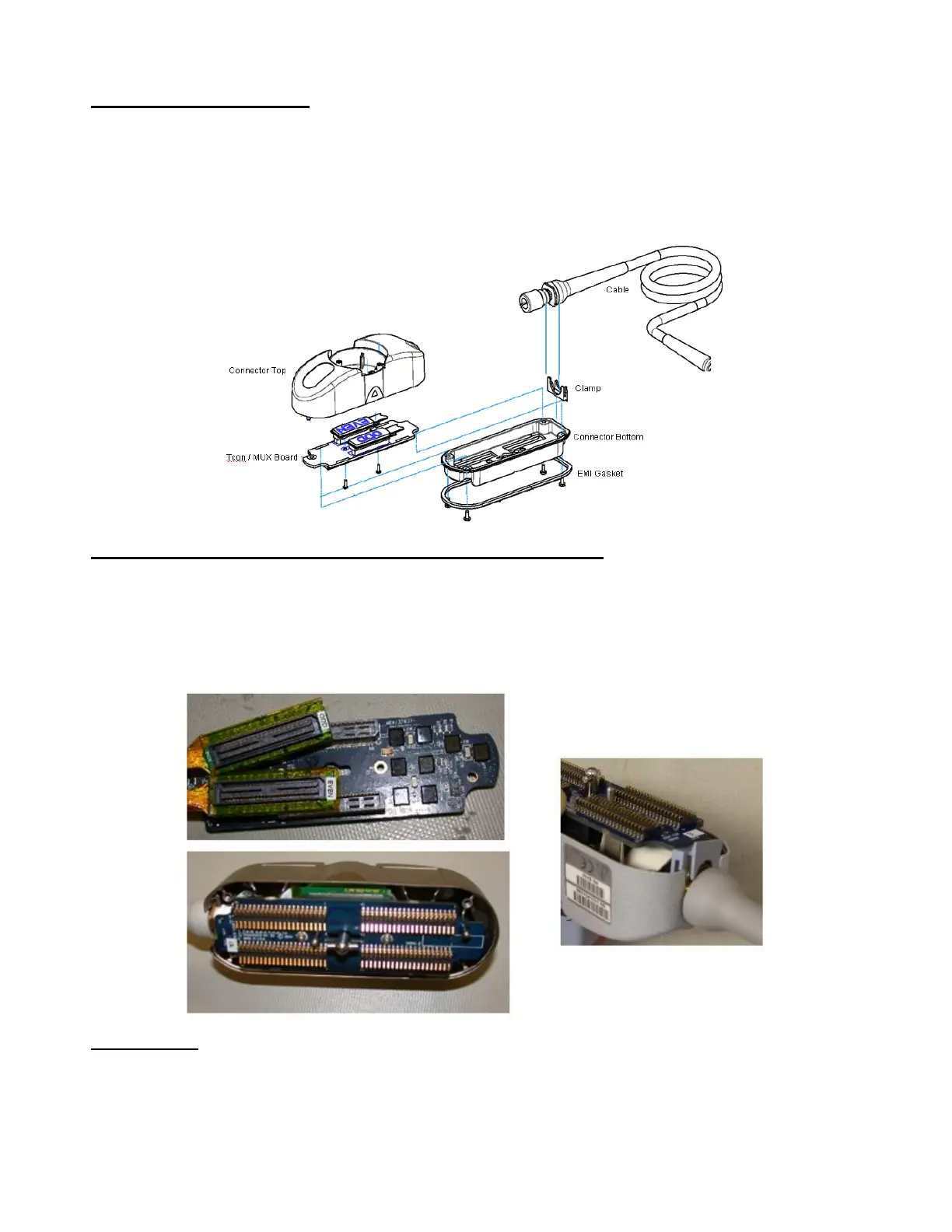
Connector Disassembly:
1. Remove four Phillips-head screws that retain connector bottom to connector top housing
2. Remove connector bottom from housing
3. Remove two Phillips-head screws that retain T-CON/MUX board to housing
4. Disconnect MUX even and odd connectors from T-CON/MUX board
5. Remove old T-CON/MUX board
T-CON/MUX Board Installation – Connector Re-Assembly:
1. Connect MUX Even and Odd connector to mating sockets on replacement T-CON/MUX board
2. Position T-CON/MUX board over alignment pin and into position for mounting
3. Install two Phillips-head mounting screws, and tighten
4. Position plastic cable clamp into proper orientation (as shown in illustration)
5. Re-install connector bottom to connector top housing, and secure using four Phillips-head screws
Verification:
1. Attach transducer to system and verify proper operation in all modes


 To Next Page