1.
Check to ensure all peripherals, software level, and serial numbers correspond with sales
order. Make note of any missing items or discrepancies, and immediately report to
ZONARE.
WARNING
To prevent possible damage to the electronics of the system from condensation, the following
warning must be observed:
If the system has been subjected to an environment during shipping/transport that differs greatly
in temperature and/or humidity, from the environment where it has been moved for
installation/intended operation, the unit should be allowed to stand for a period of no less than
30 minutes prior to powering on.
NOTE:
The Module will normally come already installed in the cart when shipped. However if the Module is removed
for any reason, refer to section 17 of this manual for installation instructions.
WARNING
To maintain the integrity of the electronic equipment within the z.one
pro
ultrasound system, it is
critically important that a specific sequence be followed at all times, for turning ON or OFF
system power. The sequences listed below should always be followed.
z.one
pro
System Verification
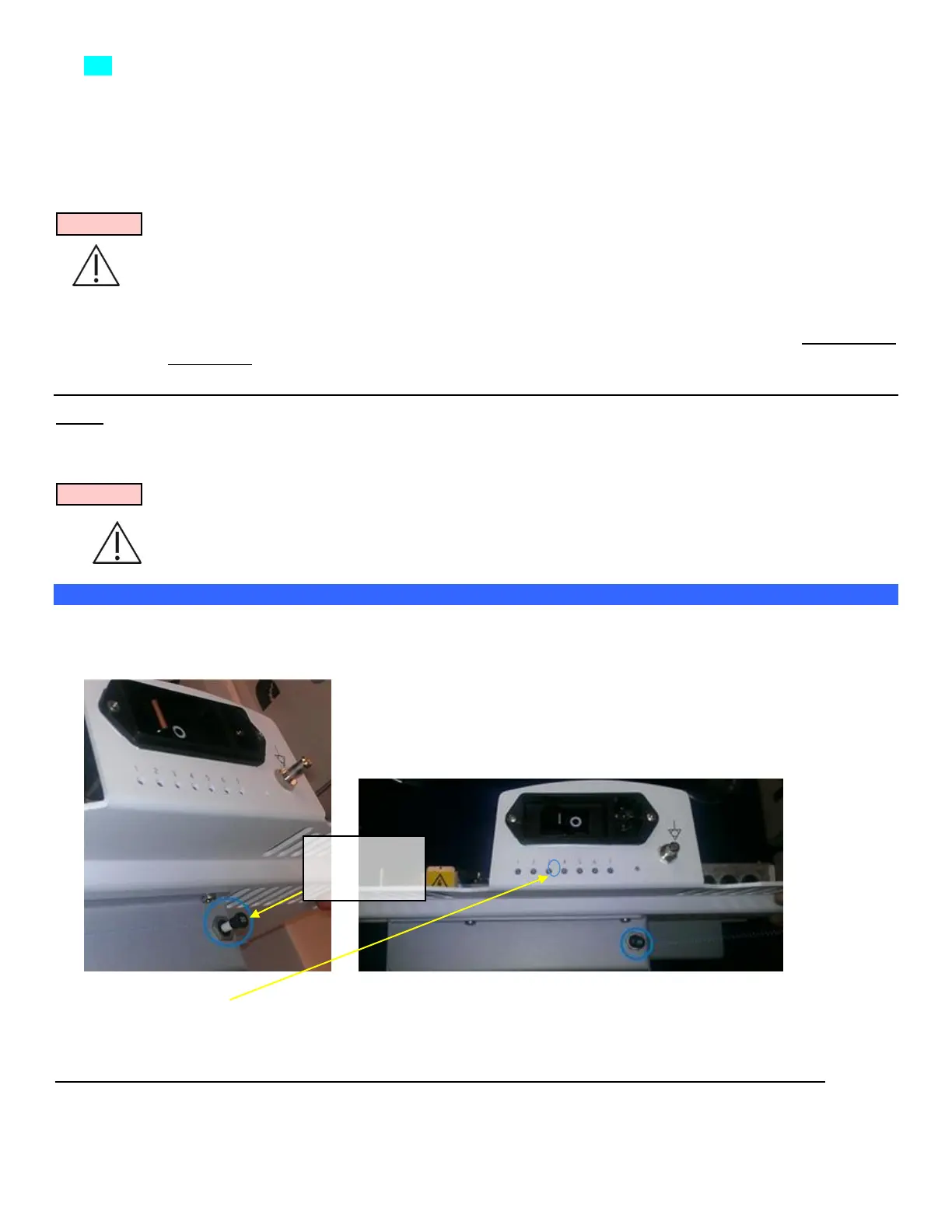
1. If the Z-PAK battery pack option is installed, the circuit breaker should come engaged (pressed in) from the
factory. If it is not, the circuit breaker can be closed by ‘gently’ pushing the plunger straight into the pack.
When the breaker is closed, the white ring around the plunger is not visible.
LED#3 will flash indicating the Cart Power microcontroller is operating.



 To Next Page