Troubleshooting
TRANSDUCER PROBLEMS
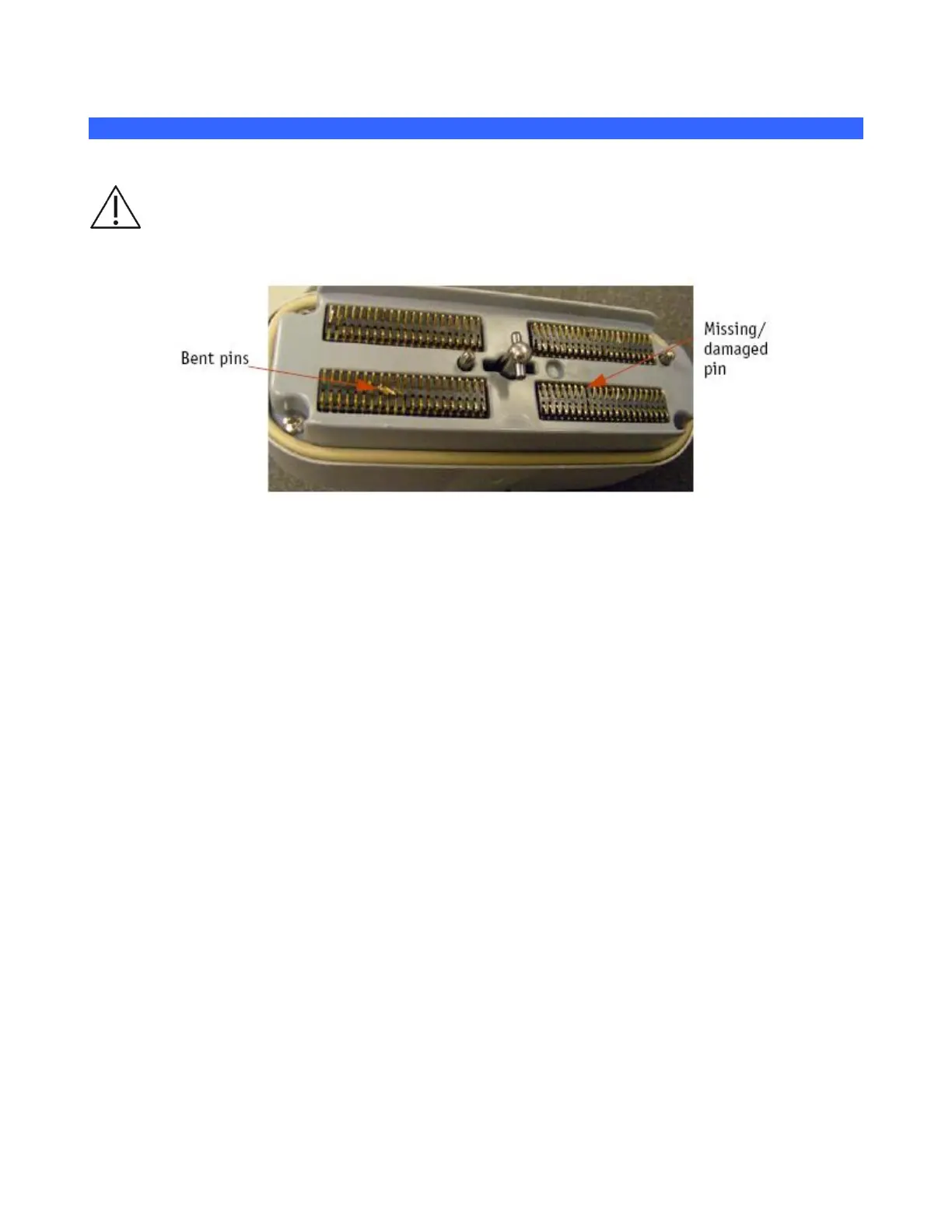
Caution: Bent, broken, or missing pins on the transducer connector may cause poor image quality,
including possible mirror image artifact. Be sure to check pins before connecting transducer to the
ZONARE ultrasound system. If pins are bent, broken, or missing, do not use the transducer and call
ZONARE Technical Support.
Figure 14: Transducer Connector Pin Damage – (Example)
Inspection of Transducers
1. Routinely inspect transducers for the following problems.
Signs of wear or damage to the housing, cable, etc.
Cracks in case or transducer face
Cuts or gouges on any part of the transducer, including transducer face, case, cable, and
connector
Buckling or bulging of the lens material on the transducer face
Damage to the transducer connector, including bent, broken, deformed, or missing pins
2. Immediately replace a transducer that exhibits any of the above damage symptoms
16.1.1 POWER-ON PROBLEMS
System fails to power on
1. Ensure that the AC power is connected to a wall outlet.
2. Ensure the AC power cord is fully seated in the socket on the rear of the cart.
3. Ensure that the circuit breaker (located in the lower-left of the rear panel) is pressed down in
the “1” (On) position.
4. With active AC power applied, verify that the LEDs located at bottom/rear of z.one
pro
system
are in the following condition:



 To Next Page