13 PERIPHERALS & ACCESSORIES
CD/DVD Drive
The system includes an internal CD/DVD burner that is used for exporting of ultrasound images. The
port for accessing the CD/DVD drive for insertion/removal of media is located just under the user
interface assembly.
13.1.1 MEDIA TYPES
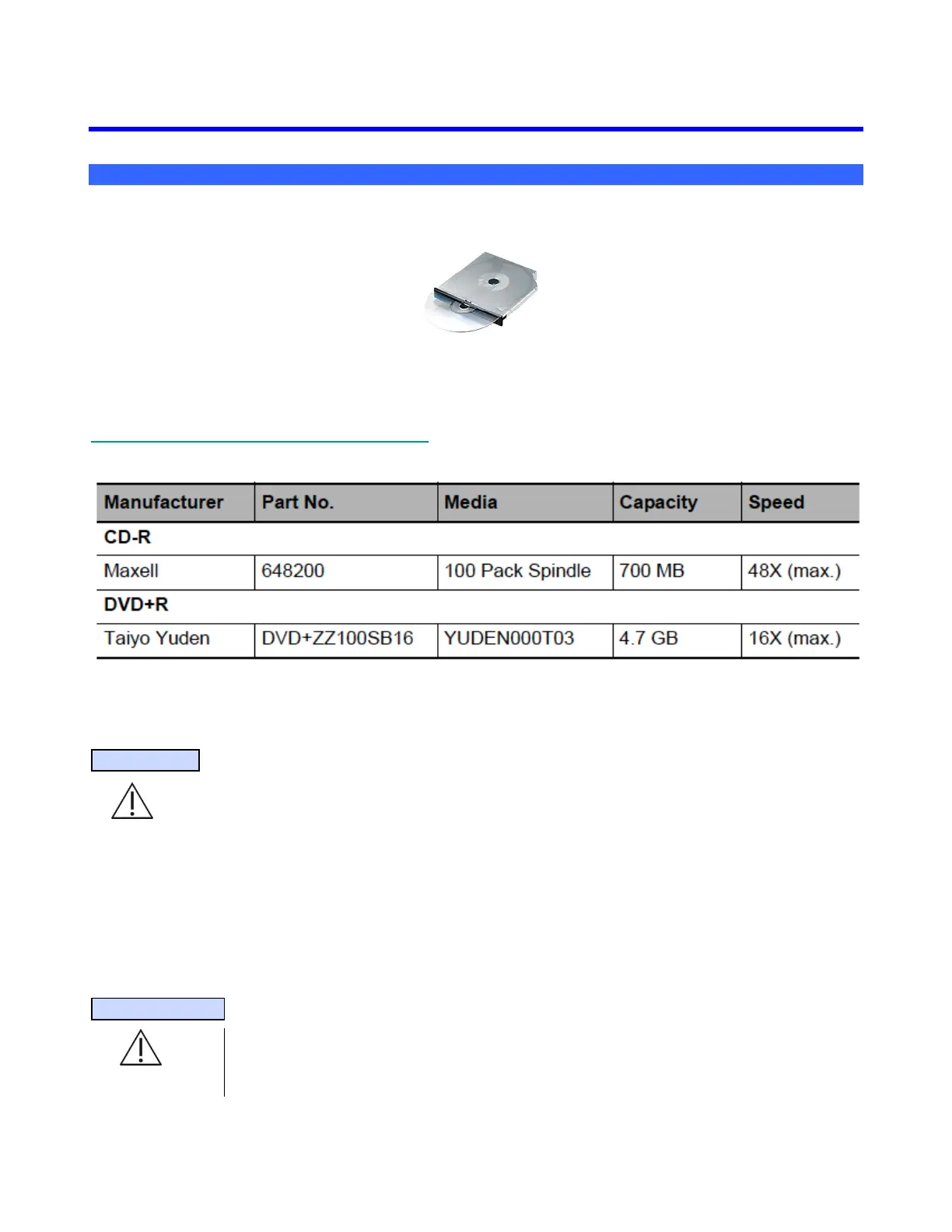
Wide variability in CD and DVD quality can prevent the system from reliably writing to and reading
from some commercially available discs. ZONARE has tested the CD and DVD products in Figure 13
and currently recommends their use. For up-to-date CD/DVD recommendations, go to
www.zonare.com/support/accessories/media/.
Figure 9: CD/DVD Part Numbers
IMPORTANT
For use of DVD media type for Exports, only one brand of DVD media has been tested and
approved to be compatible for use with the ZONARE system. The approved DVD media type is
Taiyo Yuden brand.
Before deleting any exam data from the system, always verify that the data was successfully
transferred to the CD/DVD by viewing it on an external reader/player.
When exams are exported onto the CD/DVD, a DICOM viewer program (Showcase) is simultaneously
exported onto the CD/DVD, allowing the exams to be opened, annotated, and saved in several formats
on most PCs.
SPECIAL NOTE
If an incompatible type of DVD/CD media is accidentally inserted into the system drive, it
will not be recognized by the system, and hence the “EJECT” function in the ARCHIVE
menu will not be active (it will be “grayed-out”).



 To Next Page