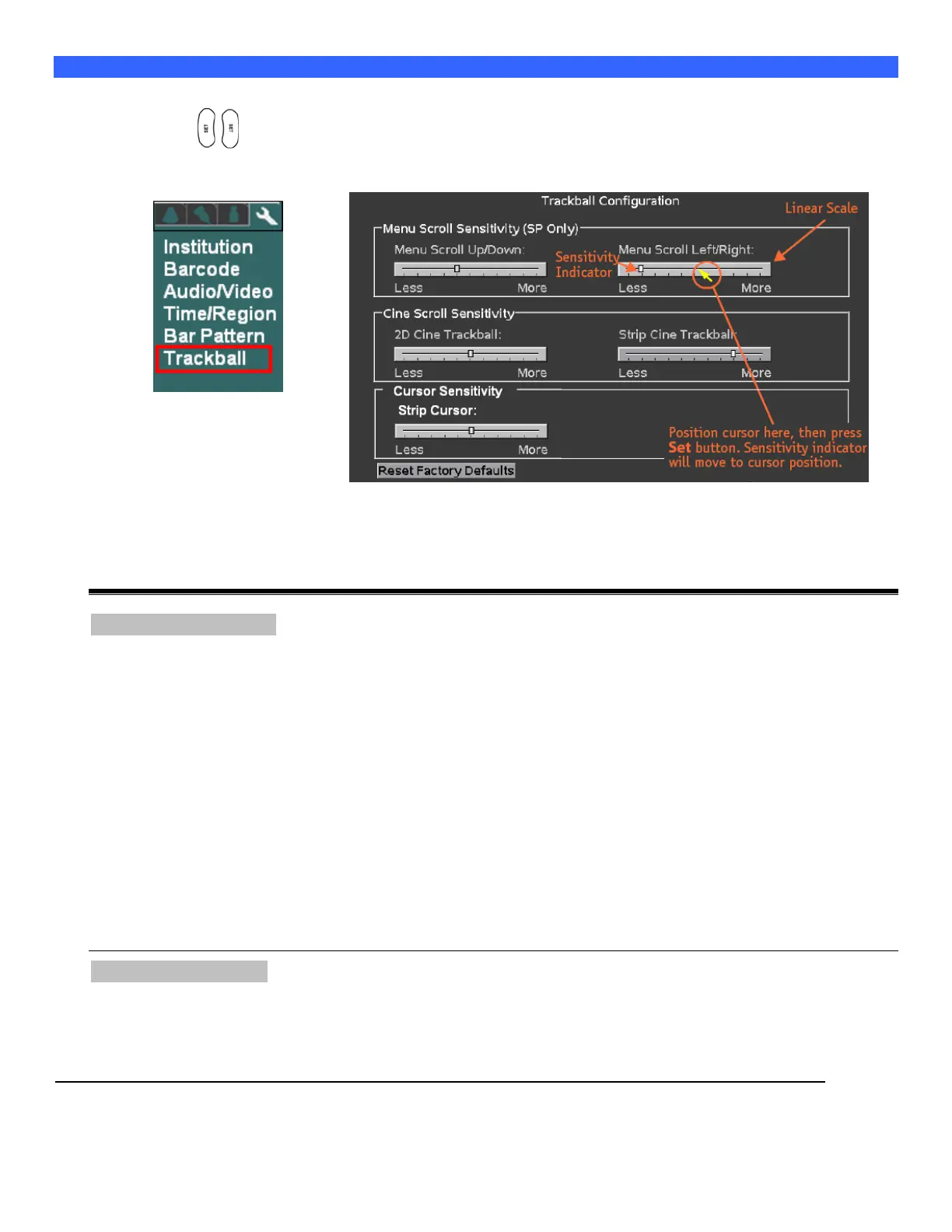
Entering “Trackball” Configuration
1. Within the Display selection, use the Menu Control to backlight Trackball selection, press one of the
SET keys to bring up this menu.
DISPLAY Sub-Menu TRACKBALL Sub-Menu
Cine Trackball Configuration:
This menu allows for configuring the behavior of the trackball to users preferences, independently for a
variety of Cine modes. The configurable usages are as listed below:
Menu Scroll Sensitivity
On the Cart, scrolling through menus and manipulating the settings for selected menu offerings can be
performed using the trackball.
The following two configurable options allow for customizing the sensitivity of the trackball response
during those menu operations on the Cart.
Menu Scroll Up/Down:
Description: Threshold for speed of trackball movement by User when moving up/down through
offered menu selections.
Menu Scroll Left/Right:
Description: Threshold for speed of trackball movement by User when moving in a left/right direction,
for altering the setting of a currently selected menu function.
Cine Scroll Sensitivity
2D Cine Trackball: (B-Mode or B-Mode/Color modes)
Description: Controls the number of frames that are advanced in response to each sweep of trackball
movement by the User.



 To Next Page