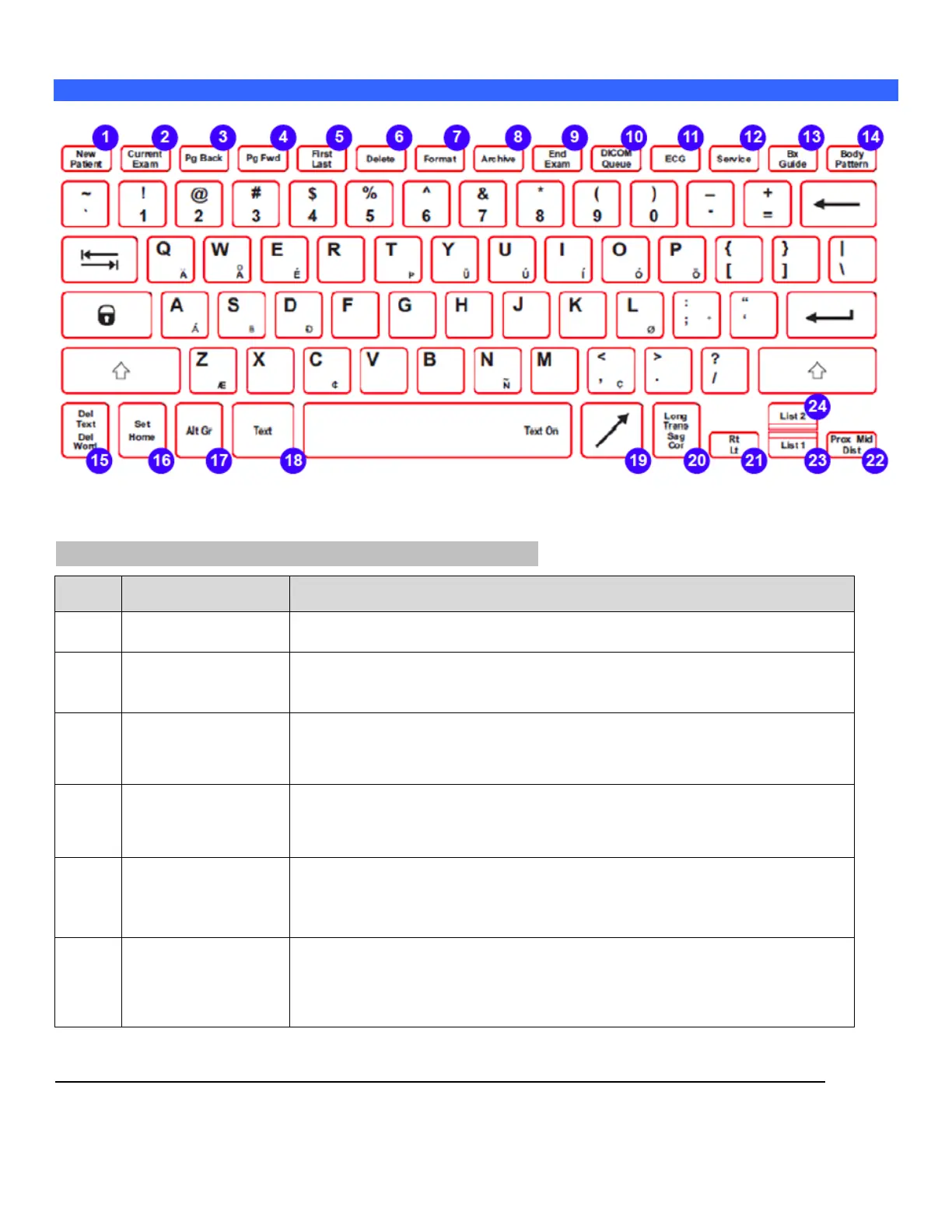
Keyboard Functions
Figure 2: z.one
pro
keyboard keys and function
KEYBOARD: SPECIAL FUNCTION CONTROLS
This is a toggle key. The first press will display the Patient Information page.
The second press will return to the imaging display.
If there is an exam in progress, pressing this key will display the in-progress
exam's images, most recently stored image displayed first. If there is no exam
in progress, pressing this key will have no effect.
This key only works when in in-progress exam review or archived exam review.
Pressing this key will display the previous image, or page of images if in a
multi-image display format. Once the first page is reached, the key press will
have no effect.
This key only works when in in-progress exam review or archived exam review.
Pressing this key will display the next image, or page of images if in a multi-
image display format. Once the last page is reached, the key press will have
no effect.
This key only works when in in-progress exam review or archived exam review.
Pressing this key will toggle between the first stored image (or first page of
images in a multi-image display format) and the last stored image (or last page
of images in a multi-image display format).
This key only works when in in-progress exam review or archived exam review.
When an image has been selected, pressing the Delete key will tag the image
for deletion by drawing a red X through it. If the selected image already has
been tagged for deletion (red X) pressing the Delete key will remove the red X,
untagging the image.



 To Next Page