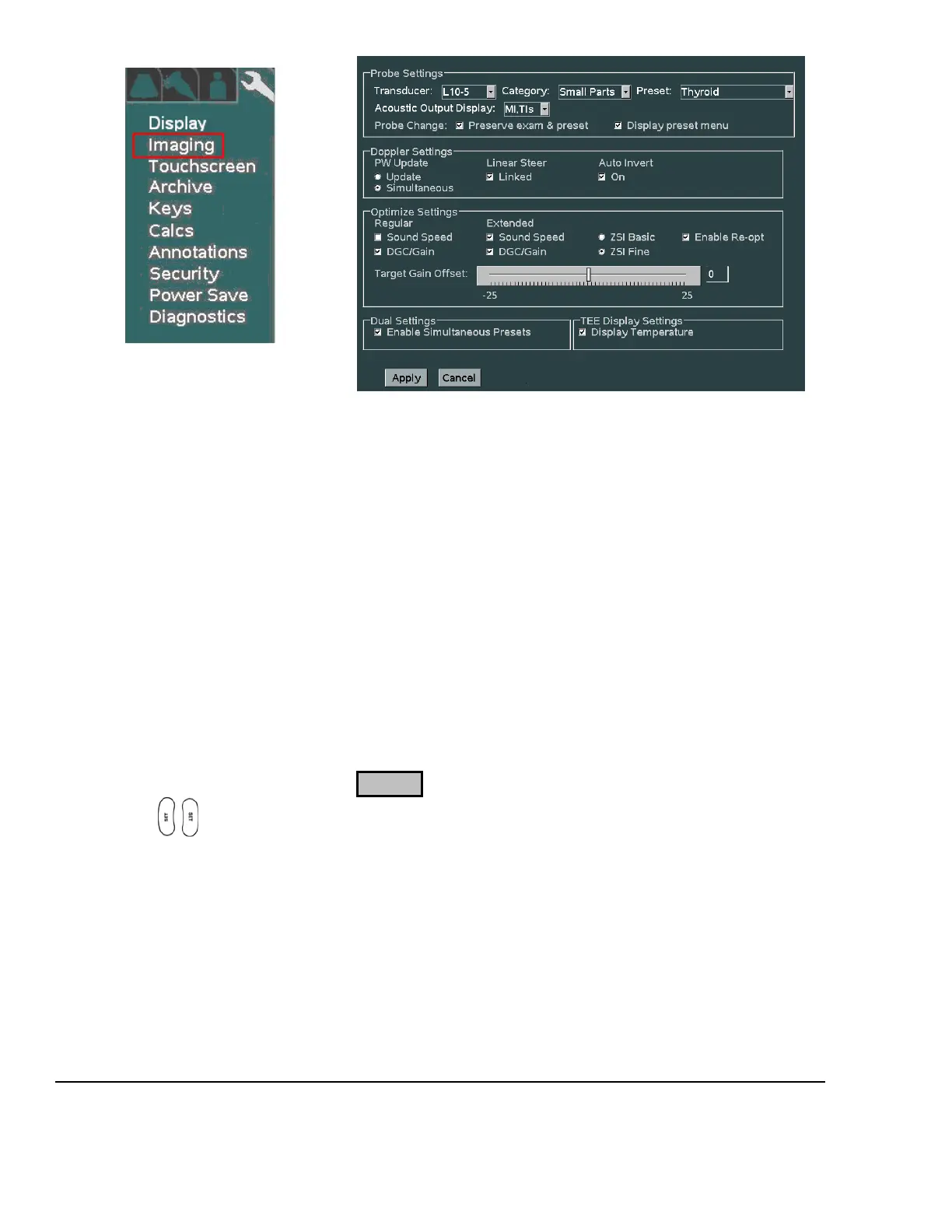
1. For each Transducer type in the pull-down menu, configure the power-up default application type and
preset type that are desired.
2. Select the desired behaviors to occur post transducer change:
Preserve Exam & Preset If checked, the system will retain the current Exam Type and Preset,
when transitioning to selection of a different active transducer.
If unchecked, the system will use the user assigned default Exam Type
and Preset for each subsequent transducer, as it is activated.
Display Preset Menu If checked, the OLED display panel will default to showing Exam
Preset options in the windows, upon a transducer change.
If unchecked, the OLED display panel will default to showing
transducer selection options in the windows, upon a transducer change
3. Select the desired default Doppler settings.
4. Select the desired default Auto-Opt/ZST settings
5. Select the desired “DUAL” mode preset behavior setting
6. Select whether TEE temperature sensor reading is desired for on-screen display
7. Place the arrow cursor over the APPLY soft-button displayed in this menu, and press one of the SET
keys to save new settings.
8. Repeat the process above for all additional transducer types.



 To Next Page