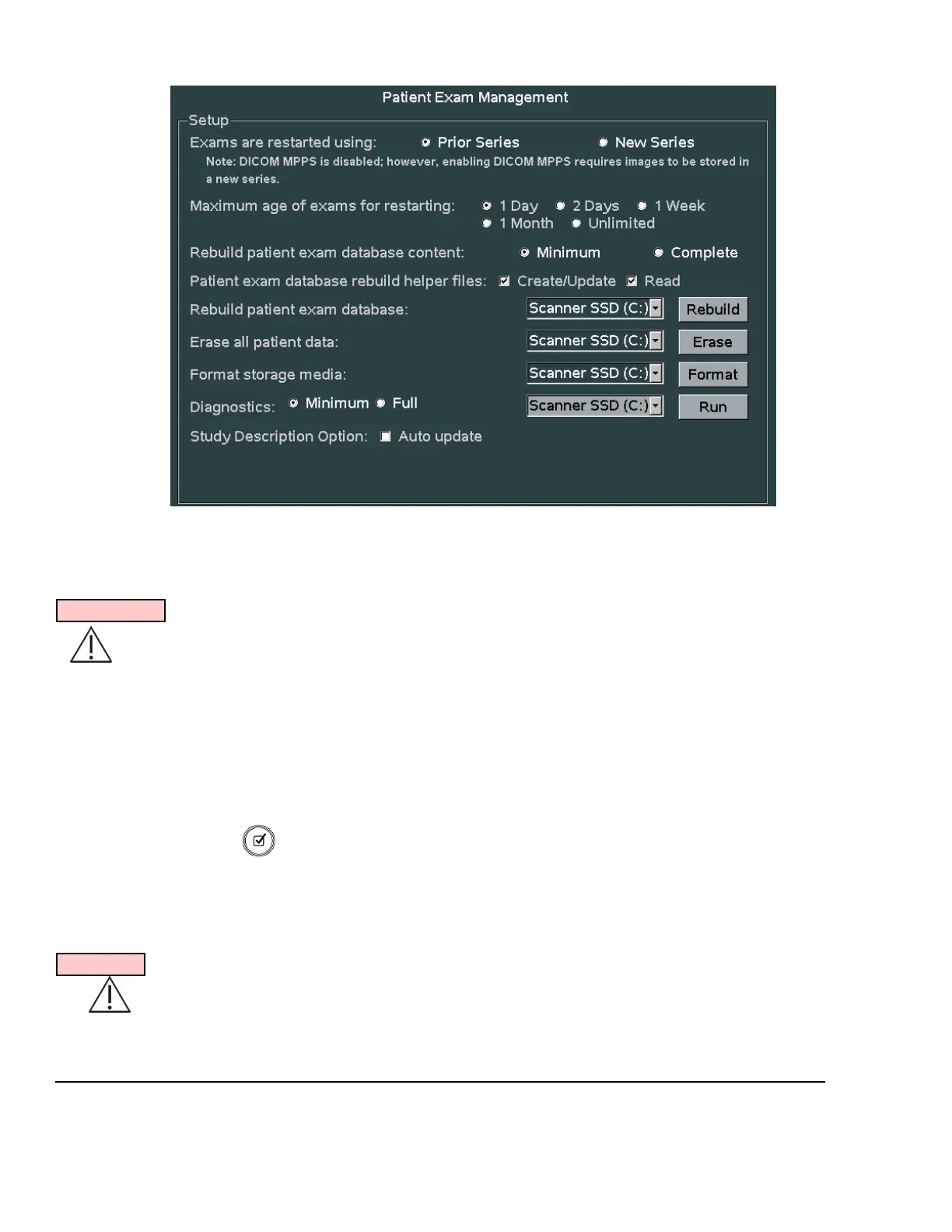
EXAM MGMT Sub-Menu
.
3. Configure the “Exams are Restarted Using” selection to reflect the desired grouping of images upon
restarting of a previous exam on the Customer’s system.
Prior Series: Appends new images onto the series of images previously captured.
IMPORTANT
“Prior Series” selection is NOT available (“New Series” only) if the system has an active DICOM MPPS
server enabled on the DICOM MPPS configuration page.
New Series: Creates a new series of images, utilizing only the Patient info from
the earlier exam series.
4. Configure how many days prior to the current date that the Users will be allowed to “RESTART”
(add/delete images) internally archived patient exams.
5. Select the granularity desired when initiating patient exam database rebuild operations.
6. Using the Menu Control, arrow down to backlight Apply selection in the main menu, and press the
SELECT button to save any exam “RESTART” configuration setup changes, and exit
--------------------------------------------------------------------------------------------------------------------------
ARCHIVE SERVICE FUNCTIONS:
WARNING
Due to the deletion of the original (assumed corrupted) database file during the “REBUILD PATIENT
EXAM DATABASE” process, it should be noted that Patient information updates made to initially
started exams (i.e. changing Patient name info, etc, after the first image for a study has already been



 To Next Page