CELL-DYN
®
3200 System Operator’s Manual
9-25
9140181K—July 2002
Section 9 Service and Maintenance
Diluent/Sheath Filter Replacement Procedure
The Diluent/Sheath Filter is located on the front panel to the left of waste chamber
#3. Replace the filter once a month, or whenever contamination is suspected. A
sign of contamination is usually manifested by high platelet background, poorly
defined PLT-RBC (0°/10°) scatterplot, excessive WBC flagging, or erroneous
5-part differential results. Refer to the Troubleshooting Guide for more details.
Materials Required
1. Diluent/Sheath Filter List Number 06H92-01
2. Paper Towel
3. Hemostat
4. Gloves, Safety Glasses, Lab Coat
Procedure
1. If the instrument is not in the STANDBY mode, then press [SPECIAL
PROTOCOLS], followed by [DAILY SHUTDOWN]. If the instrument is already
in STANDBY mode, then proceed to
Step
2.
2. Turn the power switch OFF.
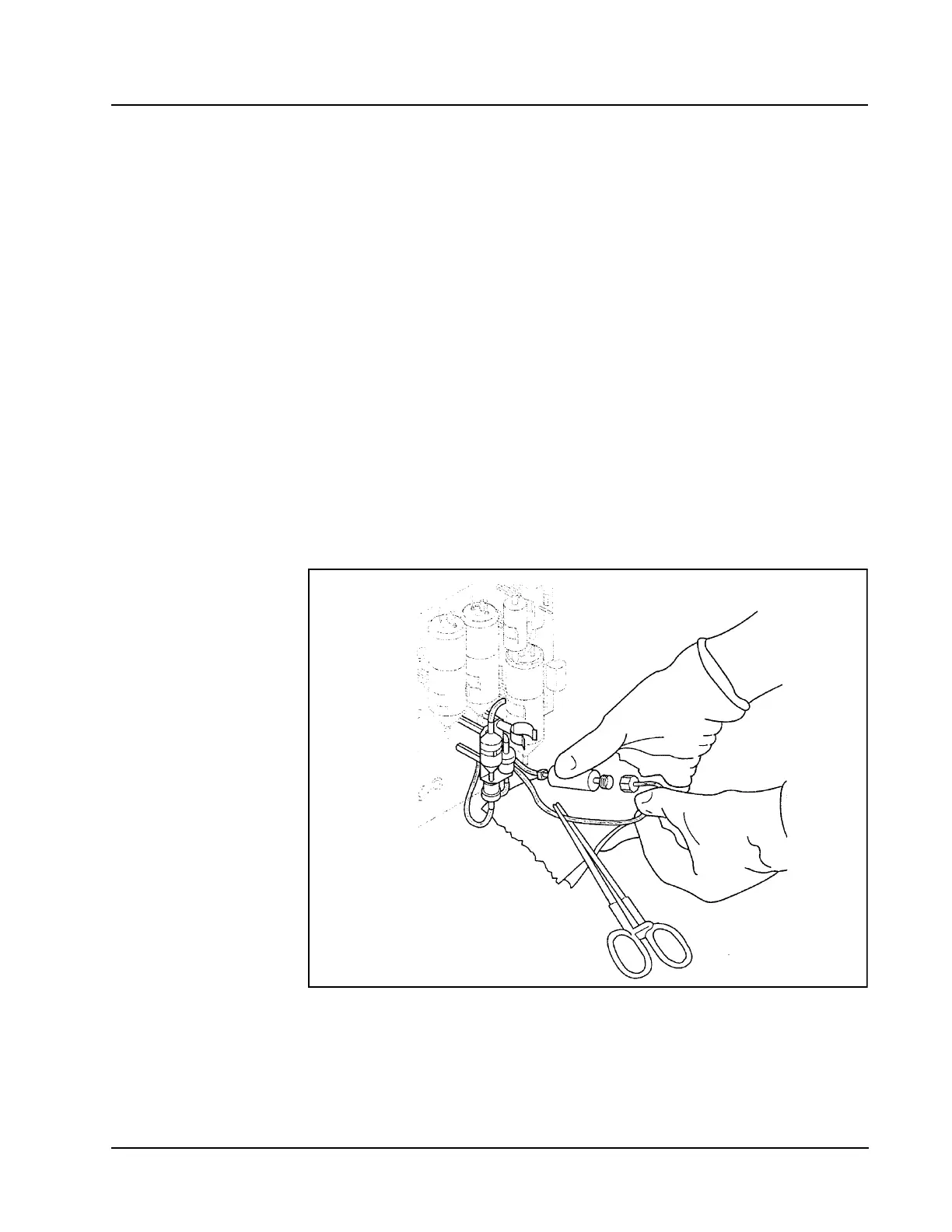
3. Locate the Diluent/Sheath Filter on the front panel. Refer to Figure 9.9.
Figure 9.9 Replacing the Diluent/Sheath Filter
4. Remove lower left section cover for easier access.
5. Remove the Diluent/Sheath Filter from its spring clip.



 To Next Page