Chap. I - Multi-Diag Scope Basic User’s Manual
Scope_manual_en-v110.docx — 32 —
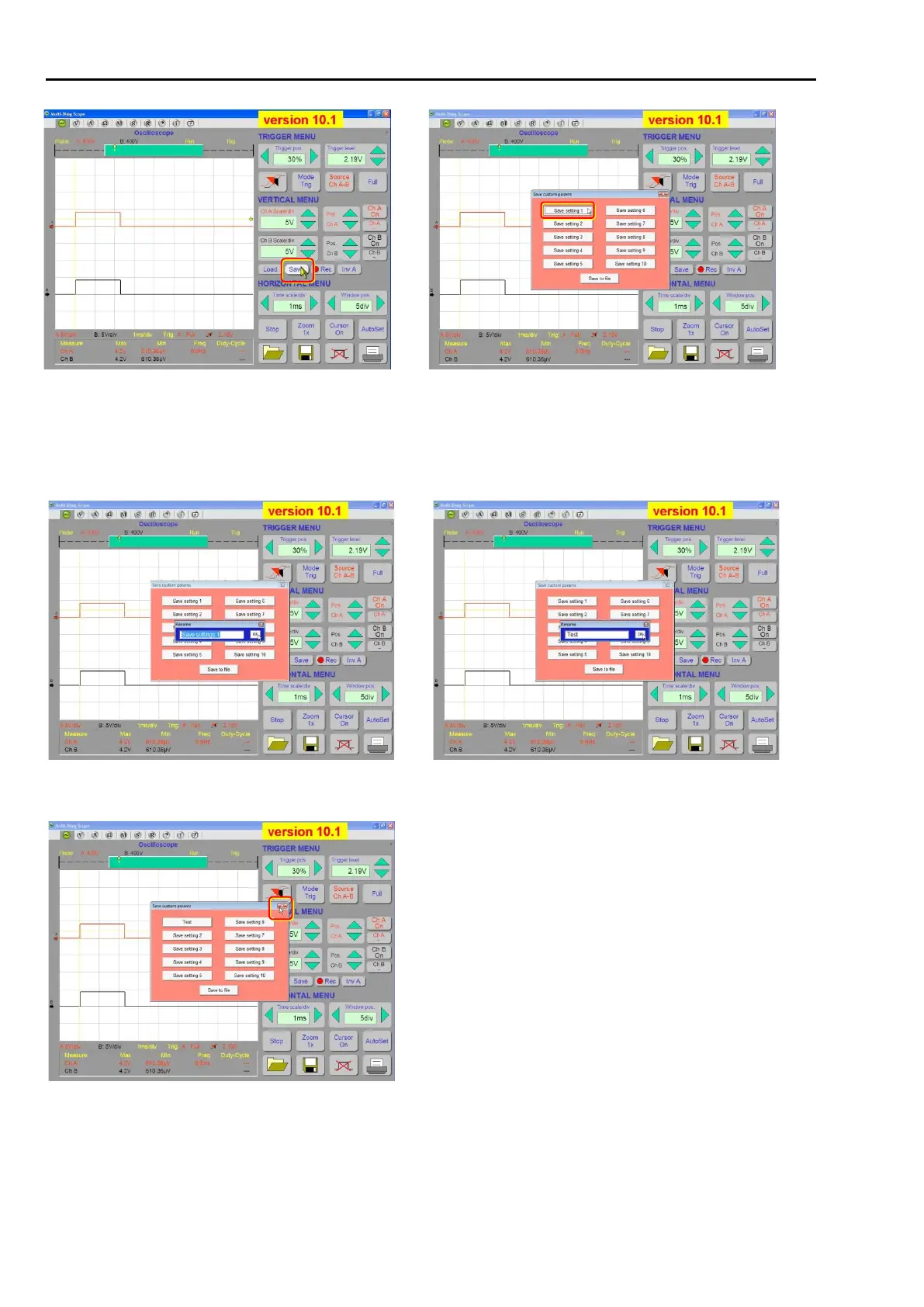
Fig. 70 – Saving the oscilloscope user setup
Fig. 71 – Choose one of the ten positions for saving the setup or
click the right mouse button to rename it
You can rename the original setup name by right-clicking the relevant button (see Fig. 71). the setup
in a newly opened window (see Fig. 72 – max. 20 characters, including spaces) and then confirm the
change by pressing the <OK> button (see Fig. 73). Click the cross to close the window (see Fig. 74).
Fig. 72 – You can rename the current setup by clicking the right
mouse button (maximum 20 characters, including spaces)
Fig. 73 – After you rename the setup (e.g. Test), confirm the change
by clicking the <OK> button
Click the cross to close the window.
Fig. 74 – Click the cross to close the window
Permanent – to file
If you select this option, you can save the oscilloscope setup into a file (.oss) on storage media (Hard-
Disk, Flash-Disk, etc.) - see Fig. 75 and Fig. 76.



 To Next Page