EasyManua.ls Logo

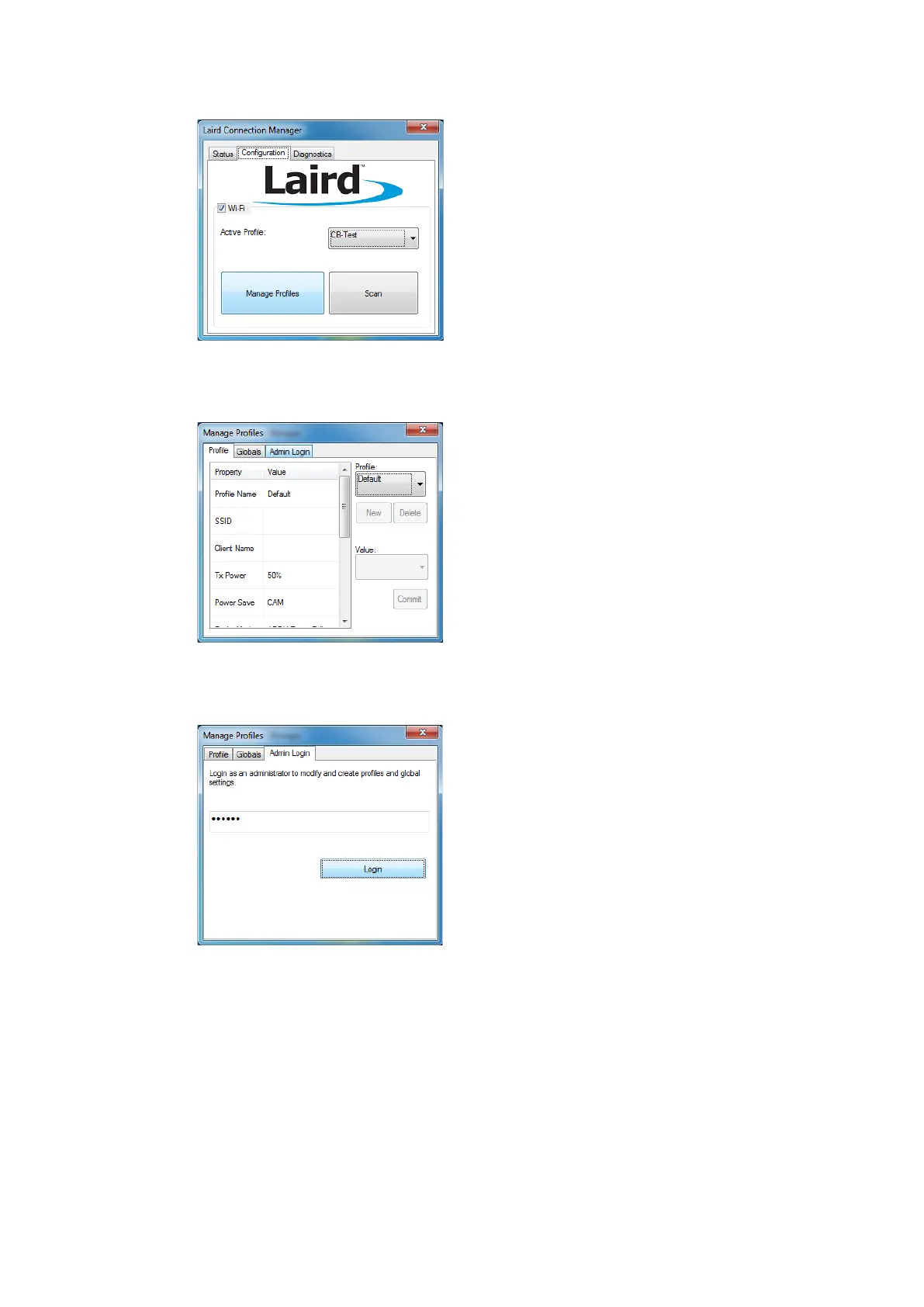
Advantech-DLoG DLT-V8312 - Fig. 11.31: LCM Configuration Tab with the Manage Profiles Button; Fig. 11.32: LCM Manage Profiles Dialog Box with the Admin Login Tab; Fig. 11.33: Entering the LCM Password: SUMMIT

Default Icon
157 pages
Print Icon
To Next Page IconTo Next Page
To Previous Page IconTo Previous Page
Loading...
WLAN configuration
102 / 157 DLT-V83 Operating Instructions V2.00
Click on Manage Profiles.
Fig. 11.31: LCM Configuration tab with the Manage Profiles button
Click the Admin Login tab.
Fig. 11.32: LCM Manage Profiles dialog box with the Admin Login tab
Default password: SUMMIT
(Must be entered in upper-case characters.)
Fig. 11.33: Entering the LCM password: SUMMIT

Table of Contents

Other manuals for Advantech-DLoG DLT-V8312

Related product manuals