Getting Started Set Up Your Phone 10
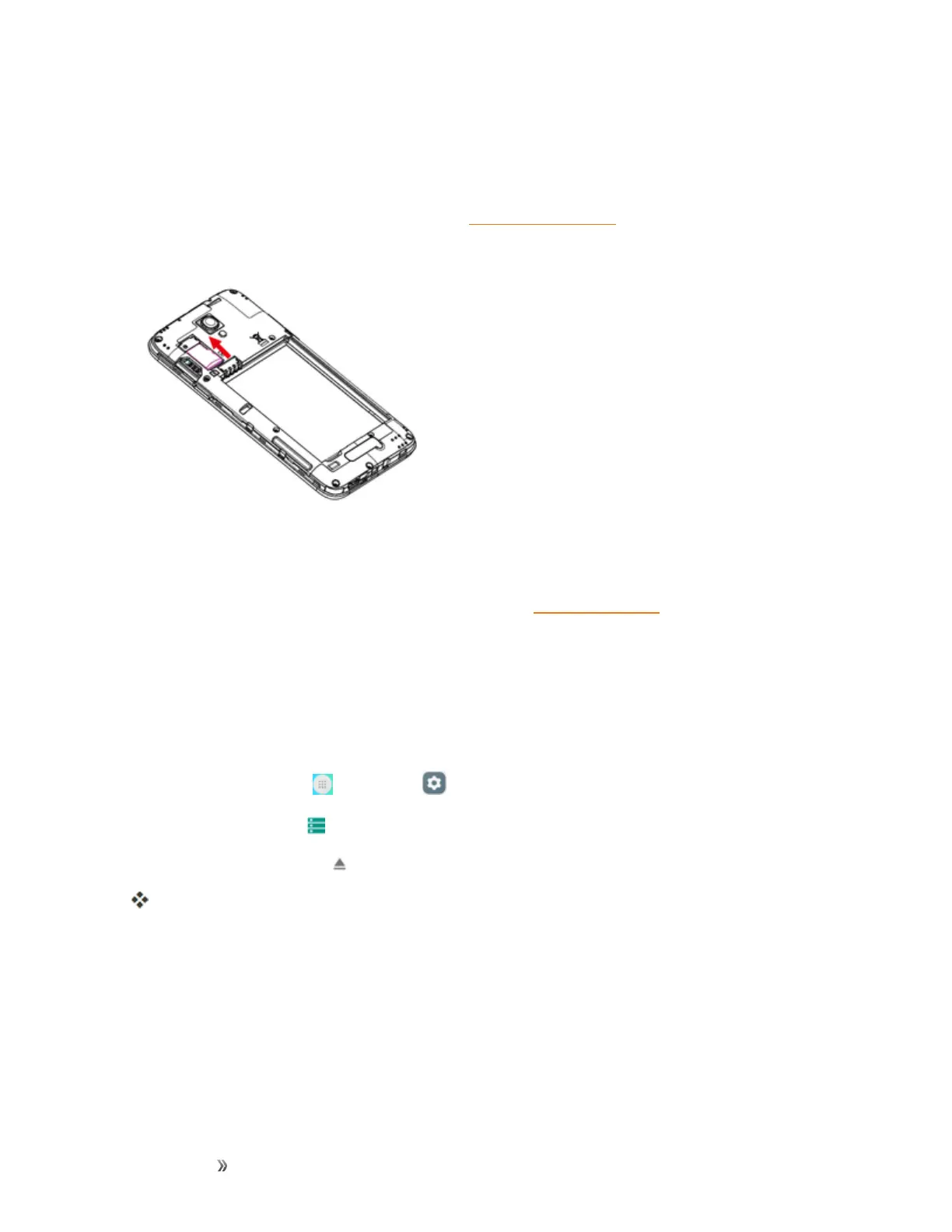
Insert an SD Card
FollowthesestepstoinsertanoptionalSDcard(notincluded).Makesuretopoweryourphoneoff
beforeinsertingorremovinganSDcard.
1. Removethebatterycoverandbattery.(SeeRemovetheBattery.)
2. InsertSDcard.
l InsertSDcardallthewaygentlywithoutbendingandwithterminalsfacingdown.
l InsertonlySDcards.
3. Insertthebatteryandreplacethebatterycover.(SeeInserttheBattery.)
l Alignthecontactsofthebatterywiththecontactsinthephone.
l Makesureallthetabsaresecureandtherearenogapsaroundthecover.
Unmount an SD Card
AlwaysunmountanSDcardbeforeremovingitfromyourphone.
1.
Fromhome,tapApps >Settings .
2.
TapStorage & USB .
3.
TapUnmountSD Card >OK.
ThemenuoptionnamechangesfromUnmount SD CardtoMount SD Card.Thecardis
nowunmounted.
Remove an SD Card
FollowtheseinstructionstoremoveanSDcard.Alwayspowerthephoneoffbeforeinsertingor
removinganSDcard.













 To Next Page