Settings System Settings 181
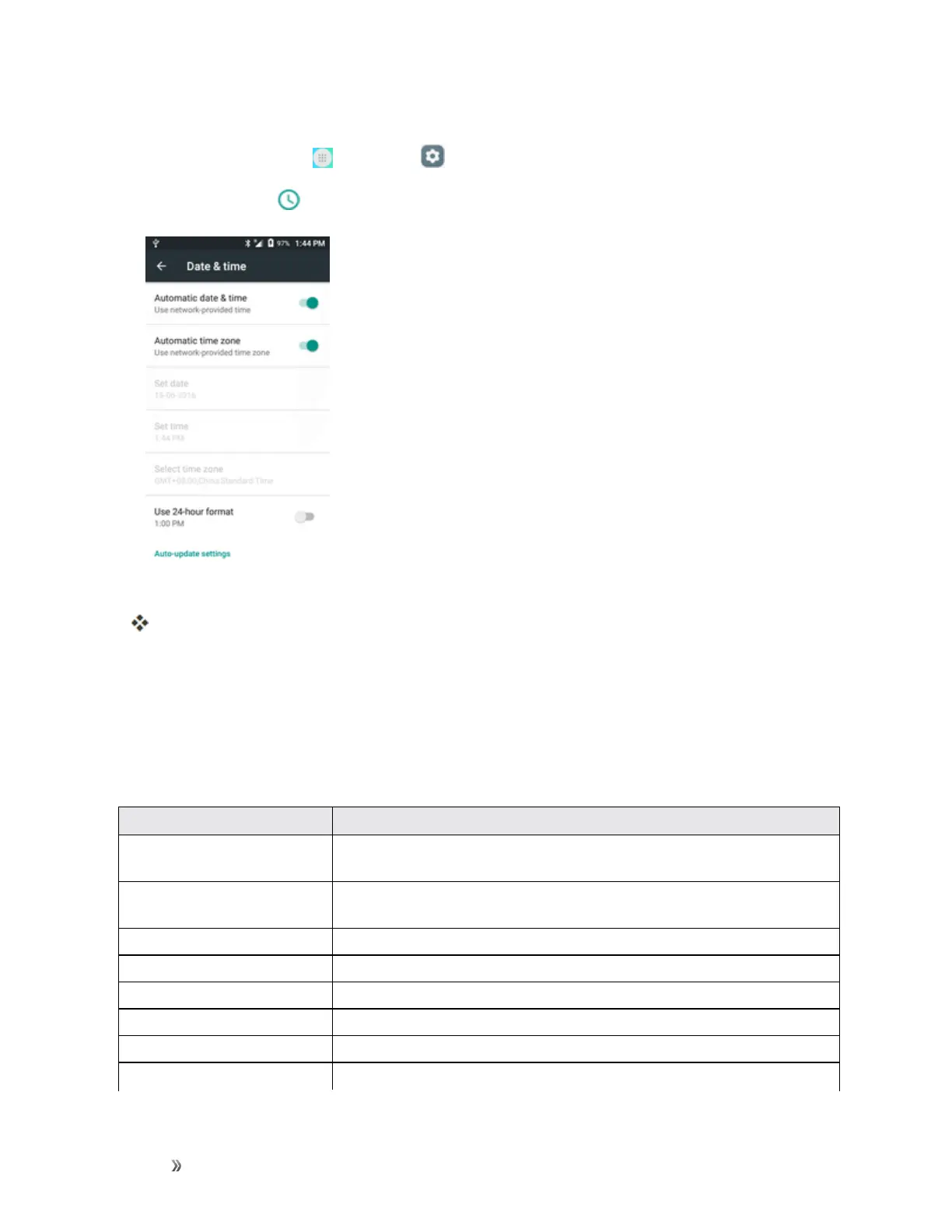
Access Date and Time Options
1.
Fromhome,tapApps >Settings .
2.
Tap Date & time .
3. Setavailabledateandtimeoptions.
Yourdateandtimesettingsareappliedandsaved.
Accessibility Settings
Theaccessibilitymenuletsyouenableandmanageaccessibility-relatedapplications.
Accessibility Settings Overview
Thefollowingaccessibilityoptionsmaybeconfigured:
Accessibility Option Description
TalkBack WhenTalkbackison,yourdeviceprovidesspokenfeedbacktohelpblind
andlow-visionusers.
Switch access Switchaccessallowsyoutocontrolyourdeviceusingconfigurablekey
combinations.
Captions Taptosetcaptionssettings.
Magnification gestures Taptoturnon/offtheMagnificationgestures.
Large text Markthecheckboxtoenlargethescreentext.
High contrast text Markthecheckboxtoenablehighcontrasttext.
Power button ends call Markthecheckboxtoenablethisfunction.
Auto-rotate screen Setthescreentorotateautomaticallywhenthephoneisrotated.













 To Next Page