Making Connections Contacts 80
YouwillseetheContactslist.
2.
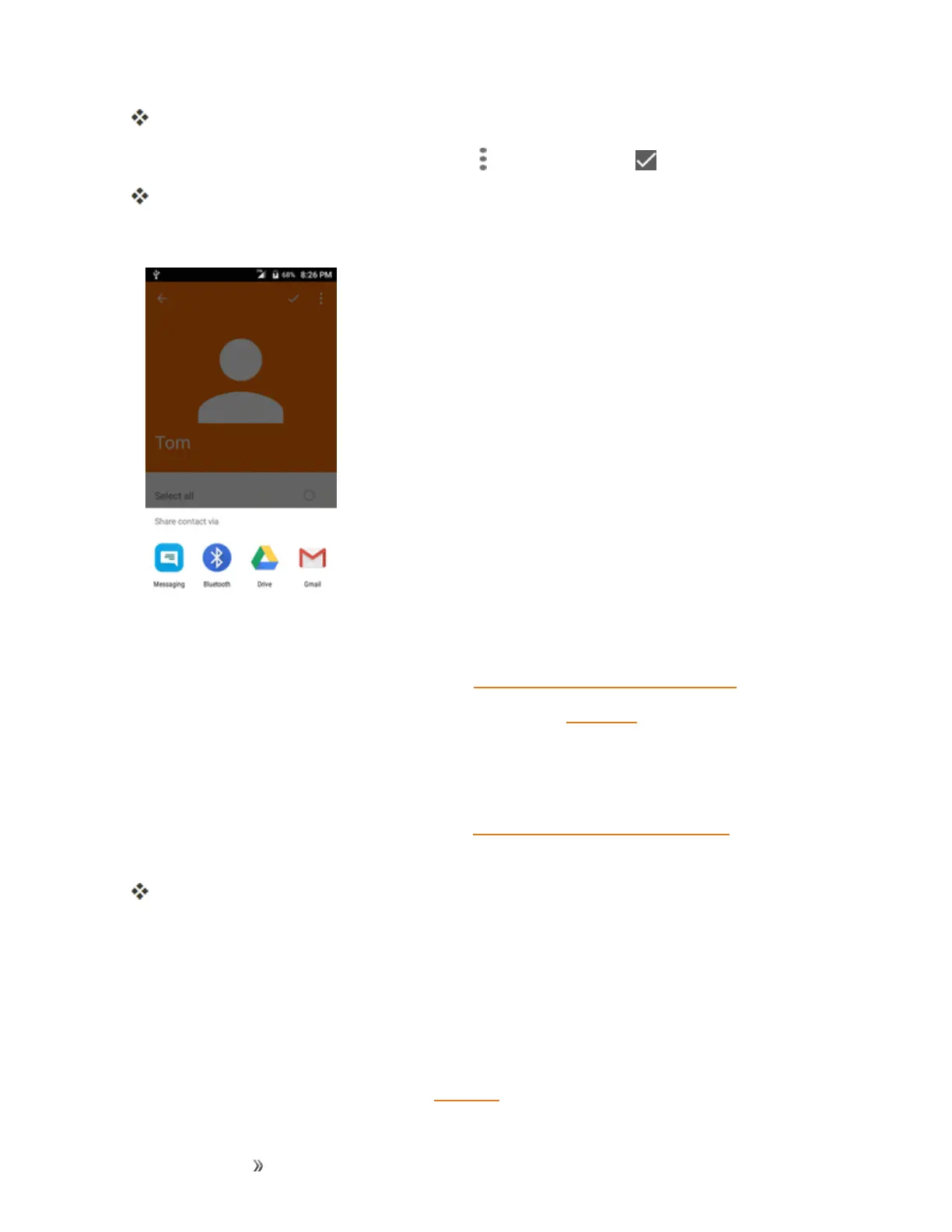
Tapacontacttodisplayit,andthentapMenu >Share contact > .
YouwillseetheSharenamecardviamenu.
3. IntheShare namecard viamenu,selectamethod:
l Messagingtosendtheinformationinatextmessage.Selectacontactorenterawireless
phonenumberoremailaddress,enteranyadditionalinformation,andthentapSend.For
moreinformationontextmessaging,seeSendaMultimediaMessage(MMS).
l BluetoothtosendtheinformationviaBluetooth.SeeBluetoothforinformationonpairing
andsendingviaBluetooth.
l DrivetosendtheinformationviaDrive.
l GmailtosendtheinformationasaGmailattachment.Addressthemessage,addasubject
andamessage,andthentapSend.SeeCreateandSendaGmailMessagefordetails.
4. Completetherequiredstepsaspromptedfortheselectedmethod.
Theselectedcontactwillbeshared.
Import Contacts
YourphoneoffersacoupleofoptionsforimportingcontactsfrominstalledSDmemorycardsor
externaldevicesviaUSB.
Before Importing Contacts from an SD Card
YouwillneedtohaveinstalledanSDcardwithpreviouslybackedupcontactsinformationintoyour
phonebeforeyoucanimportcontacts.SeeSDCardforSDcardinformation.













 To Next Page