Making Connections Contacts 75
2.
Tap toaddacontact.
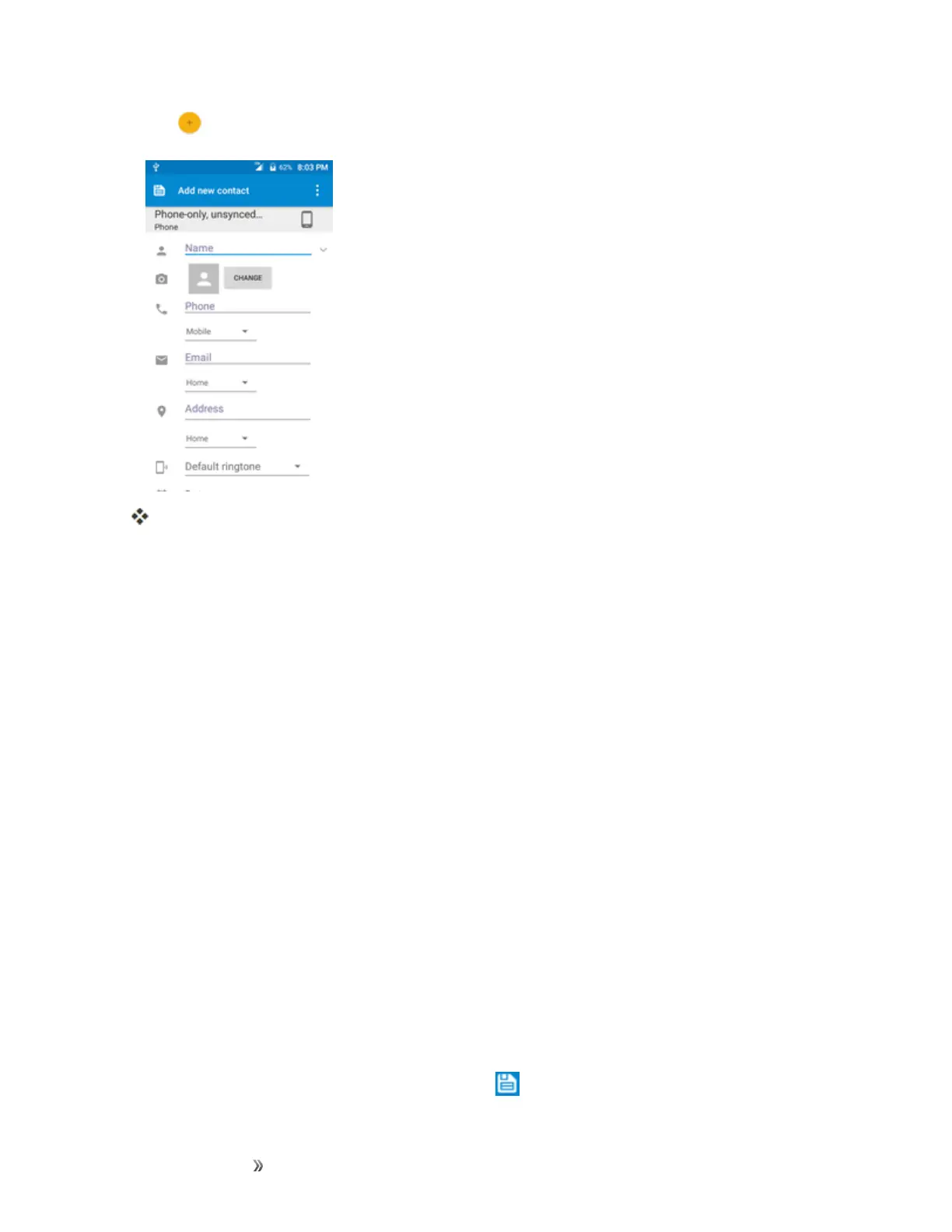
TheAddContactscreenappears.
3. Ifyouhavemultipleaccounttypesassociatedwithyourphone,selectacontacttype.
l SelectGoogleifyouwanttosavecontactstoyourGoogleAccount;thesewillbesynced
automaticallywithyourGoogleAccountonline.
l SelectPhoneasthesyncaccountifyouwantyourcontactsonyourphoneonly;theywill
notbesyncedwithyourGoogleAccount.
4. Usethekeyboardtoenterasmuchinformationasyouwant.
l [picture]:Tapthepictureicontoassignapicturetothecontact.
l Name
l Phone
l Email
l Address
l Addanotherfield:TapMOREtoincludeadditionalinformationsuchasIMaddress,Notes,
Nickname,Website,etc.
Note:Toselectatype(label)foraphonenumber,emailaddress,orpostaladdress(suchas
Mobile,Home,Work,etc.),tapthetypetotheleftofthefieldandselecttheappropriatetype.
Note:Toaddmorephonenumbers,emailaddresses,etc.,tapAdd newontherightsideofthe
entryfield.
5.
Whenyouhavefinishedaddinginformation,tap .













 To Next Page