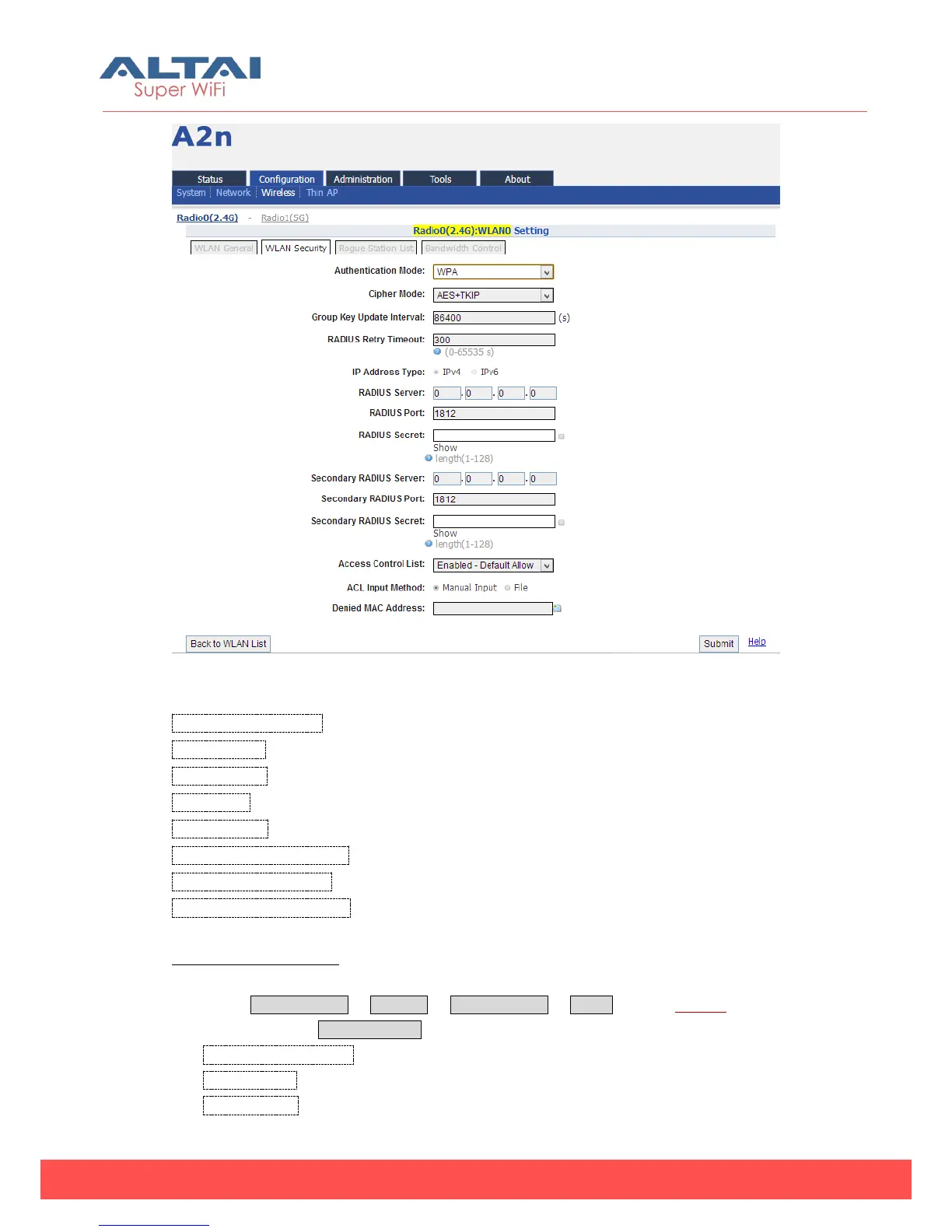
Figure 5-30 WPA/WPA2
Authentication Mode:WPA or WPA2
Cipher Mode: AES and TKIP can be choired.
Radius Server:Set Radius server IP address
Radius Port:set Radius server port
Radius Secret:Set Radius secret
Secondary Radius Server:Set Secondary Radius server IP address
Secondary Radius Port:Set Secondary Radius server port
Secondary Radius Secret:Set Secondary Radius server secret
WPA/WPA2 Procedures:
1. Select Configuration -> Wireless -> Radio0 (2.4G) -> WLAN to edit “More…” WLAN,
and then select WLAN Security to access to security configuration page.
2. Authentication Mode choose WPA or WPA2
3. Cipher Mode choose AES+TKIP
4. Radius Server set Radius server IP address



 To Next Page