MM-400A
8. Operation Screens
8-64
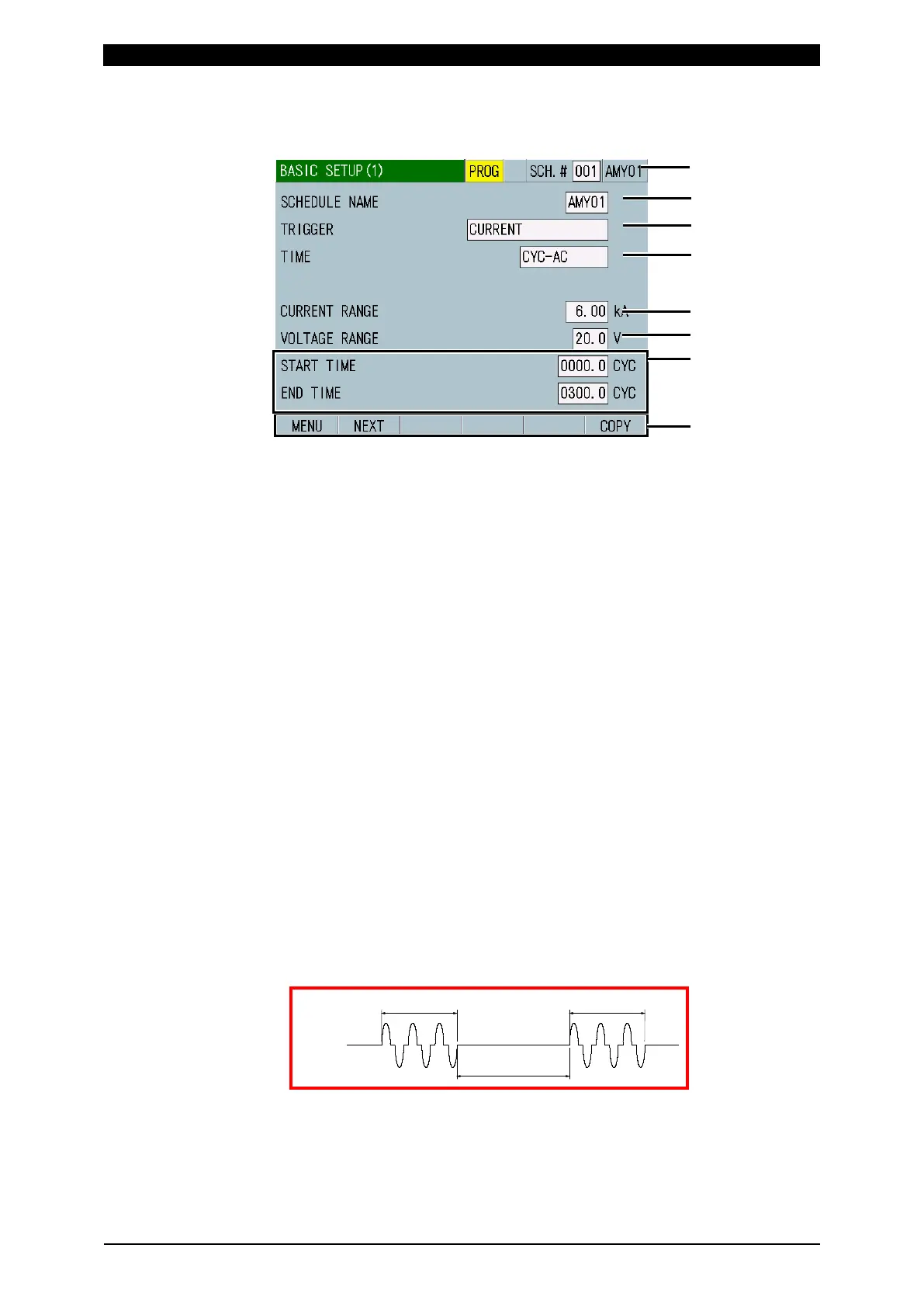
l. BASIC SETUP Screen
l-1. BASIC SETUP (1) Screen
(1) SCH.#
Shows the measurement schedule number used (1 to 127). On the other hand,
you can change schedules by selecting this field and inputting a value.
(2) SCHEDULE NAME
Inputs the name for the set schedule. Up to five alphanumeric characters can
be input.
(3) TRIGGER
Select an input signal required to start measurement. In the standard
specification (force/displacement not equipped), only CURRENT can be
selected.
When the TRIGGER setting is changed, upper and lower limits for
measurement items WELD TIME and FLOW TIME and TIME, START TIME,
END TIME, COOL TIME, and MEASUREMENT MIN TIME on the BASIC
SETUP screens may be initialized. Set upper and lower limits and TIME,
START TIME, END TIME, COOL TIME, and MEASUREMENT MIN TIME on
the BASIC SETUP screens again. (Refer to "e. COMPARATOR Screen" and
"l-2. BASIC SETUP (2) Screen.")
• CURRENT
Force and external voltage/current input are not measured.
The instrument performs measurement each time a current signal is input,
showing the measured values, waveforms and all cycles. The internal
processing time varies depending on the current flow time. As a result, the
internal processing may not be complete before next measurement. To pass
multiple current pulses, refer to PULSE MODE in the BASIC SETUP (2)
screen.
• AUTO
The first input among 1) current, 2) force or external input (±10 V voltage or
4 to 20 mA current), and 3) force trigger or external force trigger triggers
measurement.
C
urrent
Measurement
Measurement
Inter
nal pr
ocessin
g time



 To Next Page