MM-400A
8. Operation Screens
8-21
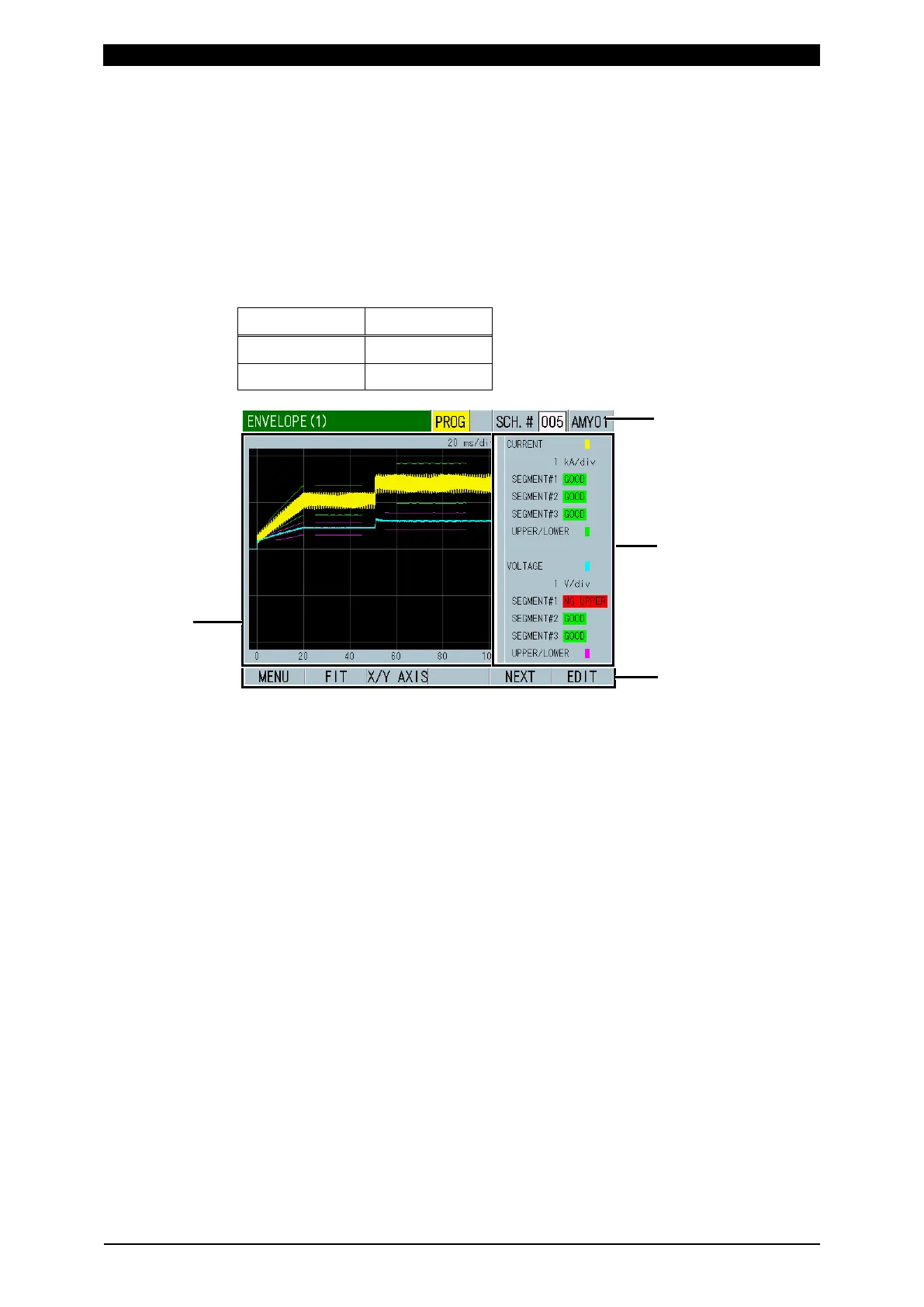
f. ENVELOPE Screen
The envelope function is to create an envelope waveform (upper/lower limit
threshold) based on the reference waveform to compare the actual measured
waveform with envelope waveform.
f-1. ENVELOPE (1) Screen
Shows the measured waveform, upper/lower limit determination threshold and
judgment result of items selected for WAVEFORM 1 and WAVEFORM 2.
WAVEFORM 1 and WAVEFORM 2 are WAVEFORM 1 and WAVEFORM 2 set in
the VIEW screen. (Refer to “c. VIEW Screen.”)
VIEW ENVELOPE
WAVEFORM 1 WAVEFORM 1
WAVEFORM 2 WAVEFORM 2
(1) SCH.#
Shows the measurement schedule number used (1 to 20). (The maximum
number of schedules is 127 in other screens, but 20 in the ENVELOPE
screen.) On the other hand, you can change schedules by selecting this field
and inputting a value.
(2) Waveform display
Shows waveforms and upper/lower limit thresholds.
(3) Item name and judgment result of the displayed waveform
Shows the item name and judgment results of WAVEFORM 1 (ENVELOPE#1)
at the upper part and WAVEFORM 2 (ENVELOPE#2) at the lower part. Shows
the judgment result of three range sections (SEGMENT#1 to #3) for
WAVEFORM 1, 2 (ENVELOPE#1, 2) respectively.
Shows GOOD when the waveform is within the range, NG UPPER when it
exceeds the upper limit, and NG LOWER when it falls below the lower limit
even if 1 point. When it is out of both upper and lower limits at the same time,
NG LOWER is preferentially displayed. Also, when there is no measured
waveform in the time range of envelope judgment, NG LOWER is displayed.



 To Next Page