Chapter 3 Measurement
3-10
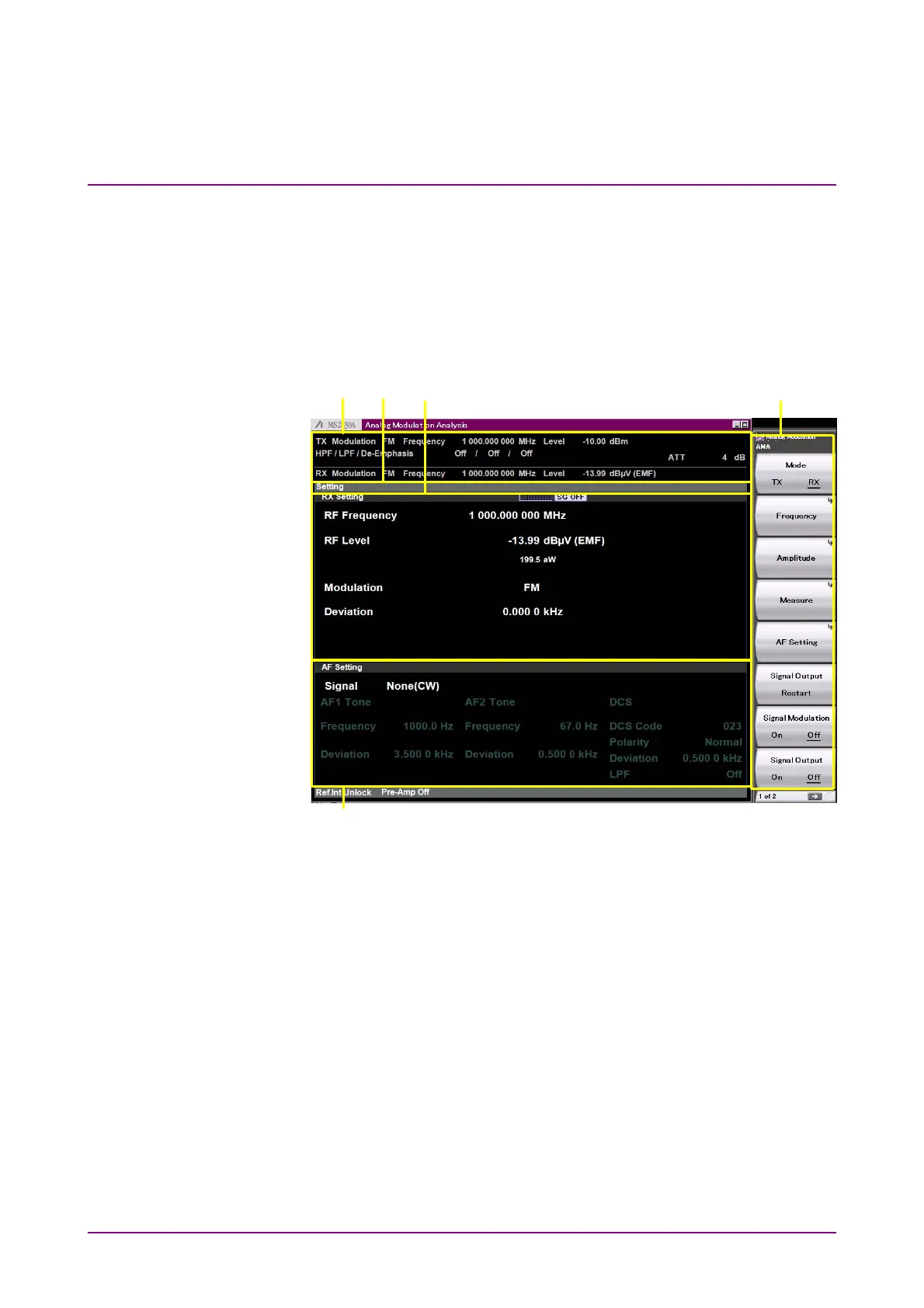
3.2.1.3 RX mode screen
Under the following conditions, selecting RX mode displays the screen
below.
●
The Analog Signal Generator (MS2830A-088/188, MS2840A-088/188)
or the Analog Function Extension Option for Vector Signal Generator
(MS2830A-029/129, MS2840A-029/129) is installed.
●
The MS2830A-018/118 Audio Analyzer is not installed, MS2840A.
[1]
[5]
[2] [3] [4]
Figure 3.2.1.3-1 RX Mode Screen
[1] Measurement parameter
Displays the specified parameter.
[2] Status message
Displays signal status.
[3] RX Setting window
Displays the setting values of frequency, level, and modulation
index of RF output signals.
[4] Function menu
Displays the functions executable with function keys.
[5] AF Setting window
Displays the setting values for AF signals to be modulated.



 To Next Page