User Interface
Remote control (option)
3.5 Remote control (option)
WARNING!
The System must always be supervised when activated.
Note!
The remote control shall only be used inside the examination room.
Note!
Always mark up the remote controls with, for example, the room number or the system num-
ber. Use the enclosed labels to distinguish different system remotes, from each other.
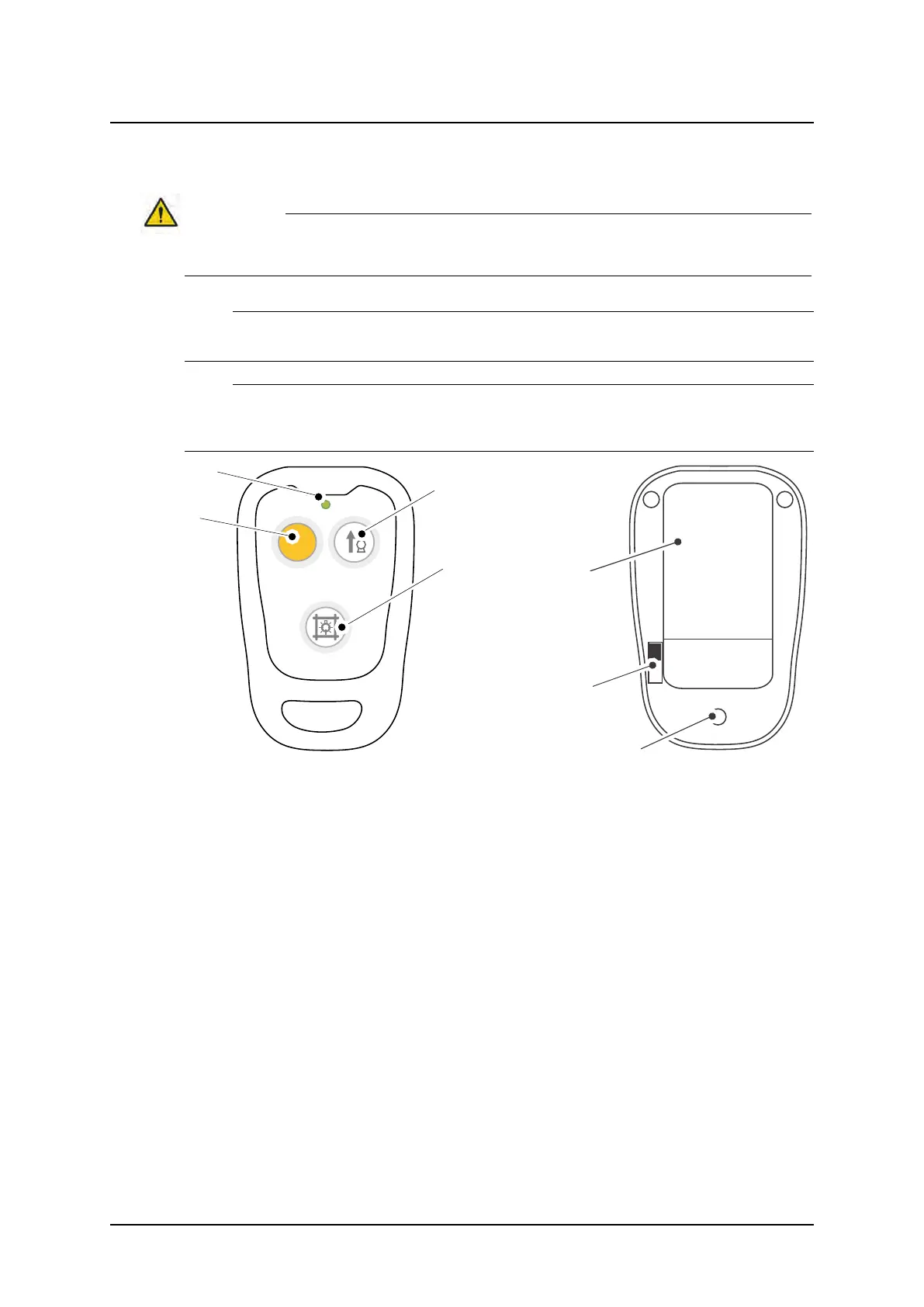
Fig. 3-35 Remote control, front and back
Front
1 Servo button – (yellow)
2 Indication diode (green)
3 Tube up
4 Switch On/Off Collimator light
Back
5 Fastening clip
6 On/Off switch
7 Battery changing slot
Servo button
The servo button is yellow with a little peg, making it easy to recognize the button.
When activating the yellow servo button, the OTC moves to auto-position.
ARCOMA AB 1000-095-051-EN Rev. 1.1
Operation Manual
SWEDEN Page 76 2020-06-16



 To Next Page