Operating the System
Detector, Wallstand
4.11.2 17x17 Detector, Wallstand
4.11.2.1 Method to load the 17x17 detector
WARNING!
• Before setting or adjusting the detector and other equipment, complete the setting
of the counterweights.
• Whenever any item is removed from the wallstand, e.g. detector, it will become
highly unbalanced.
• Whenever the brake is released, it will move upward and can cause injury. Make
sure that the operation will be done by personnel who are trained in the use of the
equipment.
• Shut down the power when changing the detector. Confirm that the detector holder
is not possible to elevate. If the detector holder elevates accidentally while work is
being carried out, it may fall against the worker and result in serious injury.
Note!
• Depending on left- or right-operated wallstand, the location of the detector tray and posi-
tion of button and latches is different.
The method of setting the detector to the detector holder is as follows;
The following instruction describes the detector operated from the left side.
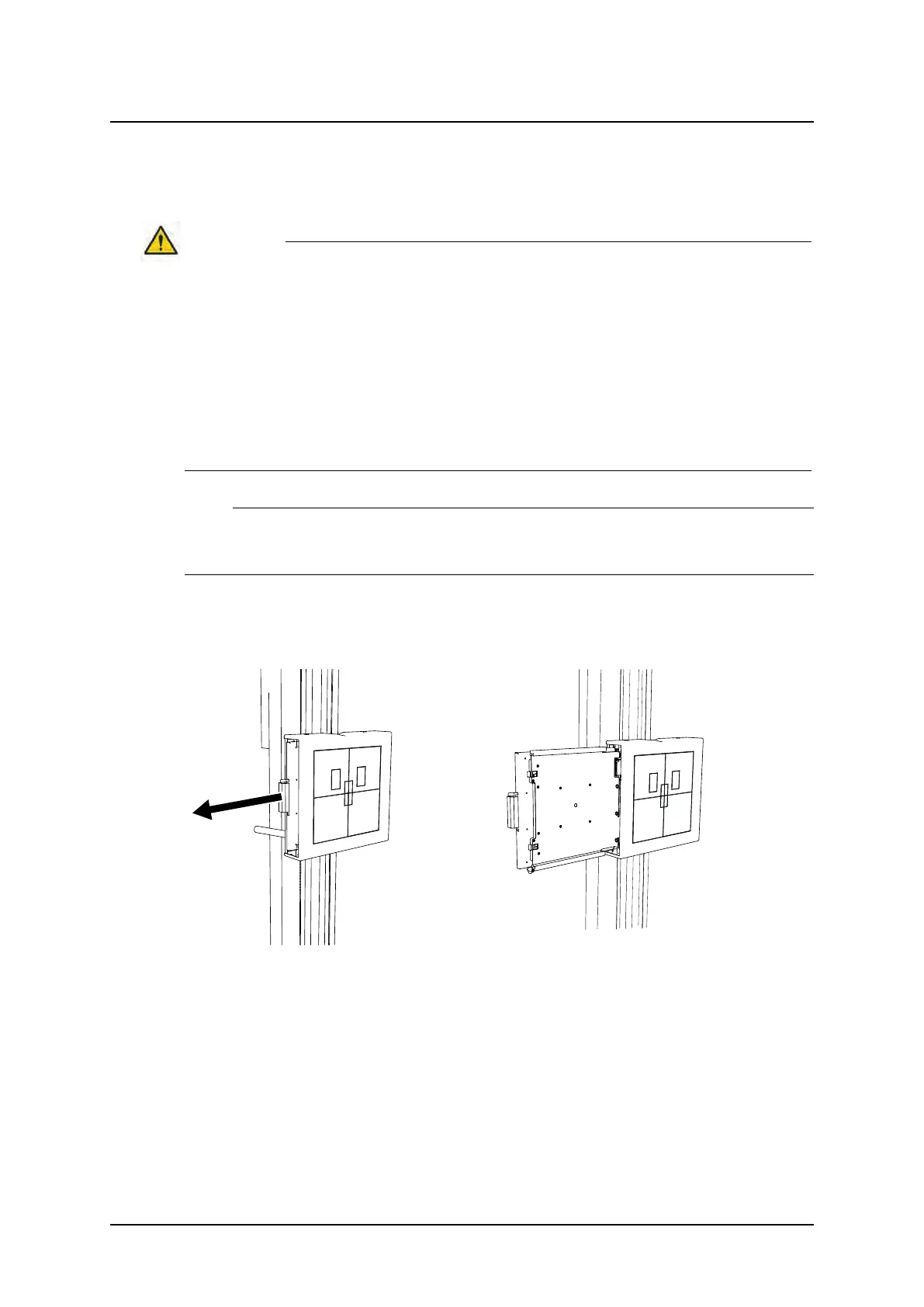
1. Pull the detector tray toward you. Make sure the detector tray is completely brought out.
2. Insert the detector into the detector tray as shown below and set it by pushing the detec-
tor, holding down the latch.
ARCOMA AB 1000-095-051-EN Rev. 1.1
Operation Manual
SWEDEN Page 126 2020-06-16



 To Next Page