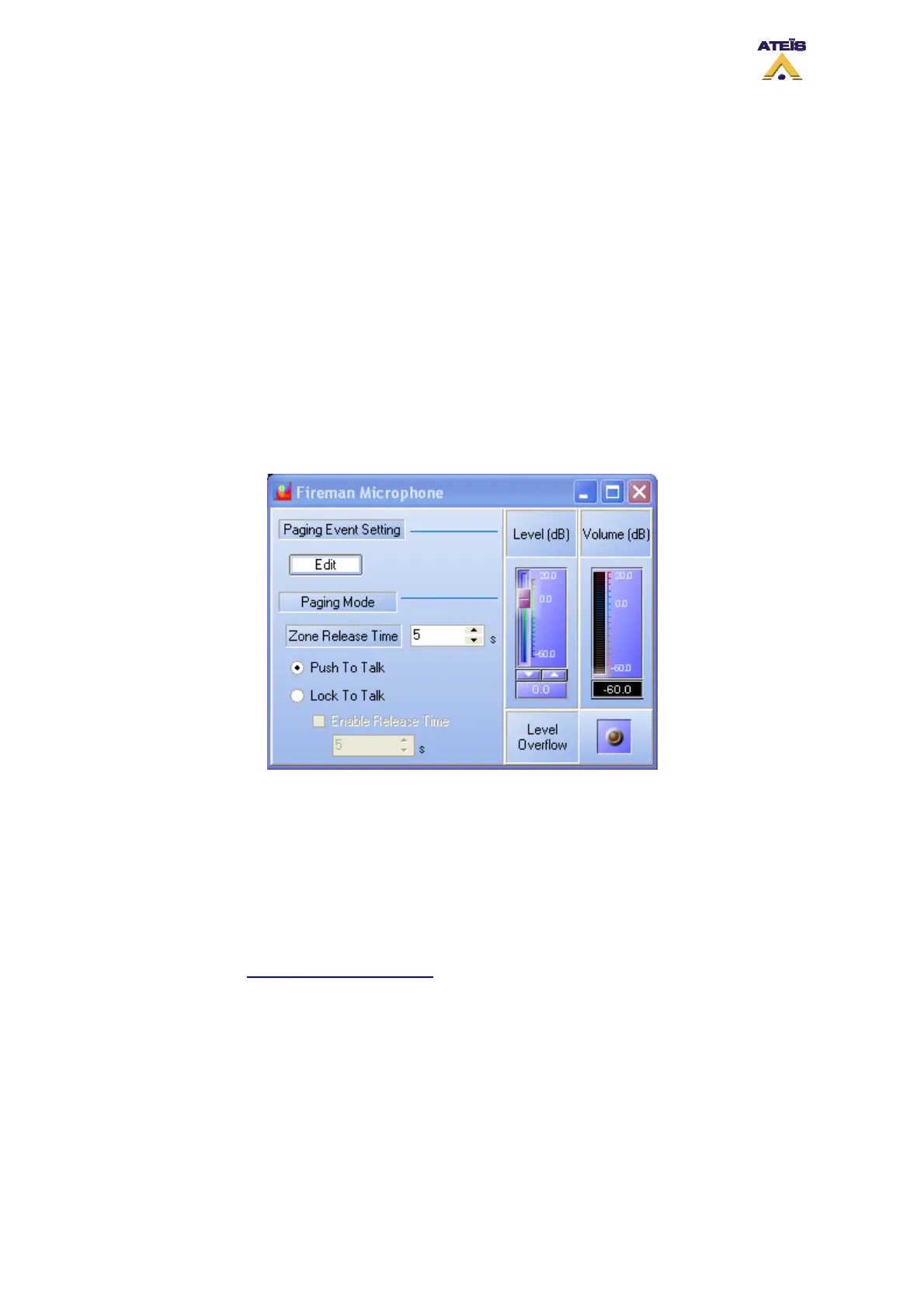
fireman microphone have been designed to be an emergency paging element, so be careful when
changing priority and security settings.
• Level (dB): When connected to DIVA, you can adjust, real time mode, the level of the fireman
microphone
• Volume (dB): Indicates the current output level of the fireman microphone
• Level Overflow: This is a LED indicators that light up when a too high level is detected on the
fireman microphone
______________________
• Zone Release Time: here you can set a time for which the manually zone selection is kept in
memory. Since this time has passed, the next fireman microphone called will be routed in the pre-
define zone
• Push to talk: with this option ticked, you will need to keep the microphone button pressed in order
to be able to talk
• Lock To Talk: with this option ticked, one pressure on the microphone button will start the call and
one more pressure will stop the call. For safe operations, you can set a time after which the call is
automatically stopped
The Fireman Microphone Paging Event window (see below) is divided in several section where you
will be able to set:
• Priority: you can specify a priority level between 20 and zero. The highest priority level is 0 when
20 is the lowest
• Security: by ticking security, you will allow user to make a call when DIVA is in security mode
______________________
• The next portion of the window is dedicated to the output relay management. In order to find out to
use please see "How to Use Output Relay"
.
______________________
• Conflict: here you can choose how to manage priority conflict. “Cancel All” consists of cancelling
all the messages or events, with a lower priority, that are currently playing in the selected zone.
“Coexist” permit to momentarily disable the current message or event and to retrieve it as soon as
the one with a higher priority has finished.
• Pre-Chime: the pre-chime option allows to play a chime message before each call. You can
choose the chime message using the drop-down menu.
• Pre-define Zone: by ticking this option you will be able to select pre-define zone in which the call
will be made. Pre-defining zones don't disable the front-panel zones selector. As soon as a call in
Ateïs International
Ch. du Dévent, 1024 Ecublens, Switzerland.
Phone : +41 21 881 25 10
84



 To Next Page