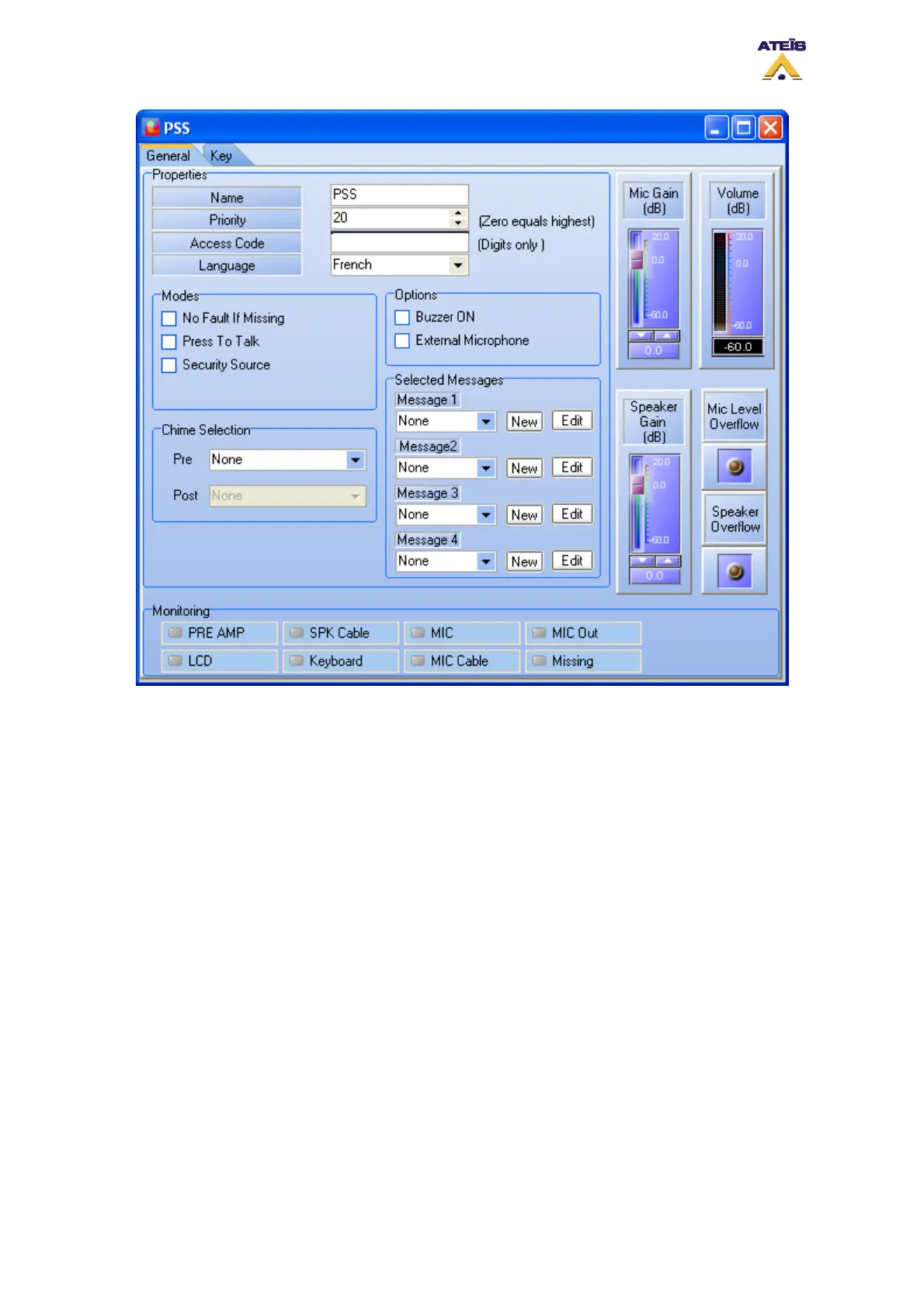
Mode:
• No Fault If Missing: if ticked, DIVA won't display a fault if the PSS is not physically connected
• Press To Talk: this option change the behaviour of the Mic key on the PSS screen from "Lock to
Talk" to "Push to Talk". For calling in "Push to Talk" mode, you have to keep the PSS Mic key
press as long as you want to talk
• Security source: if ticked, you will be able to use the PSS microphone when DIVA has entered
into the security mode. When ticked, it adds the option Evacuation Source. If evacuation source is
selected, the paging from the PSS will act like an evacuation event. So the front panel EVAC LED
will light up.
Options:
• Buzzer On: this options allows user to enable the PSS buzzer. It will beep for any DIVA fault
status and for PSS internal fault
• External Microphone: in case of using an other microphone that the gooseneck you will have to
tick this option
Chime selection:
• Pre: allows to add a chime message at the beginning of a microphone call. Simply choose the
pre-chime message from the drop down menu
• Post: allows to add a chime message at the end of a microphone call. Simply choose the post-
chime message from the drop down menu
Selected Messages:
Ateïs International
Ch. du Dévent, 1024 Ecublens, Switzerland.
Phone : +41 21 881 25 10
96



 To Next Page