Page | 28 of 105
AVR8414 Operation Manual – Rev O
Discrete Setup
The AVR8414 has three (3) discrete inputs that can be configured through the OSD to perform
various actions.
Record Start/Stop on Discrete State Change
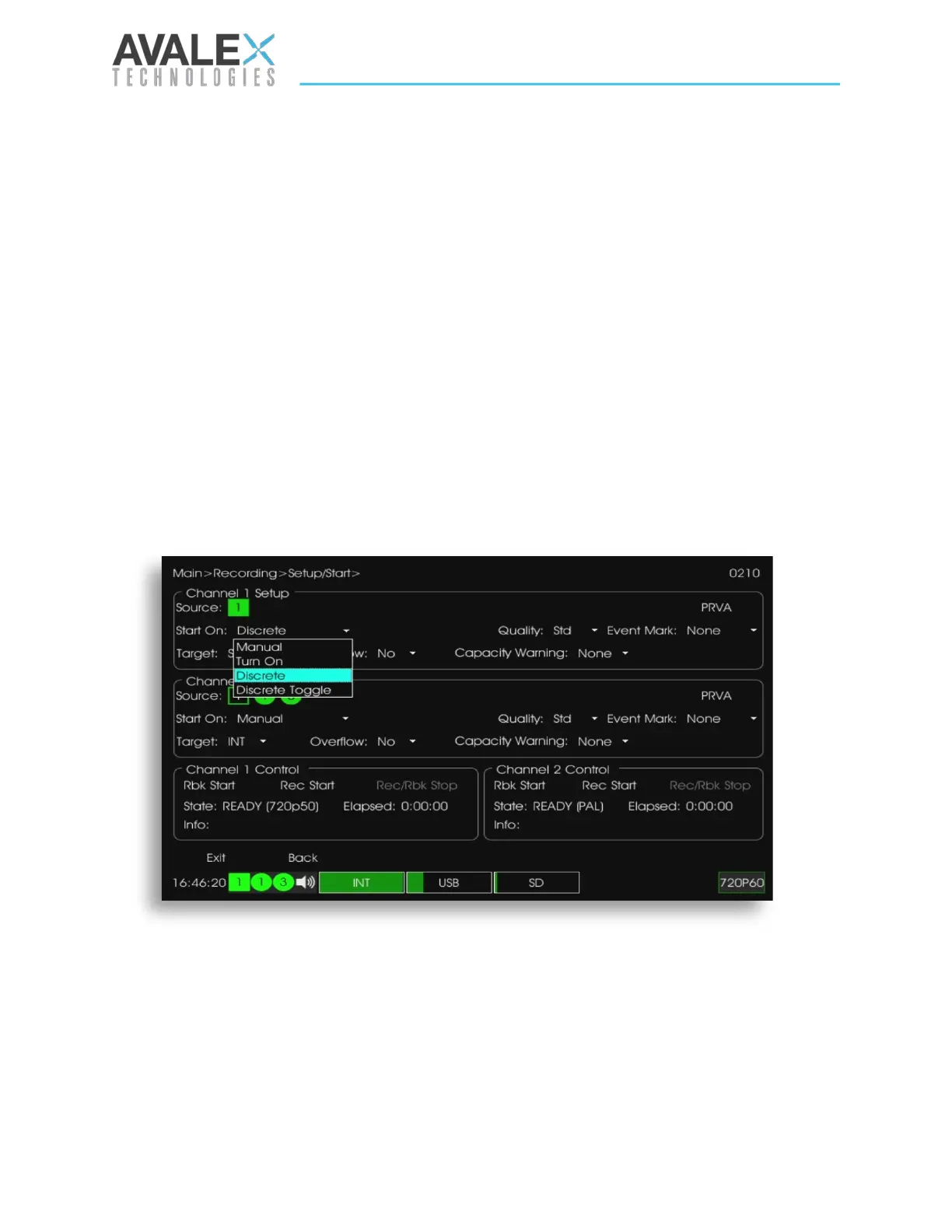
To configure a discrete to record, navigate to the OSD Main > Recording > Setup/Start page.
In the “Start On” menu, select the Discrete option. In the “State” Discrete menu, select the
desired discrete input transition. For example, selecting D2-OPEN will start a recording when
Discrete Input 2 transitions from ground to open. The recording will stop when Discrete Input 2
transitions from open to ground.
Record Start/Stop on Discrete Toggle
The discrete toggle option allows recordings to be started/stopped using a normally open or
normally closed pushbutton connected to ground. Navigate to the OSD Main > Recording >
Setup/Start page. In the “Start On” menu select the “Discrete Toggle” option. In the “State”
Discrete menu, select the desired discrete Input toggle transition. For example, to configure for
a normally open push button, select D1-GND. The recoding will start when the button is
pressed. The recording will continue when the button is released, and the recording will stop
when the button is pressed a 2
nd
time.
Record Event Mark on Discrete State Change
Event markers can be configured to be placed while recording using Discrete Inputs. This
option is accessible from the OSD Recording > Setup/Start menu. For example, selecting D1-
GND will allow an event marker to be placed each time the Discrete Input 1 transitions from
open to ground.
Figure 24 - OSD Setup/Start Screen


 To Next Page
 Loading...