Commissioning
66 AVENTICS | Marex 3D | R417003094–BDL–001–AA
6.2.5 Adjusting Marex OS for the operation with
Marex 3D
The operation of Marex 3D in combination with Marex OS
requires the software version O3WG V7.01.10 or higher in
both MPCs, port and starboard. Refer to the manual "Marex
OS II/III, Devices and Adjustments" for information how to
view and update the software version in the Marex OS
control units MPC.
Contact marineservice@aventics.com for software and
supplementary information.
Proceed as follows to adjust the Marex OS MPCs for the
operation with Marex 3D:
1. Open the cover of the Marex OS MPC if applicable.
2. Call up the System Parameter menu as explained in 6.2.2,
Adjusting the 3D Controller for the operation with Marex OS,
on page 62.
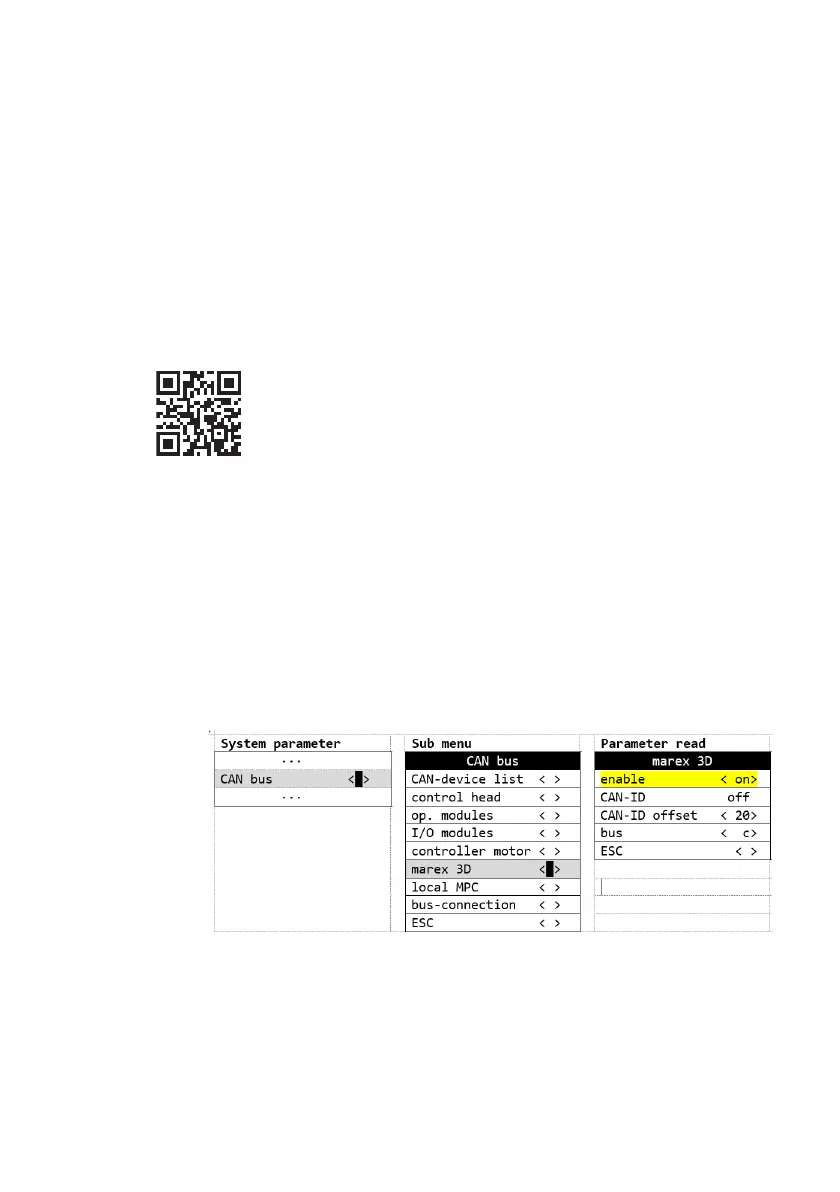
3. In the System Parameter menu, call up the menu item
"CANbus".
4. In the "CANbus" menu, call up the item "marex 3D"
5. In the "marex 3D" menu, call up the item "enable".
6. Select "on" and confirm by pushing the Select button.
Fig. 38: Marex OS III: System parameter "Enable Marex 3D"
7. Switch off the power supply for at least 10 s.
8. Proceed accordingly with the other Marex OS MPC.
3D_manual_R417003094_DE_EN.book Seite 66 Freitag, 30. November 2018 11:36 11



 To Next Page