8: StudioEngine Controls • 114
©2008 Axia Audio — Rev. 3.0
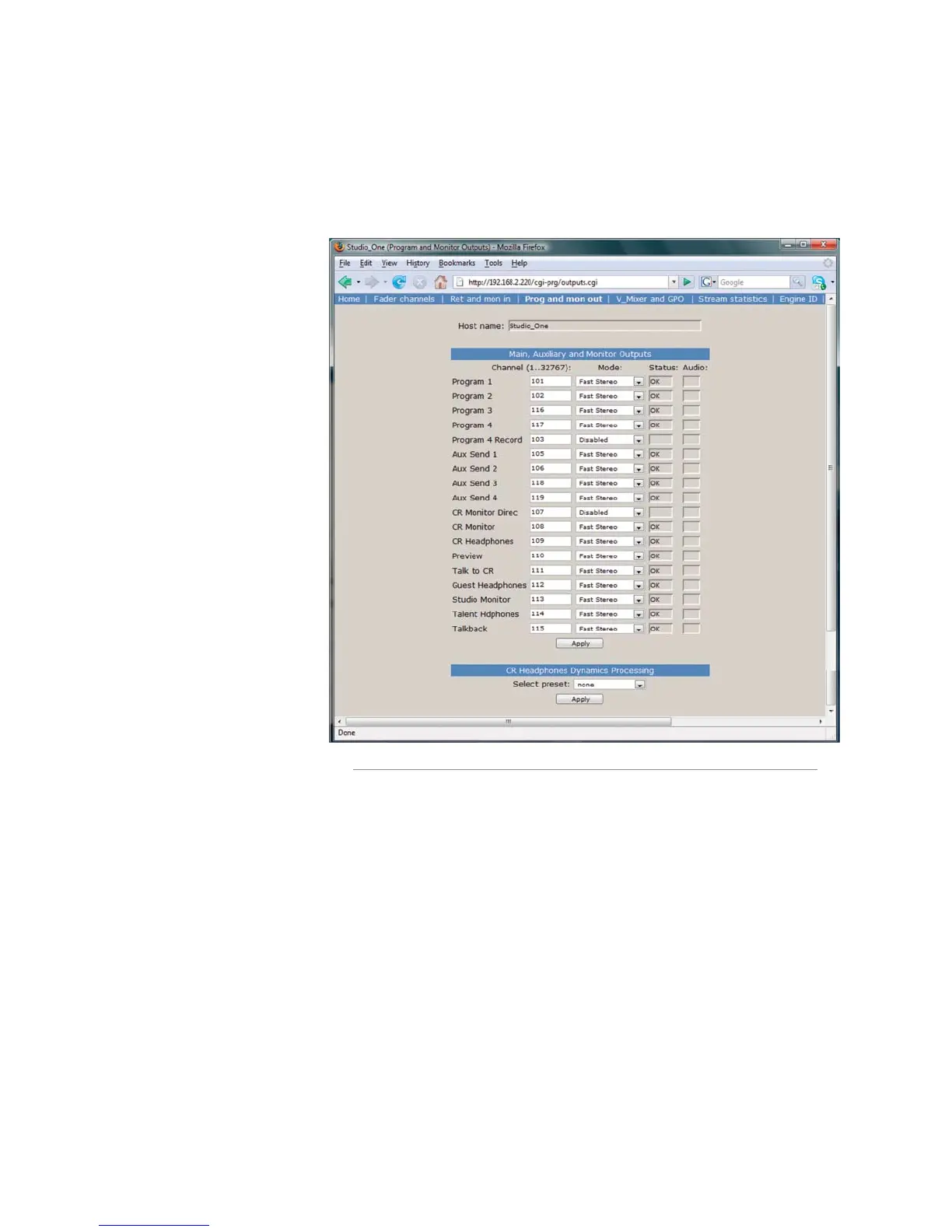
The Program & Monitor Outputs Menu
This is where you enable and assign unique channel
numbers to all of your console’s outputs. If any of your
Element’s outputs or monitor feeds are disabled in this
menu, that channel will have no
audio output.
The outputs you control are:
Program 1 - 4: Your con-
sole’s main Program bus out-
puts.
Program 4 Record: Special
output for recording devices
which feeds the contents the
Program 4 bus pre-fader and
pre-On/Off switch.
Aux Send 1 - 4: Your con-
sole’s stereo Auxiliary Send
buses.
CR Monitor Direct: This
is the output of the monitor
selector before the operator’s
volume controls and mutes;
useful for feeding a Produc-
er‘s position, or any other
monitoring station with inde-
pendent headphone volume
controls.
CR Monitor: Contains what-
ever audio source your operator has selected to feed
the Control Room monitors.
CR Headphones: Contains whatever audio source
your operator has selected to feed the Control Room
headphones.
Preview: The feed to the Preview (Cue) speaker.
Talk to CR: This channel feeds audio to the Control
Room talkback channel whenever the Talk button is
pressed on any Studio Accessory panel.
Guest Headphones: Contains whatever audio
source has been selected to feed the Guest head-
phones.
Studio Monitor: Contains whatever audio source
your operator has selected to feed the Studio moni-
tors.
•
•
•
•
•
•
•
•
•
•
Talent Headphones: Contains whatever audio
source has been selected to feed the Talent head-
phones.
Talkback: When any console Talk key is pressed,
CR Mic audio is routed, pre-fader, to this channel.
The columns following each of these entries dis-
play the status of each channel and allow you to make
changes.
The Channel column, like other similar fields used
throughout the Axia system, is where you enter a unique
channel number for each console output.
The Mode column lets you enable and disable each
output, and set the priority of each stream.
Fast Stereo are for live audio where lowest latency
is required, like Program outputs and mic-to-head-
phone paths.
Medium Stereo is the recommended default setting
for everything else, and balances low latency with
high compatibility for systems incorporating PCs.
•
•
•
•
Fig. 8-4: Program & Monitor Outputs menu



 To Next Page