4: Element Operations • 73
©2008 Axia Audio — Rev. 3.0
PRE ON
Σ PROGRAM 1
PGM 1
Σ PROGRAM 2
Σ PROGRAM 3
Σ PROGRAM 4
PGM 4
PGM 3
PGM 2
HOST
MICROPHONE
SOURCE
EQ / DYN
PHASE
Ø
PRE FDR
PRE FDR
PRE FDR
PRE FDR ON
AUX 1
Σ AUX SEND 1
AUX 1
AUX 2
Σ AUX SEND 2
AUX 2
AUX 3
Σ AUX SEND 3
AUX 3
AUX 4
Σ AUX SEND 4
AUX 4
PVW
Σ PREVIEW
FADER PAN
TALK TO X MIX
Σ TALK TO X
MUTE
HI, MID, LO EQ
COMPRESSOR
DE-ESSER
NOISE GATE
NORMAL
INVERT
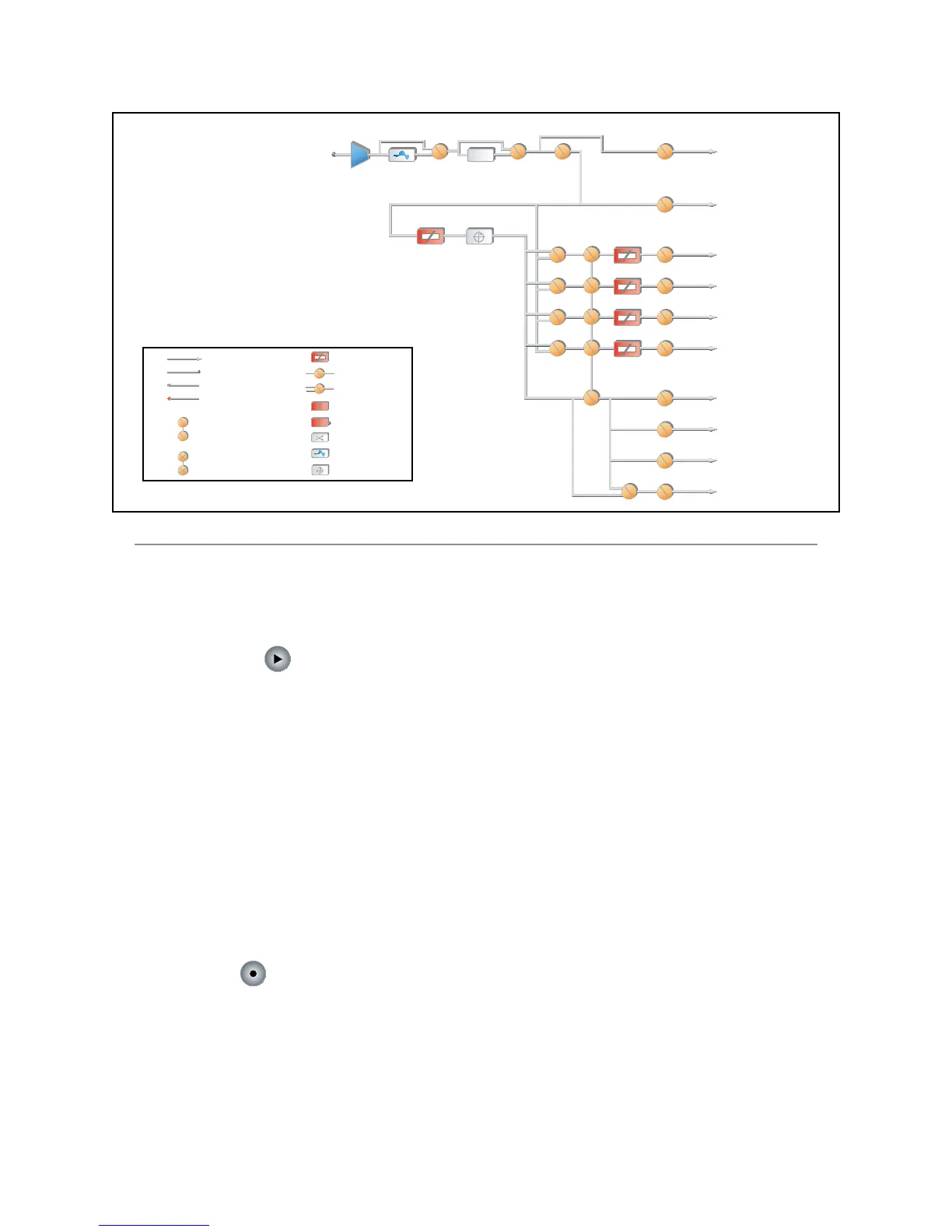
Figure 4-33: Control Room Operator Microphone channel block
TO INTERNAL NODE
GAIN CELL
SPST SWITCH
PHYSICAL CONNECTION
EXTERNAL CONNECTION
FROM INTERNAL NODE
SPDT SWITCH
ADD
SIGNAL MODE
DSP CELL
PAN / BALANCE
SUBTRACT
GANGED SWITCHES
MUTUALLY EXCLUSIVE SWITCHES
Legend
tinues to count while the display is frozen, and
a second press of the Freeze again displays the
running elapsed time counter.
Start/Stop Key:
If the Count Up Timer is not running, pressing this
starts it. If the timer is running, pressing this key stops
the countdown and retains the last displayed timer in-
terval.
Record Mode Section
Element’s Record Mode is a special “one-touch”
mode which can be set to automatically start a desig-
nated record device so that talent can record a phone call
or remote interview with a single button-press. Record
Mode can be enabled or disabled for each Show Prole
(see Chapter 5, “Show Profiles”, for details).
Engage Key:
Press this key to put Element into Record Mode.
Pressing this button activates a pre-determined record-
ing device. Pressing the key a second time deactivates
Record Mode and stops the recorder.
•
•
“Magic Key” Sequences for Monitor + 2-Fader Module
The list of “Magic Key” sequences for the Standard
Monitor Module are:
IP Address Book: Press and hold the * (star), 4 &
7 keys on the keypad for 5 seconds.
Clock & Timer Settings: Press and hold the Timer
Options key for 5 seconds.
Capture Mode: Press and hold the * (star) & 2
keys on the keypad for 5 seconds.
Help Screen: Press and hold the * (star) &
# (pound) keys on the keypad for 5 seconds.
Test Mode: Press and hold the Help and Right Ar-
row keys for 5 seconds.
Source-Specic Channel Controls
Some fader functions change their behavior to suit
the type of source assigned to the fader. A Guest Mic in-
put has unique functions different from those of a Codec
input, and so forth. In this section we’ll explain the chan-
nel functions unique to each type of source input, as well
as providing functional block diagrams of each type.
•
•
•
•
•



 To Next Page