4: Element Operations • 72
©2008 Axia Audio — Rev. 3.0
Note: Pressing and holding the Timer Options
Key opens the Clock & Timer Options Menu
discussed in Chapter 1.
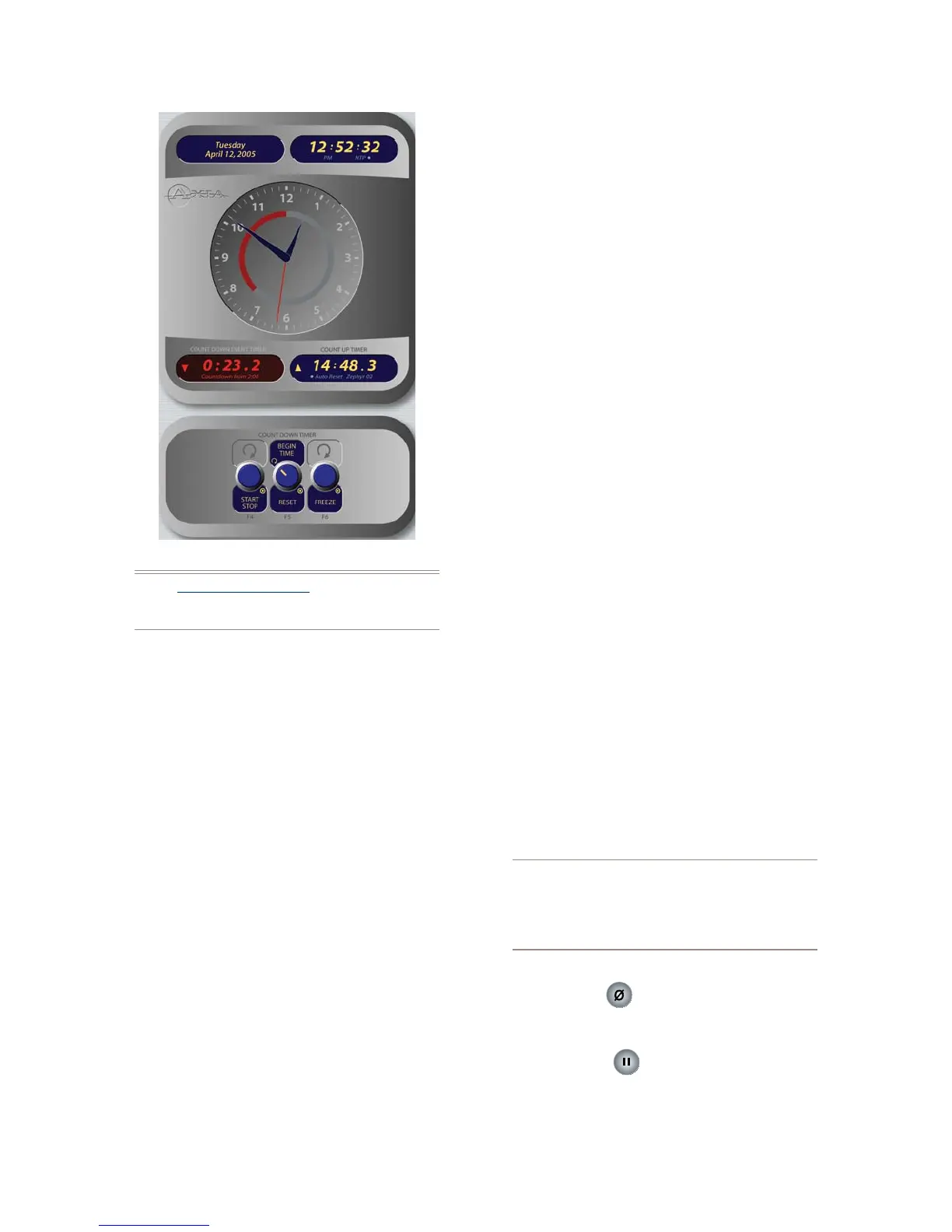
The Count Up Timer is an event timer with three
modes, which can be set to start/stop/reset either au-
tomatically or manually. Using Source Profiles, you
can determine whether individual sources will start or
stop this timer automatically; the onscreen controls de-
scribed below allow the operator to override or modify
those settings.
Rotate the Timer Mode/Reset SoftKnob to
choose how the event timer will operate. Your
choice will be displayed onscreen just below the
Count Up Timer readout.
Choose Manual to start, stop and reset the
timer by hand using the controls displayed
when the Timer Options key is pressed.
Choose Auto-Reset and the timer will au-
tomatically reset to zero and begin counting
whenever a fader whose source starts the
timer is turned On.
Choose Auto-Add to have the timer count
up when a designated source’s fader is turned
On and stop counting when that source is
»
*
*
*
turned Off. In this mode, the timer will not
reset to zero when it is started.
Press Timer Mode/Reset to return the Count
Up Timer to zero.
Press Start/Stop to begin and end the Timer’s
countdown.
Pressing Freeze holds the on-screen Timer dis-
play so you may take note of it; the timer con-
tinues to count while the display is frozen, and
a second press of the Freeze again displays the
running elapsed time counter.
The Countdown timer is useful for counting down to
network joins, top-of-hour IDs, and other events which
require exact timing. The Countdown timer is started,
stopped and reset manually using the controls displayed
when the Timer Options key is pressed. To use:
Rotate the SoftKnob marked Begin Time/Re-
set to set the interval from which the countdown
will begin. As you rotate, small numbers below
the red counter onscreen will inform you of the
new countdown interval.
Press the Begin Time/Reset knob to set the
new time you’ve dialed in.
Press the Start/Stop knob to begin or end the
countdown.
Pressing Freeze holds the on-screen Timer dis-
play so you may take note of it; the timer con-
tinues to count while the display is frozen, and
a second press of the Freeze again displays the
running elapsed time counter.
“Look at me!!” During the last 60 seconds of the
countdown, the inner ring of Element’s onscreen
analog clock will turn red and diminish as time
passes, providing the operator with a visual cue
to how much time is left until zero.
Reset Key:
Pressing this key resets Element’s Count Up Timer.
Freeze Key:
Pressing Freeze holds the Count Up Timer dis-
play so you may take note of it; the timer con-
»
»
»
»
»
»
»
•
•
»
Figure 4-32: Timer controls.



 To Next Page