4: Element Operations • 45
©2008 Axia Audio — Rev. 3.0
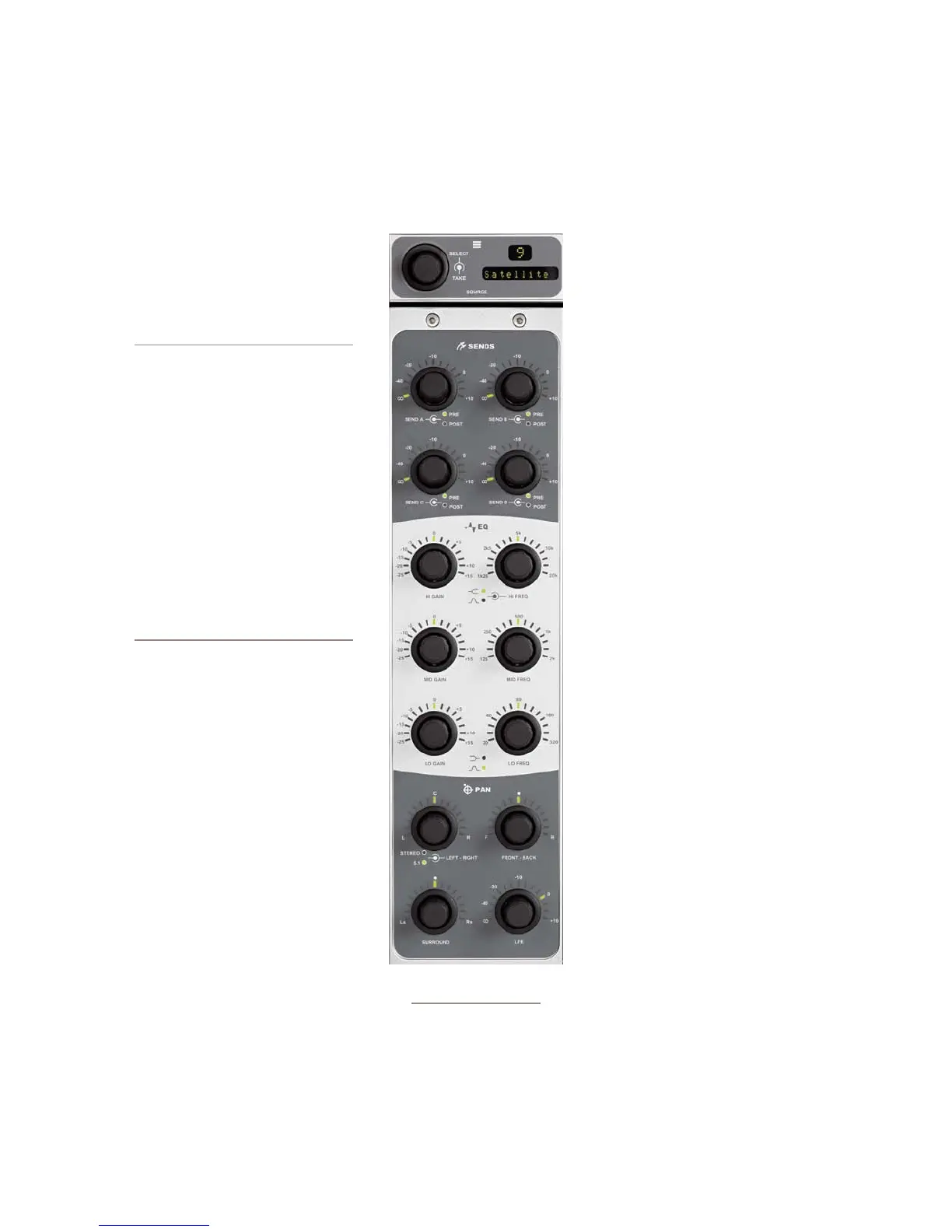
Production Module Controls
The Element Production Module gives production-
room gurus quick access to often-used EQ and posi-
tioning controls for each loaded source.
Its controls provide direct access to the
options presented in the EQ & DYNAM-
ICS options screens detailed later in this
chapter.
About Element EQ: Our EQ model
is three-band quasi-parametric. Con-
trols are provided for center frequency
and boost/cut, with a unique SmartQ™
automatic bandwidth system.
SmartQ works by varying the Q of the
selected parametric band proportional
to the amount of boost or cut you spec-
ify. A small amount of boost or cut will
affect a broader range of frequencies
for a warm, musically-pleasing effect.
As gain is increased the Q sharpens,
affecting a narrower range of fre-
quencies for tighter control of target
bands. At aggressive cut levels, the
EQ becomes a tunable notch lter.
SmartQ keeps the EQ sounding natu-
ral at virtually all settings.
To activate the Production Module,
press the Options key on any fader strip.
The Production Module’s overbridge dis-
play will immediately mirror the number
of that fader and the name of the source
you’re adjusting EQ for.
Once the Production Module is active,
you can quickly adjust EQ using the con-
trols described below. To quickly set EQ
for multiple channels, rotate the SELECT
knob on the overbridge panel to choose
a different fader source, and press it to
TAKE that source.
AUX SEND A/B/C/D: These controls
allow you to send the output of the active fader to any
or all of the four Aux Send buses for ourboard audio
effects processing, custom IFB mixes, etc. Each Aux
Send control has 50 dB of adjustment range, from -∞
to +10dB. Rotating the knobs adjusts the send level;
•
pushing the knob toggles the send between PRE-
and POST-FADER.
The three central pairs of knobs are EQ Controls:
HI GAIN/HI FREQ, MID GAIN/MID
FREQ and LO GAIN/LO FREQ.
The GAIN knobs provide 40 dB of adjust-
ment range for boost or cut of the three
parametric bands, from -25 dB to +15 dB.
The FREQ knobs each act slightly differ-
ently:
HIGH FREQ: Sets the active frequency
for high-band EQ. Pushing this knob
toggles the EQ model between Shelf
and Bandpass modes. If set to Shelf,
the HIGH FREQ knob determines the
top of the shelf. If set to Bandpass,
it sets the center frequency of the BP
filter (SmartQ determines the width of
the BP filter, as described above).
MID FREQ: Sets the center frequency
of the midrange parametric band.
LOW FREQ: Sets the center frequency
of the low parametric band. Pushing
this knob toggles the EQ model be-
tween Shelf and Bandpass modes.
If set to Shelf, the LOW FREQ knob
determines the top of the shelf. If set
to Bandpass, it sets the center fre-
quency of the BP filter
The four knobs at the bottom of the mod-
ule are the PAN controls.
The upper left knob PANs the sound
field left-to-right.
The FRONT-BACK knob moves the
soundfield front-to-rear (in 5.1 mode).
The SURROUND knob pans the rear
speakers left-to-right (in 5.1 mode).
The LFE knob adjusts the gain of the Low Fre-
quency Effects channel (in 5.1 mode).
•
»
»
»
•
»
»
»
»
Figure 4-4:Production Module
+ overbridge display



 To Next Page